 22.06.2026, 10:26 |
#119596
|
|
Местный
Регистрация: 04.10.2017
Сообщений: 125,003
Сказал(а) спасибо: 0
Поблагодарили 7 раз(а) в 7 сообщениях
|
 QueueExplorer Professional 5.0.83
 QueueExplorer Professional 5.0.83 | Size: 36.01 MB
Language: English
The indispensable tool for working with queues and messages: understand and manage your system, figure out what went wrong, fix it.
Works with multiple queuing systems
QueueExplorer supports multiple systems from the same installation, without need for additional licensing: MSMQ, Azure Service Bus, RabbitMQ, and ActiveMQ.
With QueueExplorer you can do much more than with built-in management console - copy, move or delete messages, save and load, stress test, view and edit full message bodies (with support for XML, JSON, .Net objects.), and much more. QueueExplorer is a fast, native Windows application.
Benefits for Developers
Find out all about your messages
With QueueExplorer you can dig into your queues and see which message went where, whether they were correctly formatted, with correct headers and settings, etc.
Multiple viewers are at your disposal: JSON, XML, WCF, Hex, text with different encodings.
Develop and test producers and consumers separately
With QueueExplorer you can test individual pieces of your solution, or even simulate third party messages going in or out. You can create and edit test messages, send one by one or bunch of them together.
Test performance and load handling of your app
Send thousands of messages for performance testing to see how system handles that load.
Benefits for Admins
Troubleshoot, fix, and resend problematic messages
If something is wrong, QueueExplorer is the fastest and easiest way to investigate and fix incorrect, poison, or failed/deadletter messages.
See status of your system at glance
Check if some of queues are growing too large, if there are messages in deadletter queues, etc. With autorefresh functionality see how entire system works in near real time.
Filter and sort messages to quickly find important data
QueueExplorer allows you to quickly find messages you're interested in. Professional edition allows you to even extract your business data from within messages using XPath, JSON, or Regex, and to immediately see e.g. invoice totals, etc.
Backup and restore messages
Backup messages to files, or move/copy them to another queue.
Copy, compare and sync queues, topics and other schema (metadata) objects
This can be used to migrate queues (and other objects) to another server, e.g. to propagate from development to production. Or just to compare and see which changes were made. Or to backup schema before changes are made. You can also duplicate queues with all their settings on the same server (Professional).
Multi system support
QueueExplorer supports multiple messaging system in one program. You don't need to purchase new licenses if you decide to migrate to another system or already manage different message brokers.
This not only protects your investment, but also reduces learning curve in that process for all team members.
System requirements:
Windows 11, Windows 10, Windows 8, Windows 7
Windows Server 2022, Windows Server 2019,
Windows Server 2016, Windows Server 2012,
Windows Server 2008, Windows Server 2008 R2
.Net Framework 4.6.2 or higher
HOMEPAGE:
Код:
https://www.cogin.com/
DOWNLOAD LINKS:
Код:
https://rapidgator.net/file/eddc613098264ff3f3f3ffffa132353a/QueueExplorer_Professional_5.0.83.rar.html
Код:
https://nitroflare.com/view/2F946557B7A6C65/QueueExplorer_Professional_5.0.83.rar
|

|

|
|
22.06.2026, 10:29
|
#119597
|
|
Местный
Регистрация: 04.10.2017
Сообщений: 125,003
Сказал(а) спасибо: 0
Поблагодарили 7 раз(а) в 7 сообщениях
|
Rufus 4.15.2393 Beta2 Multilingual
 Rufus 4.15.2393 Beta2 Multilingual Rufus is a USB formatting utility which also can create a bootable USB drive using a bootable ISO image. This app requires admin rights.
Rufus is a small utility that helps format and create bootable USB flash drives, such as USB keys/pendrives, memory sticks, etc.
It can be be especially useful for cases where
you need to create USB installation media from bootable ISOs (Windows, Linux, etc.)
you need to work on a system that doesn´t have an OS installed
you need to flash a BIOS or other firmware from DOS
you want to run a low-level utility
File Size : 1.9 Mb
Features
Format USB, flash card and virtual drives to FAT/FAT32/NTFS/UDF/exFAT/ReFS
Create DOS bootable USB drives, using FreeDOS or MS-DOS
Create BIOS or UEFI bootable drives, including UEFI bootable NTFS
Create bootable drives from bootable ISOs (Windows, Linux, etc.)
Create bootable drives from bootable disk images, including compressed ones
Create Windows To Go drives
Twice as fast as Microsoft's USB/DVD tool or UNetbootin, on ISO -> USB creation (1)
Perform bad blocks checks, including detection of "fake" flash drives
Compute MD5, SHA-1 and SHA-256 checksums of the selected image
Modern and familiar UI, with more than 35 languages natively supported
Small footprint. No installation required.
Supported Languages
Deutsch, Ελληνικά, English, Español, Français, Italiano, Lietuvių, Magyar, Netherlands, Polski, Ð ÑÑÑкий, RomânÄ, SlovenÅ¡Äina, Türkçe, æ*£é«ä¸*æ, íêµ*
System Requirements: Windows 11, Windows 10, 8 , 7
HOMEPAGE
Код:
https://rufus.ie/en/
DOWNLOAD
Код:
https://rapidgator.net/file/d0d907e09fdd825cef42215dcb7b12f9/rufus-4.15_BETA2.exe.html
Код:
https://nitroflare.com/view/32C5A695F1E084E/rufus-4.15_BETA2.exe
|
|
|
|
|
22.06.2026, 10:31
|
#119598
|
|
Местный
Регистрация: 04.10.2017
Сообщений: 125,003
Сказал(а) спасибо: 0
Поблагодарили 7 раз(а) в 7 сообщениях
|
ThunderSoft Video Editor Pro 13.4 (x64) Multilingual
 ThunderSoft Video Editor Pro 13.4 (x64) Multilingual | Size: 389.06 MB
Language: English
ThunderSoft Video Editor Pro is the easiest video editing software for all content creators. With powerful timeline editing features, video/text/audio/effect/PIP tracks supported, built-in hundreds of transition effects, filters, overlays, animations, it contains all the functions of a professional video editor. Just create a new project and load your footages, music, pictures and other resource to start your video creation! Pro version's Toolkit page contains all features of Video Editor Standard Version.
Video Studio:
Sources management, easy to add your footages, music files, photos to your project.
Powerful timeline editing, easily split main video on timeline. Drag, drop, zoom in/out supported.
Multiple tracks supported, allow add new text/audio/effect/PIP tracks.
Allow undo, redo every step of your editing.
Saving and opening your project file with fast speed.
Easy to preview the final effect in time.
Easy to add texts, lots of text effects ready to use.
Allow add and edit subtitles.
Built-in hundreds of transition effects, filters, overlays, animations. All allowed to config their parameters.
Output supports video formats(MP4, AVI, WMV, MKV, MOV, GIF) and audio formats(MP3, AAC). 4K video supported.
Toolkit:
Rotate, Crop, Split, Cut and Join your videos.
Easily add an audio track in MP3 or other audio formats to your video file, or remove the original audio.
Easily cut a long video file into many smaller parts, and also supports deleting unwanted video clips from video file.
Easily adjust brightness, contrast, saturation, and contains hundreds of filters and effects.
Add texts, picture, video, animated gifs as watermark to video, make a picture in picture video.
Easily add subtitles from .srt and .ass files.
Compress video size and keep quality.
Make gif from video and pictures.
Divide screen to play more than one video at the same time.
Speed up or slow down video playback.
Operating System: Windows 11/10/8.1/8/7/Vista/XP
HOMEPAGE:
Код:
https://www.thundershare.net/
DOWNLOAD LINKS:
Код:
https://rapidgator.net/file/949d7c962773f5646cd44ef11bf47aab/ThunderSoft_Video_Editor_Pro_13.4_x64_Multilingual.rar.html
Код:
https://nitroflare.com/view/068EA7E7C58BCB6/ThunderSoft_Video_Editor_Pro_13.4_x64_Multilingual.rar
|
|
|
|
|
22.06.2026, 10:34
|
#119599
|
|
Местный
Регистрация: 04.10.2017
Сообщений: 125,003
Сказал(а) спасибо: 0
Поблагодарили 7 раз(а) в 7 сообщениях
|
ThunderSoft Video Editor Pro 13.4 Multilingual (x64)
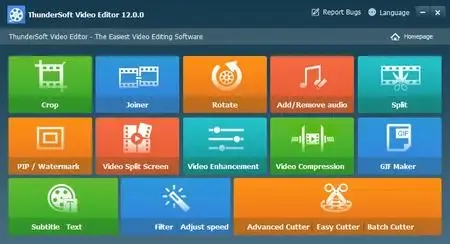 ThunderSoft Video Editor Pro 13.4 (x64) Multilingual Fast Links | 327.4 Mb
ThunderSoft Video Editor Pro is a comprehensive video editing application designed for content creators, vloggers, educators, and social media producers who need an intuitive yet feature-rich editing environment. Combining a powerful timeline editor with an extensive collection of visual effects and media tools, the software simplifies the process of creating professional-looking videos for any purpose.
The program provides a complete editing workspace where users can import videos, photos, music, and other media assets, then arrange them on multiple tracks for precise editing. With support for text, audio, effects, and picture-in-picture layers, complex video projects can be built using an easy drag-and-drop workflow.
Hundreds of built-in transitions, filters, overlays, animations, and text effects help enhance videos without requiring advanced editing experience. The integrated toolkit also includes numerous utilities for cutting, merging, cropping, compressing, watermarking, subtitle editing, GIF creation, and playback speed adjustment.
Whether producing online content, presentations, tutorials, or personal videos, ThunderSoft Video Editor Pro delivers a complete set of tools for editing, enhancing, and exporting high-quality video projects, including support for 4K output formats.
Key Features:- Easy-to-use video editing workspace
- Organized media and project management
- Advanced timeline-based editing
- Split and trim video clips precisely
- Drag-and-drop editing workflow
- Multiple video, audio, text, and effect tracks
- Picture-in-picture video support
- Undo and redo editing actions
- Fast project saving and loading
- Real-time project preview
- Add and customize text overlays
- Create and edit subtitles
- Hundreds of transitions and visual effects
- Built-in filters, overlays, and animations
- Adjust effect parameters individually
- Export to MP4, AVI, WMV, MKV, MOV, and GIF
- Export audio in MP3 and AAC formats
- 4K video output support
- Rotate, crop, split, cut, and join videos
- Add or replace audio tracks
- Remove original audio from videos
- Delete unwanted video segments
- Adjust brightness, contrast, and saturation
- Apply extensive video filters
- Add image, video, GIF, and text watermarks
- Create picture-in-picture compositions
- Import SRT and ASS subtitle files
- Compress videos while maintaining quality
- Generate GIFs from videos and images
- Create split-screen video layouts
- Control video playback speed
- Speed up or slow down footage
System Requirements
Operating System: Windows 11/10/8.1/8/7/Vista/XP
Home Page
Код:
https://www.thundershare.net/
Rapidgator
Код:
https://rapidgator.net/file/780e3d1bd8a73436e965fed3faaecc01/hsb25.ThunderSoft.Video.Editor.Pro.13.4.x64.Multilingual.rar.html
Код:
https://nitroflare.com/view/0161C2E03D7F81F/hsb25.ThunderSoft.Video.Editor.Pro.13.4.x64.Multilingual.rar
|
|
|
|
|
22.06.2026, 10:37
|
#119600
|
|
Местный
Регистрация: 04.10.2017
Сообщений: 125,003
Сказал(а) спасибо: 0
Поблагодарили 7 раз(а) в 7 сообщениях
|
ThunderSoft Watermark Remover 6.3.0
 ThunderSoft Watermark Remover 6.3.0 | Size: 219.56 MB
Language: English
Watermark in a photo or picture is very annoying, getting rid of it is very difficult even with a professional photo editor. Watermark Remover can help you remove watermark, logo, date stamp and other unwanted objects on your photo or pictures. With various area selection tools, it's easy to select a watermark, and remove it by clicking the "Remove" button. The area removed is filled with automatically generated texture, and the photo will be back into its natural state.
Features:
Provide various area selection tools.
Provide 3 different removing methods: Smooth Filling, Edge Filling and Texture Repair.
Allow undo and redo your operations.
Contains basic photo editing features: crop, rotate, flip, resize, etc.
Allow add your own watermark and logo.
Allow drawing shapes, such as straight line, curve, rectangle, ellipse, arrow, etc.
Supports batch operation.
Operating System: Windows 11/10/8.1/8/7/Vista/XP
HOMEPAGE:
Код:
https://www.thundershare.net/
DOWNLOAD LINKS:
Код:
https://rapidgator.net/file/5e3f064af41ba683f1542ed13547ca24/ThunderSoft_Watermark_Remover_6.3.0.rar.html
Код:
https://nitroflare.com/view/BDFEB8777CEBC3F/ThunderSoft_Watermark_Remover_6.3.0.rar
|
|
|
|
|
22.06.2026, 10:40
|
#119601
|
|
Местный
Регистрация: 04.10.2017
Сообщений: 125,003
Сказал(а) спасибо: 0
Поблагодарили 7 раз(а) в 7 сообщениях
|
Tixati 3.43
 Tixati 3.43 | Size: 42.3 MB
Language: English
Tixati is a peer-to-peer file sharing program that uses the popular BitTorrent protocol. This protocol allows many peers to form a cooperative swarm and download very large files with great efficiency.
How does it work?
Once the Tixati software is installed, starting a download is easy.
First, the user finds a .torrent file on the web. A .torrent file is very small, and contains meta-data describing the much larger file that is to be downloaded from a swarm of other peers. These .torrent files can be easily found by using Google, or one of hundreds of Torrent Sites which also feature organized categories for the user to browse.
Once the user has chosen and downloaded a .torrent file from the web, they simply open it from within Tixati by clicking the 'Add' button. After the .torrent is opened, Tixati connects to other peers in the swarm and downloads the desired files automatically, leaving them in a convenient 'Downloads' folder on the user's desktop.
Why choose Tixati?
Tixati is one of the most advanced and flexible BitTorrent clients available. And unlike many other clients, Tixati contains NO SPYWARE, NO ADS, and NO GIMMICKS.
Tixati has the following features
detailed views of all aspects of the swarm, including peers, pieces, files, and trackers
support for magnet links, so no need to download .torrent files if a simple magnet-link is available
super-efficient peer choking/unchoking algorithms ensure the fastest downloads
peer connection encryption for added security
full DHT (Distributed Hash Table) implementation for trackerless torrents, including detailed message traffic graphs and customizable event logging
advanced bandwidth charting of overall traffic and per-transfer traffic, with separate classification of protocol and file bytes, and with separate classification of outbound traffic for trading and seeding
highly flexible bandwidth throttling, including trading/seeding proportion adjustment and adjustable priority for individual transfers and peers
bitfield graphs that show the completeness of all downloaded files, what pieces other peers have available, and the health of the overall swarm
customizable event logging for each download, and individual event logs for all peers within the swarm
expert local file management functions which allow you to move files to a different partition even while downloading is still in progress
100% compatible with the BitTorrent protocol
System Requirements: Windows 11, Windows 10, 8 , 7
DOWNLOAD LINKS:
Код:
https://rapidgator.net/file/1cb121a6b23c72805432499eb2f0cc7d/Tixati_3.43.rar.html
Код:
https://nitroflare.com/view/90B32407F00F6E1/Tixati_3.43.rar
|
|
|
|
|
22.06.2026, 10:43
|
#119602
|
|
Местный
Регистрация: 04.10.2017
Сообщений: 125,003
Сказал(а) спасибо: 0
Поблагодарили 7 раз(а) в 7 сообщениях
|
TONSTURM SpinTracer v1.5.0
 TONSTURM SpinTracer v1.5.0 | 9.19 MB
TONSTURM SpinTracer is an innovative spatial audio effect designed for producers, sound designers, composers, and immersive audio creators who want precise real-time control over sound movement in three-dimensional space. Using intuitive mouse interaction and an advanced motion engine, the plugin transforms static audio sources into dynamic and evolving spatial performances.
The plugin allows audio signals to travel through complex trajectories, geometric formations, and organic movement patterns, creating engaging spatial effects that add depth, motion, and dimension to a mix. Whether used for cinematic productions, electronic music, game audio, or experimental sound design, SpinTracer provides a creative environment for generating unique movement-based effects.
Its integrated motion engine can produce both structured paths and unpredictable swarm-like behaviors, making it suitable for everything from subtle spatial enhancement to dramatic sound manipulation. Version 1.5 introduces several workflow and visualization improvements, along with new modulation capabilities for greater creative flexibility.
Key Features:- Real-time three-dimensional sound positioning
- Interactive mouse-based spatial control
- Creative motion engine for dynamic movement
- Generate geometric audio trajectories
- Create random swarm-like motion patterns
- Enhance depth and spatial perception
- Suitable for music, film, and game audio
- Flexible sound movement automation
- Advanced visualization tools
What's New in Version 1.5:- New Multi-Orb Tremolo module
- Distance-based modulation support
- Integrated background grid display
- Enhanced height visualization
- Improved two-row parameter layout
- New X-Over Dry/Wet mode
Home Page
Код:
https://tonsturm.com/product/spintracer
Rapidgator
Код:
https://rapidgator.net/file/233385ebbd939a16d5f640f3ae3fb761/ddufr.TONSTURM.SpinTracer.v1.5.0.rar.html
Код:
https://nitroflare.com/view/458A60B2E51FBF9/ddufr.TONSTURM.SpinTracer.v1.5.0.rar
|
|
|
|
|
22.06.2026, 10:47
|
#119603
|
|
Местный
Регистрация: 04.10.2017
Сообщений: 125,003
Сказал(а) спасибо: 0
Поблагодарили 7 раз(а) в 7 сообщениях
|
TweakNow WinSecret Plus 9.5.2
 TweakNow WinSecret Plus 9.5.2 The Ultimate All-in-One Toolkit for Windows 11 and 10. Streamline, optimize, and maintain your PC effortlessly with this top-rated utility suite. It includes over 25 powerful tools designed to help you clean, tweak, repair, and enhance your system. Whether you're a casual user or a power tweaker, this toolkit is your ideal companion for achieving a faster and smoother Windows experience.
Auto Dark Mode - Smarter, Seamless Theme Switching
Windows lets you choose between light and dark mode, but it doesn't offer much flexibility when it comes to switching between them automatically.
File Size: 34.7 MB
Convert Images to PDF, Split & Merge Files - All Offline, All in One App
The new PDF Tools section brings powerful, built-in utilities that eliminate the need for separate apps or risky online converters.
Safely Unlock Windows 11 and 10 Hidden Settings
Effortlessly personalize hidden settings in Windows 11 and 10 to customize your taskbar, desktop, privacy preferences, and more.
Powerful and Comprehensive System Information at Your Fingertips
System Information module is designed to quickly and lightweightly provide all the detailed information you need about your PC's performance and components.
Looking to Supercharge Your Apps or Games Performance?
You can increase the priority level of apps or games to allocate more system resources, such as CPU time and RAM, to them.
Effortlessly Connect to Wi-Fi With QRr Codes
Using a QR code to share your Wi-Fi is super convenient and easy. Instead of typing out a long password, your friends can just scan the code with their phone and connect instantly.
View and Extract Icons From Windows Library (imageres.dll, shell32.dll, Etc.)
Windows 11 has a lot of attractive icons that make both the system look good and fun to use. Have you ever wondered where Windows may bury them in the system?
Keep Your PC Awake While You Are Leaving!
There are times when you might need to keep your PC running and prevent it from going into sleep mode or hibernation.
Effortlessly Convert PDF Into Images
At times, you may need to transform PDF documents into image files.
Quickly Convert HEIC to JPG on Windows
HEIC (High Efficiency Image Format) is a file format for images introduced by Apple with the release of iOS 11 in 2017.
Whats New
System Requirements: Windows 10, 11
HOMEPAGE
Код:
https://www.tweaknow.com/
DOWNLOAD
Код:
https://rapidgator.net/file/465b1b5363ec0c489d650a3c1e337d6c/WinSecret.9..rar.html
Код:
https://nitroflare.com/view/1BC56757D2E5BFA/WinSecret.9..rar
|
|
|
|
|
22.06.2026, 10:50
|
#119604
|
|
Местный
Регистрация: 04.10.2017
Сообщений: 125,003
Сказал(а) спасибо: 0
Поблагодарили 7 раз(а) в 7 сообщениях
|
TweakNow WinSecret Plus 9.5.2 + Portable
 TweakNow WinSecret Plus 9.5.2 + Portable Fast Links | 34.7/40.6 Mb
TweakNow WinSecret Plus is a comprehensive Windows optimization and customization suite designed for users who want greater control over their Windows 10 and Windows 11 systems. Combining system maintenance, performance enhancement, privacy customization, and productivity tools in a single package, it provides a convenient way to keep a PC running efficiently while unlocking advanced operating system settings.
The software includes more than 25 integrated utilities that help users clean unnecessary data, fine-tune Windows behavior, monitor hardware information, and access hidden configuration options that are not readily available through standard system menus. Its user-friendly interface makes advanced system management accessible to both everyday users and experienced enthusiasts.
Beyond optimization features, WinSecret Plus also includes practical utilities for handling PDF documents, image conversion, Wi-Fi sharing, icon extraction, and power management. These tools eliminate the need for multiple third-party applications while allowing users to perform common tasks completely offline.
Whether you're looking to personalize Windows, improve system responsiveness, manage resources more effectively, or simplify everyday computing tasks, TweakNow WinSecret Plus offers an all-in-one toolkit for maintaining and enhancing your PC.
Key Features:- All-in-one toolkit for Windows 10 and 11
- More than 25 integrated system utilities
- Optimize and maintain PC performance
- Access hidden Windows settings safely
- Customize taskbar and desktop behavior
- Adjust privacy-related system options
- Automatic Light and Dark mode switching
- Comprehensive system information module
- View detailed hardware and performance data
- Increase application and game priorities
- Allocate system resources more efficiently
- Built-in PDF tools
- Convert images to PDF files
- Split and merge PDF documents
- Convert PDF files into images
- Convert HEIC images to JPG format
- Generate Wi-Fi QR codes for easy sharing
- Extract icons from Windows libraries
- Browse icons from system DLL files
- Prevent sleep and hibernation modes
- Keep your PC awake when needed
- Lightweight and easy-to-use interface
- Offline utilities without online services
System Requirements
Operating System: Windows 10/11
Home Page
Код:
https://www.tweaknow.com/
Rapidgator
Код:
https://rapidgator.net/file/43f9e68cf8341a3222c51c8280ef4339/ktvpy.TweakNow.WinSecret.Plus.9.5.2.Portable.rar.html
https://rapidgator.net/file/48603baead50d8991c8857f517fac9a4/ktvpy.WinSecret9.zip.html
Код:
https://nitroflare.com/view/B112CE15AB37E0A/ktvpy.TweakNow.WinSecret.Plus.9.5.2.Portable.rar
https://nitroflare.com/view/3C3ACBB852CDC7B/ktvpy.WinSecret9.zip
|
|
|
|
|
22.06.2026, 10:53
|
#119605
|
|
Местный
Регистрация: 04.10.2017
Сообщений: 125,003
Сказал(а) спасибо: 0
Поблагодарили 7 раз(а) в 7 сообщениях
|
Yamicsoft Windows Manager 2.3.9 (x64) Multilingual + Portable
 Yamicsoft Windows Manager 2.3.9 (x64) Multilingual + Portable Fast Links | 37.8 MB
Yamicsoft Windows Manager is a comprehensive system optimization and maintenance suite designed specifically for Windows 10 and Windows 11. Packed with more than 40 powerful utilities, it helps users improve system performance, clean unnecessary files, enhance security, customize Windows settings, and maintain overall system stability.
Whether you want to speed up your PC, repair common issues, optimize startup processes, protect your privacy, or personalize the Windows interface, Windows Manager provides a complete set of tools within a single, easy-to-use application.
Key Features:- All-in-one toolkit for Windows 10 and Windows 11
- Includes over 40 optimization and maintenance utilities
- Create manual system restore points
- Display detailed hardware and system information
- Recover Microsoft Windows and Office product keys
- Manage running processes and system threads
- Diagnose and repair common Windows problems
- One-click system cleanup and optimization
- Improve system performance and responsiveness
- Optimize startup entries and boot configuration
- Manage Windows services, drivers, and scheduled tasks
- Analyze disk usage with visual charts
- Clean WinSxS folder to free storage space
- Completely uninstall applications without leftovers
- Remove junk files and duplicate files
- Clean and defragment the Windows Registry
- Customize File Explorer, Start Menu, Taskbar, and Desktop
- Add custom items to Desktop and This PC
- Manage context menus and Win + X shortcuts
- Adjust Windows appearance and interface settings
- Strengthen security with advanced system tweaks
- Protect files and folders with encryption options
- Remove privacy traces and sensitive activity logs
- Recover deleted or formatted files
- Optimize internet and network performance
- Manage Wi-Fi profiles and network settings
- Monitor real-time network traffic activity
- Edit Hosts files and manage IP configurations
- Create automated tasks and monitoring actions
- Split, merge, copy, and back up files efficiently
- Access advanced Registry management tools
Main Modules:- Information - System details, diagnostics, restore points, and repair tools.
- Optimizer - Startup management, service optimization, and performance tuning.
- Cleaner - Disk cleanup, duplicate finder, registry maintenance, and uninstaller.
- Customization - Personalize Windows interface and system behavior.
- Security - Privacy protection, encryption, access restrictions, and file recovery.
- Network - Internet optimization, Wi-Fi management, network monitoring, and IP tools.
- Misc. Utilities - Task automation, file management, backup, and registry tools.
System Requirements:
Windows 10 / Windows 11 (64-bit)
Home Page
Код:
http://www.yamicsoft.com/
Rapidgator
Код:
https://rapidgator.net/file/66314fd8443a09b231d4ff3476fd8bb9/vlcq0.WindowsManagerPortable2.3.9.rar.html
https://rapidgator.net/file/a1a6e674831cba209d99a5fb0a36f4d1/vlcq0.YamicsoftWindowsManager2.rar.html
Код:
https://nitroflare.com/view/067A091C1D1D5BE/vlcq0.WindowsManagerPortable2.3.9.rar
https://nitroflare.com/view/5161020DC871DFA/vlcq0.YamicsoftWindowsManager2.rar
|
|
|
|
|
22.06.2026, 10:55
|
#119606
|
|
Местный
Регистрация: 04.10.2017
Сообщений: 125,003
Сказал(а) спасибо: 0
Поблагодарили 7 раз(а) в 7 сообщениях
|
Venomode Maximal 3 v3.1.0
 Venomode Maximal 3 v3.1.0 | 12.83 MB
Venomode Maximal 3 is a professional mastering and loudness enhancement plugin designed to maximize audio levels while maintaining clarity, punch, and overall sound quality. Combining a true-peak brickwall limiter, flexible soft clipper, and broadcast-standard loudness metering, it provides the essential tools required for modern mixing and mastering workflows.
Built for producers, mixing engineers, and mastering professionals, Maximal 3 allows tracks to achieve competitive loudness without introducing unwanted distortion or sacrificing important musical details. Its advanced true-peak processing ensures reliable output levels by preventing inter-sample clipping that can occur during playback or format conversion.
The plugin offers multiple limiting modes and adjustable dynamics controls, making it suitable for a wide range of applications-from transparent peak control and natural transient preservation to more aggressive bus processing and energetic pumping effects. The integrated soft clipper further enhances loudness potential while adding controlled saturation and character when desired.
Whether used on individual tracks, buses, or full masters, Maximal 3 delivers precise loudness management and professional metering in a streamlined interface.
Key Features:- True-peak brickwall limiter
- Integrated soft clipping processor
- Broadcast-standard loudness metering
- Increase perceived loudness effectively
- Preserve audio quality during mastering
- True-peak lookahead detection
- Prevents inter-sample clipping
- Four limiter processing modes
- Adjustable attack controls
- Customizable release settings
- Transparent limiting capabilities
- Transient preservation options
- Warm bus glue processing
- Creative pumping effects
- Suitable for mixing and mastering
- Accurate peak management
- Professional loudness optimization
- Streamlined workflow and interface
Home Page
Код:
https://venomode.com/maximal
Rapidgator
Код:
https://rapidgator.net/file/d85253db16e28ba752ceb430b7aa56ee/6x3xb.Venomode.Maximal.3.v3.1.0.rar.html
Код:
https://nitroflare.com/view/723AFAF66C39531/6x3xb.Venomode.Maximal.3.v3.1.0.rar
|
|
|
|
|
22.06.2026, 10:56
|
#119607
|
|
Местный
Регистрация: 04.10.2017
Сообщений: 125,003
Сказал(а) спасибо: 0
Поблагодарили 7 раз(а) в 7 сообщениях
|
Vivaldi v8.0.4033.50 + Mail + VPN
 Vivaldi v8.0.4033.50 + Mail + VPN Superior Internet/Web Browser plus these features: e-mail, VPN, calendar, contacts, notes, translator.
Vivaldi is Chromium-based. Chromium is the source code of "Google Chrome Browser". But Vivaldi doesn't have any of the negative characteristics of Google Chrome.
You can use the Chrome extensions/add-ons on Vivaldi. Take a look at the extensions available in the 'Chrome Web Store'.
→Vivaldi Mail compared to other e-mail clients. →New:Now Proton VPN, the best VPN service, is integrated into Vivaldi.
We're building the most feature-packed, customizable browser out there.
Built-in features: e-mail client, calendar, contacts, feed reader, webpage translation (108 languages), screen capture (incl. full-page screenshots), ad/tracker blocker, .
File Size: 138.41 MiB | Languages: English, Deutsch, Español, Italiano, Português, Français
..
***
Now with Vivaldi Mail
Vivaldi Mail, Calendar, and Feed Reader have arrived, built right into your favorite browser.
Vivaldi Mail makes it easy to manage e-mails from multiple accounts, mailing lists and feeds in a unified inbox.
Stress less, celebrate more! Because your e-mails and schedules are now better organized and in safe hands with Vivaldi Mail.
Vivaldi Mail is our ode to the original, simple, and reliable form of communication. And we hope you will enjoy using it as much as we have enjoyed building it for you.
Enable Vivaldi Mail via "Settings → General → Productivity features → Enable Mail, Calendar and Feeds".
***
Features
• Tab Management
Unique features give you full control of how you group and display browser tabs.
• Customization
Tweak and tune every part of the browser to create your own unique experience.
• User Interface
An adaptive interface lets you adjust the position, size and appearance of the browser's UI elements.
• Navigation
Get to where you're going faster with fully configurable Search options, custom shortcuts and a Bookmark manager fit for power users.
• Privacy and Security
Vivaldi is built with privacy as a priority and gives you full control of settings critical to keeping your data safe.
• Tools
An arsenal of built-in tools like Notes, Image Properties and more give you advanced functionality without sacrificing performance.
• Mouse and Keyboard
Use custom Keyboard Shortcuts, Mouse Gestures or the command line control of Quick Commands. The choice is at your fingertips.
Release Notes
System requirements: Windows 7, 8.1, 10, 11
HOMEPAGE
Код:
https://vivaldi.com/
DOWNLOAD
Код:
https://rapidgator.net/file/a68119c9b13c908ae4e1ee2fa601a8de/Vivaldi-v8.0.4033.50-win64.rar.html
Код:
https://nitroflare.com/view/90CFD74F5976E80/Vivaldi-v8.0.4033.50-win64.rar
|
|
|
|
|
22.06.2026, 10:59
|
#119608
|
|
Местный
Регистрация: 04.10.2017
Сообщений: 125,003
Сказал(а) спасибо: 0
Поблагодарили 7 раз(а) в 7 сообщениях
|
VovSoft Text Edit Plus 16.5 Multilingual
 VovSoft Text Edit Plus 16.5 Multilingual Text Edit Plus is a simple but powerful plain text editor with helpful features. It is a lightweight tool that enables users to easily create new text documents or modify existing ones. The application is designed as an alternative to Notepad, by offering a wider set of features.
The software is a general-purpose editor and useful for anyone who regularly works with text documents. Its analysis module can be valuable when quick statistics on text documents are needed. The ability to compute word frequencies can allow users to easily spot and quantify repetitions.
File size: 7 MB
Text Edit Plus comes with a clean and simple interface that newcomers will find very easy to grasp. The application can load text files, such as TXTs, CSVs and HTMLs. It provides an arsenal of features for text manipulation. A lot of quick-edit functions can prove invaluable when small fine-tunes are needed.
Whats New
System Requirements: Windows 11, Windows 10, Windows 8/8.1, Windows 7, Windows Vista (32-bit & 64-bit)
HOMEPAGE
Код:
https://vovsoft.com/
DOWNLOAD
Код:
https://rapidgator.net/file/e70205ce92e7b0830f6d107bca2ed60f/VovSoftTextEditPlus16..rar.html
Код:
https://nitroflare.com/view/984E0EC9B57C5BE/VovSoftTextEditPlus16..rar
|
|
|
|
|
22.06.2026, 11:02
|
#119609
|
|
Местный
Регистрация: 04.10.2017
Сообщений: 125,003
Сказал(а) спасибо: 0
Поблагодарили 7 раз(а) в 7 сообщениях
|
WildBit Viewer 6.20.1 Commercial
 WildBit Viewer 6.20.1 Commercial | Size: 65.49 MB
Language: English
WildBit Viewer is compact & fast image viewer with slide show and editor. Eye catching interface within blazing fast folder, file list and thumbnail viewer. Viewer includes also Image Info with Image EXIF meta data JPEG and TIFF support and IPTC (IIMV4) information (like PhotoShop file info) from JPEG and TIFF, Thumbview has changeable views, sorting and thumbnail predefined sizes for fast thumbnail size setting.
WildBit Viewer also includes shell toolbar, you can drop your favorite folder there and use it as an organizer. It also includes image compare. In Compare you can compare images side-by-side. In Favorites you can save list of favorite images and load list later on and you can create custom show in to Slide Show also that list you can edit with Custom Show List Editor. With Slide Show you can view images within 176 different transition effects. Slide Show includes now multi-monitor support for fast switching between two monitors. WildBit Viewer supports all major graphic formats including BMP, JPEG, JPEG 2000, GIF, PNG, PCX, TIFF, WMF and TGA (over 70 formats).
Operating System: Windows 7, 8/8.1, 10, 11
HOMEPAGE:
Код:
http://www.wildbit-soft.fi/
DOWNLOAD LINKS:
Код:
https://rapidgator.net/file/c372a564660d34735ef09da527a16fd9/WildBit_Viewer_6.20.1_Commercial.zip.html
Код:
https://nitroflare.com/view/FE1EF76B5CE5CA5/WildBit_Viewer_6.20.1_Commercial.zip
|
|
|
|
|
22.06.2026, 11:04
|
#119610
|
|
Местный
Регистрация: 04.10.2017
Сообщений: 125,003
Сказал(а) спасибо: 0
Поблагодарили 7 раз(а) в 7 сообщениях
|
Windows 10 22H2 build 19045.7417 AIO 16in1 With Office 2024 Pro Plus Multilingual ...
 Windows 10 22H2 build 19045.7417 AIO 16in1 With Office 2024 Pro Plus Multilingual Preactivated June 2026 Windows 10 is a series of personal computer operating systems produced by Microsoft as part of its Windows NT family of operating systems. It is the successor to Windows 8.1, and was released to manufacturing on July 15, 2015, and to retail on July 29, 2015. Windows 10 receives new releases on an ongoing basis, which are available at no additional cost to users. Devices in enterprise environments can receive these updates at a slower pace, or use long-term support milestones that only receive critical updates, such as security patches, over their ten-year lifespan of extended support.
Windows x64 | Languages: Arabic,English,German,Greek,French,Spanish,Italian ,Portuguese-Portuguese,Portuguese-Brazil,Turkish,Dutch,Czech | File Size: 9.12 GB
One of Windows 10's most notable features is support for universal apps, an expansion of the Metro-style apps first introduced in Windows 8. Universal apps can be designed to run across multiple Microsoft product families with nearly identical code*-*including PCs, tablets,smartphones, embedded systems, Xbox One, Surface Hub and Mixed Reality. The Windows user interface was revised to handle transitions between a mouse-oriented interface and a touchscreen-optimized interface based on available input devices*-*particularly on 2-in-1 PCs, both interfaces include an updated Start menu which incorporates elements of Windows 7's traditional Start menu with the tiles of Windows 8. Windows 10 also introduced the Microsoft Edge web browser, a virtual desktop system,a window and desktop management feature called Task View, support for fingerprint and face recognition login, new security features for enterprise environments, and DirectX 12.
Editions Includes
1. "Windows 10 Home"
2. "Windows 10 Home N"
3. "Windows 10 Pro"
4. "Windows 10 Pro N"
5. "Windows 10 Team"
6. "Windows 10 Enterprise"
7. "Windows 10 IoT Enterprise"
8. "Windows 10 Enterprise multi-session"
9. "Windows 10 Education"
10. "Windows 10 Pro Education"
11. "Windows 10 Pro for Workstations"
12. "Windows 10 Enterprise N"
13. "Windows 10 Education N"
14. "Windows 10 Pro Education N"
15. "Windows 10 Pro N for Workstations"
16. "Windows 10 Home Single Language""
Whats New
- Update Windos To 22H2 build 19045.7417
- Update Office to v2605 Build 20026.20182
System Requirements For Windows 11
Processor: 2 gigahertz (GHz) or faster.
RAM: 2 gigabyte (GB).
Free space on hard disk: 40 gigabytes (GB).
Graphics card: DirectX 9 graphics device or a newer version.
Additional requirements to use certain features.
To use touch you need a tablet or monitor that supports multitouch.
To access the Windows store to download and run apps, you need an active Internet connection and a screen resolution of at least 1024 x 768 pixels
HOMEPAGE
Код:
https://www.microsoft.com/en-pk
DOWNLOAD
Код:
https://rapidgator.net/file/7a77f8d39923af4b1091dc64e75be4c4/Win.10.Aio.19045.7417.Office.part1.rar.html
https://rapidgator.net/file/f3687ad981c785aa0b515e6aea76812b/Win.10.Aio.19045.7417.Office.part2.rar.html
https://rapidgator.net/file/7b099ff3d9dfdf366b9de2598fbef927/Win.10.Aio.19045.7417.Office.part3.rar.html
https://rapidgator.net/file/25ac0da06f72083c2b78941037ae9fc8/Win.10.Aio.19045.7417.Office.part4.rar.html
https://rapidgator.net/file/c49eb56fe40831912287176262d3cc1d/Win.10.Aio.19045.7417.Office.part5.rar.html
Код:
https://nitroflare.com/view/0D815634AC3C0BA/Win.10.Aio.19045.7417.Office.part1.rar
https://nitroflare.com/view/AF1D8EAEEC8D336/Win.10.Aio.19045.7417.Office.part2.rar
https://nitroflare.com/view/49ECD6A6E4CD509/Win.10.Aio.19045.7417.Office.part3.rar
https://nitroflare.com/view/50EDC501AB43E57/Win.10.Aio.19045.7417.Office.part4.rar
https://nitroflare.com/view/76780F008EC9BF9/Win.10.Aio.19045.7417.Office.part5.rar
|
|
|
|
      
Любые журналы Актион-МЦФЭР регулярно !!! Пишите https://old.nado.in/private.php?do=newpm&u=12191 или на электронный адрес pantera@nado.ws
|
Здесь присутствуют: 5 (пользователей: 0 , гостей: 5)
|
|
|
 Ваши права в разделе |
Вы не можете создавать новые темы
Вы не можете отвечать в темах
Вы не можете прикреплять вложения
Вы не можете редактировать свои сообщения
HTML код Выкл.
|
|
|
Текущее время: 03:13. Часовой пояс GMT +1.
| |






