 07.03.2026, 06:11
|
#116986
|
|
Местный
Регистрация: 04.10.2017
Сообщений: 125,003
Сказал(а) спасибо: 0
Поблагодарили 7 раз(а) в 7 сообщениях
|
 Comfy Data Recovery Pack 5.0 Multilingual
 Comfy Data Recovery Pack 5.0 Multilingual
Windows x86/x64 | All Editions | File size: 94.52 MB
Recover deleted data with Comfy Data Recovery Pack. The program package contains a utility for recovering deleted images, Comfy Photo Recovery, and a utility for recovering deleted files, Comfy File Recovery.
The programs recover data regardless of the type of the information to be recovered, the method of its deletion, or the carrier from which the files were deleted.
The programs' interface was developed based on the principle of making the programs accessible to regular users. Extremely complex algorithms of information recovery are skillfully concealed beneath a step-by-step wizard which helps the user find, recover, and save information in any way that is convenient for him or her: to a hard drive, CD or DVD, or a remote server. The programs' functionality has been recognized by professionals in the field of data recovery all over the world!
We ensure the safety of the data recovery process. When scanning the information carrier, the utilities work only to read the drive contents. This eliminates the possibility of re-saving the deleted files. To work with corrupted (hit) partitions, the programs have a function of creating a virtual copy of the data and the capability to recover this copy later. This significantly increases the volume of information that can be recovered.
The program's capabilities
Recovers data regardless of the file type
Documents: Adobe PDF, Microsoft Word, Open and Star Writer (xps, doc, docx, docm, dot, dotm, pdf, wpd, wps, odt, ott, odm, oth);
Presentations: Microsoft Power Point, Open Impress (pptx, ppt, pptm, potx, potm, pot, thmx, pps, ppsx, ppam, ppa, odp, otp);
Electronic tables: Microsoft Excel, Open Calc (xl, xlsx, xlsm, xlsb, xlam, xltx, xltm, xls, xlt, xlm, xlw, ods, ots);
Various text documents, settings and log files, original program codes (txt, asp, aspx, chm, cue, def, inc, inf, lnk, o, php, pro, rc, rsc, s, set, sql, sub, sys, 1st, cal, css, ctt, dic, es, fil, gadget, xhtml, xhtm, htm, html, ics, log, part, pf, swp);
Digital images and photos from professional and regular cameras, mobile phones, smartphones, PDAs and clipboards;
Compressed archives (rar, zip, 7z, ace, arj, bz2, cab, gz, iso, jar, lzh, tar, uue, z);
Music and video file formats (avi, dat, mkv, mov, mpg, vob, wmv, m4p, mp3, wav, wma).
The programs recover both accidentally deleted files after emptying the Recycled Bin, and files deleted using the "Shift" + "Del" keys (without using the Recycled Bin).
The Deep Analysis function that was developed in these programs makes it possible to recover data that was lost after quick and total formatting or deletion of a logical volume.
The utilities support the following file systems: VFAT, FAT16, FAT32 и NTFS3, NTFS4, NTFS5, NTFS6 (including the recovery of alternative data streams - ADS, and recovery of files on compressed and encrypted partitions).
While working, the software only reads the carrier, without saving anything to it. The programs make it possible to create a copy of a partition or the whole carrier and to continue recovery from the copy. This fully eliminates the chance of irreversibly corrupting the information being recovered.
Recovered files can be saved on
Any logical partition that is connected to the user's system.
A CD, DVD or ISO;
A remote server using an FTP protocol.
The programs make it possible to view the contents of the files being recovered, and to search, filter, and sort the files that are found and that are to be recovered.
Languages: English, العربية, 中文, Deutsch, Español, Français, Italiano, 日本語, Nederlands, Русский, Українська
What's new
• official site does not provide any info about changes in this version
Editions: Unlimited / Commercial / Office / Home
HOMEPAGE
Код:
https://www.my-data-recovery.com/
DOWNLOAD
Код:
https://rapidgator.net/file/082074d830660874b00ac521897084a0/Comfy.Data.Recovery.Pack.5.0.rar.html
Код:
https://nitroflare.com/view/05287AAAD7ACC4F/Comfy.Data.Recovery.Pack.5.0.rar
|

|

|
|
07.03.2026, 06:15
|
#116987
|
|
Местный
Регистрация: 04.10.2017
Сообщений: 125,003
Сказал(а) спасибо: 0
Поблагодарили 7 раз(а) в 7 сообщениях
|
Comfy File Recovery 7.2 Multilingual
 Comfy File Recovery 7.2 Multilingual
Windows x86/x64 | All Editions | File size: 71.69 MB
Recover deleted files using Comfy File Recovery. The program recovers accidentally deleted files, information lost after formatting logical volumes on hard drives, USB flash drives, and memory cards. The program's "Partition search" function lets you find and continue recovering files from a deleted logical partition.
A user-friendly interface resembling Windows Explorer displays files in the folders they were in prior to deletion, and the program's "File recovery wizard" make the program accessible for any user. A built-in wizard not only allows users to quickly find and recover files, but also to save data to any folder, record it to CD or DVD, create a virtual ISO copy, or save files to a remote server using an FTP protocol.
File recovery with Comfy File Recovery is absolutely risk-free. When scanning the information carrier, the program works only to read the information carrier, without re-saving the deleting information. The function of creating a virtual copy of the carrier and the ability to recover data from it later significantly increases the percentage of the information volume that you can recover from a hit or corrupted drive.
The program's capabilities
- Recovers accidentally deleted files regardless of type: documents, digital images, compressed archives, music and videos; Recovers information that was lost after emptying the Recycle Bin and files that were deleted using the "Shift" + "Del" keys (without using the Recycle Bin);
- Recovers data that was lost after quick and total formatting or total deletion of a logical drive; Supports the following file systems: VFAT, FAT16, FAT32 и NTFS3, NTFS4, NTFS5, NTFS6 (including recovery of ADS - alternative data streams, and recovery of files on compressed and encrypted partitions);
- While working, the program only reads the carrier, without saving anything on it. The program lets you create a copy of a partition or the entire carrier and to continue recovering data from the copy. This completely eliminates the chance of irreversibly corrupting the information being recovered;
- The program lets you save the recovered files to any logical partition that is connected to your system, record them to CD or DVD, create an ISO copy with the recovered data, and to save files to a remote server using an FTP protocol;
- The program lets you view the contents of the files being recovered and to search for, filter, and sort the files that were found for recovery.
What's new
• official site does not provide any info about changes in this version
Editions: Unlimited / Commercial / Office / Home
HOMEPAGE
Код:
https://www.my-data-recovery.com/
DOWNLOAD
Код:
https://rapidgator.net/file/d483efe23500ae75f6e30fba9d32f165/Comfy.File.Recovery.7.2.rar.html
Код:
https://nitroflare.com/view/C9CE92DB8C5B521/Comfy.File.Recovery.7.2.rar
|
|
|
|
|
07.03.2026, 06:17
|
#116988
|
|
Местный
Регистрация: 04.10.2017
Сообщений: 125,003
Сказал(а) спасибо: 0
Поблагодарили 7 раз(а) в 7 сообщениях
|
Comfy Partition Recovery 5.2 Multilingual
 Comfy Partition Recovery 5.2 Multilingual
Windows x86/x64 | All Editions | File size: 71.68 MB
The program will recover data deleted from normal and damaged logical partitions. Comfy Partition Recovery was designed for recovering files deleted after any possible type of accident.
If your data were lost after emptying the Windows Recycled Bin or were deleted using the "Shift" + "Del" combination (bypassing the Recycle Bin), lost after disk formatting, partition removal, errors of FAT or NTFS file systems, the program will recover them in no time.
The tool analyzes the contents of your hard drive and locates the file tables of FAT and NTFS file systems (if the primary copy of the file system is deleted, the program works with its copy). This information enables the program to recover not only the contents of deleted files, but all system information as well: folder tree, file attributes (name, creation date, last modification date, etc). The program uses low-level access to the hard drive, thus making it possible to recover data from inaccessible, deleted and damaged disks. The software was created in compliance with all standard security requirements. You can create a virtual copy of any disk (or its part) for subsequent data recovery. This is necessary for working with damaged drives that often irrecoverably lose data read from them. When searching for and recovering deleted files, the program only reads data, which makes overwriting impossible. Combing ease of use with a set of professional data recovery functions, Comfy Partition Recovery is the best program of this kind on today's market.
Program features
- Data recovery from any devices. Recovers data from digital cameras, mobile phones, portable MP3 players, any devices connected to a desktop or laptop computer via USB;
- Data recovery from files of all types
-- Recovers pptx, ppt, pptm, potx, potm, pot, thmx, pps, ppsx, ppam, ppa, odp, otp files with Microsoft Power Point and Open Impress presentations;
-- Recovers xps, doc, docx, docm, dot, dotm, pdf, wpd, wps, odt, ott, odm, oth files with Microsoft Word, Adobe PDF, Open and Star Writer text documents;
-- Recovers txt, asp, aspx, chm, cue, def, inc, inf, lnk, o, php, pro, rc, rsc, s, set, sql, sub, sys, 1st, cal, css, ctt, dic, es, fil, gadget, xhtml, xhtm, htm, html, ics, log, part, pf, swp files with various text documents, settings, logs and source code;
-- Recovers xl, xlsx, xlsm, xlsb, xlam, xltx, xltm, xls, xlt, xlm, xlw, ods, ots files with Microsoft Excel and Open Calc spreadsheets;
-- Recovers digital images and photos taken with professional and mainstream cameras, mobile phones, PDA's and tablets;
-- Recovers avi, dat, mkv, mov, mpg, vob, wmv, m4p, mp3, wav, wma files with music, audio tracks and videos;
-- Recovers rar, zip, 7z, ace, arj, bz2, cab, gz, iso, jar, lzh, tar, uue, z files with compressed archives;
- Recovery of files deleted from the "Recycle Bin". Recovers files after the Windows Recycle Bin is emptied, recovers files deleted with the "Shift"+ "Del" combination;
- Data recovery after disk formatting. Recovers data from formatted, damaged and deleted logical partitions preserving the original folder structure. Recovery of deleted volumes after the creation of new disk partitions. Recovers data after full and quick disk formatting;
- Recovery of FAT (VFAT, FAT16, FAT32) and NTFS (NTFS3, 4, 5, 6) file systems. Recovers file systems after serious errors, corruption of the partition table, Master Boot Record and other system data. Support of compressed and encrypted NTFS partitions, alternative data streams;
- Recovery of data from any media. Recovers data from external hard drives (IDE, SATA), USB flash drives and all types of memory cards, including SD, microSD, SDHC, SDXC, CompactFlash, SONY MemoryStick and others;
- Saving of recovered data. Saves recovered data to any logical partition, burns it to CD/DVD disks, creates ISO images with your files or uploads your data to an FTP server;
- Safe data recovery. When searching for and recovering files, the program only reads data. The program can create a virtual copy of your disk that is used for data recovery;
- Windows support. The program supports all MS Windows operating systems: 95 / 98 / Me / NT / 2000 / XP / 2003 / Vista / 7;
- Familiar Windows Explorer interface style. The main program window that displays recoverable files in their original locations makes the recovery process easy and intuitive.
What's new
• official site does not provide any info about changes in this version
Editions: Unlimited / Commercial / Office / Home
HOMEPAGE
Код:
https://www.my-data-recovery.com/
DOWNLOAD
Код:
https://rapidgator.net/file/e5e1b108d36ff4a51cecef7c631c2675/Comfy.Partition.Recovery.5.2.rar.html
Код:
https://nitroflare.com/view/A44E82C2D2B4FC3/Comfy.Partition.Recovery.5.2.rar
|
|
|
|
|
07.03.2026, 06:21
|
#116989
|
|
Местный
Регистрация: 04.10.2017
Сообщений: 125,003
Сказал(а) спасибо: 0
Поблагодарили 7 раз(а) в 7 сообщениях
|
Comfy Photo Recovery 7.0 Multilingual
 Comfy Photo Recovery 7.0 Multilingual
Windows x86/x64 | All Editions | File size: 65.11 MB
Recover digital images using the Comfy Photo Recovery program. The program recovers not only accidentally deleted photo files, but also images that were lost after formatting the hard drive, memory cards, or USB flash drive. The program's "Search for partitions" function lets you find and continue recovering digital images from the partition that was deleted.
Comfy Photo Recovery is extremely simple to use, with an interface that was developed in the form of a step-by-step wizard that offers to fill in the parameters required for recovery. The program leads the user through the process of searching, recovering, and saving deleted photos. The only thing that will give you more pleasure than working with the program is the result of the photo recovery!
While working, Comfy Photo Recovery only reads the drive data. The program does not save anything to the drive and does not zap your deleted files. The utility lets you create a virtual copy of the logical partition or physical information carrier to restore the information later. This function significantly decreases the chance of harming the data that is on the corrupted ("hit") drive.
The program's capabilities
- Recovers digital images in the following formats: jpe, jpeg, jpg, bmp, psd, gif, ico, psp, wmf, png, tif, tiff, .;
- Recovers digital photos, including RAW files of professional cameras in the following formats: 032, 3fr, arw, bay, bmq, cr2, crw, cs1, dc2, dcr, dng, erf, fff, k25, kdc, mef, mos, mrw, nef, orf, pef, pxn, qtk, raf, raw, rdc, sr2, srf, x3f;
- Recovers images that were deleted from memory cards (Smart Media, Compact Flash, Memory Stick, Sd, Xd) of cameras, mobile phones, smartphones, and tablets. Recovers photos that were deleted from hard and removable drives, USB flash drives (Sony, Datatraveler, Kingston, Kingmax, Sandisk, Silicon, Transcend), and internal camera memory of the following brands: Nikon, Canon, Olympus, Casio, Kodak, Sony, Pentax, Panasonic;
- Recovers photo files that were lost after quick and total formatting or total deletion of a logical drive. Displays pictures that were found for recovery in the form of small images ("preview") and also lets you filter and sort the list of found files by date, size, and resolution;
- The program lets you do the following with the recovered files
-- Save them to any logical partition that is connected to the your system;
-- Record them to CD or DVD or create an ISO copy of the recovered data;
-- Save them to a remote server using an FTP protocol.
What's new
• official site does not provide any info about changes in this version
Editions: Unlimited / Commercial / Office / Home
HOMEPAGE
Код:
https://www.my-data-recovery.com/
DOWNLOAD
Код:
https://rapidgator.net/file/4e3c7552c989ff063a5163e63b4f1837/Comfy.Photo.Recovery.7.0.rar.html
Код:
https://nitroflare.com/view/B3062BC6014460A/Comfy.Photo.Recovery.7.0.rar
|
|
|
|
|
07.03.2026, 06:22
|
#116990
|
|
Местный
Регистрация: 04.10.2017
Сообщений: 125,003
Сказал(а) спасибо: 0
Поблагодарили 7 раз(а) в 7 сообщениях
|
DbVisualizer Pro 26.1 (x64)
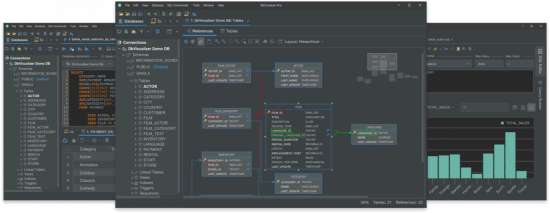 DbVisualizer Pro 26.1 (x64)
File size: 209.4 MB
The database client with the highest user satisfaction. DbVisualizer has a long history of being the preferred database tool for the world's leading data professionals. Built for navigating complexity. DbVisualizer has everything you need to build, manage and maintain state-of-the-art database technologies. Each feature has been thoughtfully crafted to solve real world problems.
It connects to all popular databases.
DbVisualizer is the only database tool you'll need. Everything you need to gather data from all your data sources is bundled right in - including support for database-specific object types and more.
Leading the way in user satisfaction.
DbVisualizer is continuously developed in close collaboration with our users. We pride ourselves in engineering software of the highest quality and deliver support to our users directly from our developers.
Because that's the kind of support we like.
Advanced SQL editor.
DbVisualizer includes an advanced SQL editor that will help make your coding life easier.
Write beautiful queries.
Copy-pasted queries can be easily formatted to your liking and auto-suggestions will help you write efficiently.
Simplify the re-use of queries.
DbVisualizer variables make it easy for users to modify specific values inside a query as it is being initiated.
Access. Explore. Optimize.
DbVisualizer is a universal database client that will help you access, explore and optimize most popular databases.
Explore and visualize
Easily viewed, managed and control your stored data.
Driver management via Maven
JDBC driver management is built in with version handling.
Custom object types and actions
We support unique object types across a huge range of databases.
Taking control of your data.
The data stored in your database can be easily managed and controlled with DbVisualizer.
Results visualization
As you get the result from a query, you can decide how it should be presented. You can choose from a simple table to various graphs with custom design.
Inline editing
You can edit data directly in the DbVisualizer viewer. Each edit will be highlighted and saved locally until you decide to commit your updates to the database.
Exporting
You can export a result set into almost any file format, with specific formatting. There are also quick-export options for when you just want to open the result set as a spreadsheet.
HOMEPAGE
Код:
https://www.dbvis.com/
DOWNLOAD
Код:
https://rapidgator.net/file/3cf35b57b7dde16de28d4bbbf474045e/DbVisualizerPro26..rar.html
Код:
https://nitroflare.com/view/4DC0FFE9BC9F6D3/DbVisualizerPro26..rar
|
|
|
|
|
07.03.2026, 06:24
|
#116991
|
|
Местный
Регистрация: 04.10.2017
Сообщений: 125,003
Сказал(а) спасибо: 0
Поблагодарили 7 раз(а) в 7 сообщениях
|
FinePrint 12.24 Multilingual
 FinePrint 12.24 Multilingual
File size: 26.2 MB
FinePrint saves you money on paper and toner, weight in your briefcase, and time and hassle in managing your print jobs. With FinePrint working for you, annoying printing problems disappear. Below are just some examples of printing problems that FinePrint can fix. See also our Enterprise section for benefits of FinePrint in the Enterprise.
Features
- Delete unwanted pages
- Print multiple pages on a sheet
- Combine multiple print jobs into one
- Print on electronic letterhead
- Archive print jobs
Other features
- Mark documents with custom watermarks such as "draft" or "confidential".
- Create custom electronic letterhead and forms. No more buying, storing and manually loading pre-printed letterhead.
- Page numbering over multiple documents including Bates stamping
- Output pages to clipboard
- Save pages in JPEG, TIFF and text format
HOMEPAGE
Код:
https://fineprint.com/
DOWNLOAD
Код:
https://rapidgator.net/file/ddd8de2f07d91a814cbd0560194b900e/FinePrint12..rar.html
Код:
https://nitroflare.com/view/D9E5234BB0011A4/FinePrint12..rar
|
|
|
|
|
07.03.2026, 06:26
|
#116992
|
|
Местный
Регистрация: 04.10.2017
Сообщений: 125,003
Сказал(а) спасибо: 0
Поблагодарили 7 раз(а) в 7 сообщениях
|
Free YouTube Download 4.5.7.306 Premium Multilingual
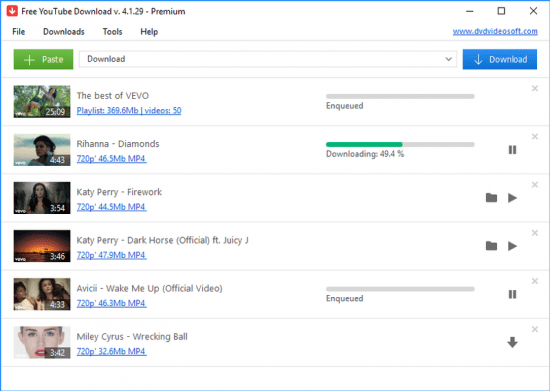 Free YouTube Download 4.5.7.306 Premium Multilingual
File size: 130.06 MB
Free YouTube Download is the most popular YouTube downloader application now, released in 2006 and updated on a regular basis. It lets you download and convert YouTube videos, so you can watch them whenever you want.
Instructions (step by step)
Download and run the app
Copy YouTube URL and click 'Paste' button
Click the 'Download' button and enjoy!
Download videos in bulk!
Save entire YouTube playlists, user channels, videos from personal playlists (History, Liked, Favorites, Watch later), videos from different categories.
Download videos super fast!
Free YouTube Download is known for its lightning fast multistream downloading.
It allows you to download several videos in original quality in just a few seconds.
Features
get YouTube stream in any format, choose between MP4, MKV up to 8K UHD, WEBM, and MP3
perform conversion to MP4, AVI, and MP3
apply output name format patterns
open lists of links from any text files
transfer videos to iTunes automatically and convert them to iPhone / iPad / iPod
download subtitles
HOMEPAGE
Код:
https://www.dvdvideosoft.com/en12
DOWNLOAD
Код:
https://rapidgator.net/file/c4b9e1b493514bce2691e5646b16d024/Free.YouTube.Download.4.5.7.306.Premium.rar.html
Код:
https://nitroflare.com/view/AE653FC688F2D85/Free.YouTube.Download.4.5.7.306.Premium.rar
|
|
|
|
|
07.03.2026, 06:30
|
#116993
|
|
Местный
Регистрация: 04.10.2017
Сообщений: 125,003
Сказал(а) спасибо: 0
Поблагодарили 7 раз(а) в 7 сообщениях
|
Free YouTube To MP3 Converter 4.5.7.306 Premium Multilingual
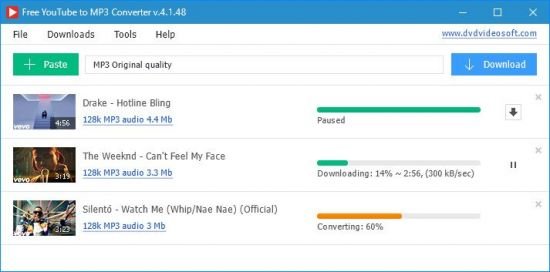 Free YouTube To MP3 Converter 4.5.7.306 Premium Multilingual
File size: 134.42 MB
Granted it is easy to lose track of time watching videos on YouTube when you have a reliable Internet connection. However, if you need to be offline but still want to enjoy playlists, user channels or a new artist, then rest assured that you can use tools such as Free YouTube to MP3 Converter and grab the audio from your favorite YouTube content.
Convert YouTube to MP3. Fast. Free. The Best!
Download original quality files without conversion.
Get Insane and Extreme MP3 hi-fi files, nobody does it, but we!
Convert to AAC, OGG, M4A, FLAC and WAV lossless audio.
Convert any YouTube playlist to MP3.
Bulk download
Get the whole world of MP3s. Find playlists and channels to match your mood. Download and convert YouTube Playlist to MP3. This is the unique feature of the program.
Pure sound
Convert to lossless and lossy. Formats available: MP3 (Lame Insane and Extreme Profiles), M4A (AAC), WAV, FLAC and OGG. Download the original stream to get hi-fi sound within the reach of the audiophile.
Functional
Enjoy multithreaded downloading. Download playlists and separate links - all at once. Customize output names easily. Fill MP3 tags and artworks automatically
HOMEPAGE
Код:
https://www.dvdvideosoft.com/en12
DOWNLOAD
Код:
https://rapidgator.net/file/3255382a55f998922f251f16a8de8d17/Free.YouTube.To.MP3.Converter.4.5.7.306.Premium.rar.html
Код:
https://nitroflare.com/view/9F23C66F8BEE84C/Free.YouTube.To.MP3.Converter.4.5.7.306.Premium.rar
|
|
|
|
|
07.03.2026, 06:32
|
#116994
|
|
Местный
Регистрация: 04.10.2017
Сообщений: 125,003
Сказал(а) спасибо: 0
Поблагодарили 7 раз(а) в 7 сообщениях
|
Gillmeister Automatic PDF Processor 2.0.20
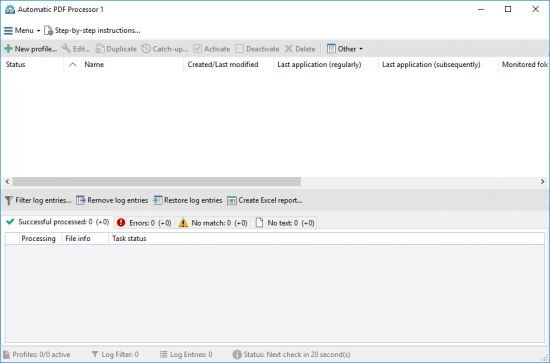 Gillmeister Automatic PDF Processor 2.0.20
File size: 194.3 MB
With Automatic PDF Processor, PDF files can be processed automatically. Any number of folders can be monitored in order to automatically print, rename or move incoming PDF files to dynamically named folders. Numerous metadata of the PDF document can be used in addition to the content, for example to include invoice information in the file path. The PDF files to be processed can be narrowed down with various profile-specific filters - the document text, PDF metadata and general file information are available as filters.
Extraction of data from the text of PDF files is optional. An unlimited number of extraction rules can be created within a profile. The extracted data can be used (after optional validation and formatting) for naming folders or the file name, and can be saved as an extract in a CSV file. Another task that can be automated with the Automatic PDF Processor is the extraction of attachments from PDF files, for example to save ZUGFeRD XML files, XRechnung attachments or similar as part of a PDF invoice in the same folder.
Monitor any number of folders
Examine incoming PDF files and apply individual rules
Store PDF files in a structured manner
Automatically rename PDF files and save them in dynamically created folders
Print PDF files automatically
Send certain PDF documents directly to the printer (e.g., invoices or quotations)
Optional further processing
Perform subsequent tasks, e.g., run a program with the filename of the PDF file passed as parameter
HOMEPAGE
Код:
https://www.gillmeister-software.com/
DOWNLOAD
Код:
https://rapidgator.net/file/c8414f414156b39b12d1a5b33ec737ce/Gillmeister_Automatic_PDF_Processor_2.0.20..rar.html
Код:
https://nitroflare.com/view/718A99C85FD4E51/Gillmeister_Automatic_PDF_Processor_2.0.20..rar
|
|
|
|
|
07.03.2026, 06:33
|
#116995
|
|
Местный
Регистрация: 04.10.2017
Сообщений: 125,003
Сказал(а) спасибо: 0
Поблагодарили 7 раз(а) в 7 сообщениях
|
Hasleo Backup Suite 5.6.2.1 Multilingual
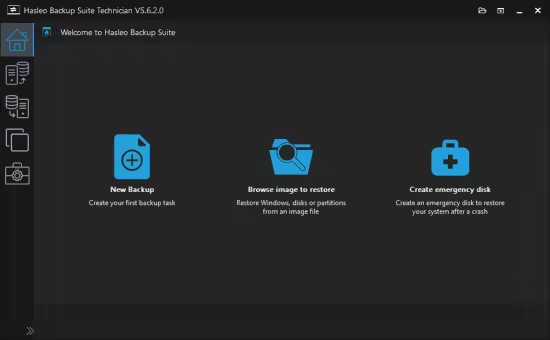 Hasleo Backup Suite 5.6.2.1 Multilingual
Windows x64 | File size: 45.47 MB
Hasleo Backup Suite is a Windows backup and restore software, which embeds backup, restore and cloning features, it is designed for Windows operating system users and can be used on both Windows PCs and Servers.
The backup and restore feature of Hasleo Backup Suite can help you back up and restore the Windows operating systems, disks and partitions to protect the security of your Windows operating system and personal data. The cloning feature of Hasleo Backup Suite can help you migrate Windows to another disk, or easily upgrade a disk to SSD or a larger capacity disk.
As a professional backup and restore software, the bootable Windows PE emergency disk can help you quickly and effectively restore the Windows operating system to a healthy state after a disaster strikes, such as system crash or disk corruption.
Highly intuitive looks
This application comes with a straightforward appearance that makes it easy even for those with little PC skills to choose the operation they want to initiate. You can either backup the currently running Windows to an image file or an entire disk or partition.
Regardless of the one you need, you can specify customize a flurry of details related to it, such as compression level, protect it with a password, define the notification SMTP server and target email addresses. You can even choose pre- and post-commands.
Restoring a previously created task can be managed just as easily, even if you are not a tech-savvy user.
Supports cloning operations
Hasleo Backup Suite can also be used to clone the currently running OS to another disk, to clone one disk to another one, as well as clone a partition to a different location.
You need to select the source and the target locations, then you can define the new partition size, specify its alignment (1M, Cylinder, 4K or none) and activate sector by sector clone.
Packs additional tools
When using Hasleo Backup Suite, you get the possibility to rebuild the MBR, wipe a drive or add a boot menu. If you are interested in creating an emergency disk, you can save it to your connected USB device or export it as an ISO file and burn it on a disc later on.
What's new
Compare and Take Advanced Editions
Editions: Workstation / Professional / Server / Enterprise / Technician
HOMEPAGE
Код:
https://www.easyuefi.com/
DOWNLOAD
Код:
https://rapidgator.net/file/b351b5fefdb762b454d47cbb0bb30b91/Hasleo.Backup.Suite.5.6.2.1_x64.rar.html
Код:
https://nitroflare.com/view/C83C3903EDA3563/Hasleo.Backup.Suite.5.6.2.1_x64.rar
|
|
|
|
|
07.03.2026, 06:36
|
#116996
|
|
Местный
Регистрация: 04.10.2017
Сообщений: 125,003
Сказал(а) спасибо: 0
Поблагодарили 7 раз(а) в 7 сообщениях
|
Hetman Data Recovery Pack 5.0 Multilingual
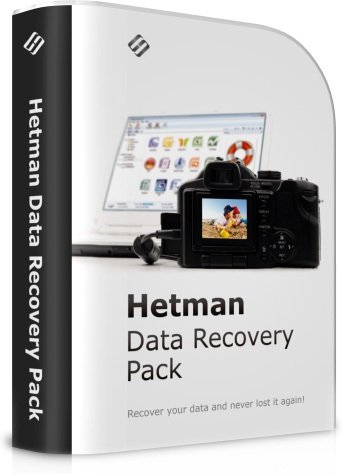 Hetman Data Recovery Pack 5.0 Multilingual
Windows x86/x64 | All Editions | File size: 252.29 MB
The complete data recovery pack from Hetman Software: eight data recovery tools for the price of one! Hetman Data Recovery Pack contains everything you need to recover all kinds of information from all types of storage media. The pack consists of eight tools you can run on the same or different computers.
Hetman Partition Recovery
Hetman Partition Recovery will reliably restore information from damaged FAT and NTFS disks, recovering the original file and folder structure. In addition to existing partitions, the tool discovers all previously created volumes. This allows the user to search and recover files from those deleted volumes. The tool can save the entire logical drive, recovering the original file and folder structure.
Hetman NTFS Recovery
Hetman NTFS Recovery restores information that goes missing after a storage accident. Formatted and repartitioned hard drives, deleted partitions, inaccessible disks or simply a bunch of deleted files and folders - Hetman NTFS Recovery can recover everything as long as the problem concerns an NTFS volume.
Hetman FAT Recovery
The tool will effectively restore information lost after a system accident, firmware malfunction and user error. Supporting all versions of the FAT file system including FAT12, FAT16 and FAT32, Hetman FAT Recovery is designed to recover files and folders from hard disks, USB pen drives, and all popular memory cards including the latest mini- and micro- varieties. In addition, the tool can recover information directly from many models of digital cameras, tablets, mobile phones and audio players.
Hetman Photo Recovery
Hetman Photo Recovery recovers digital pictures from all types of storage media. Undelete photos from hard disks, recover from USB drives, or restore from formatted, corrupted or inaccessible memory cards - Hetman Photo Recovery can do all this, and more. The tool can even recover pictures directly from the smartphones, tablets and many digital camera models. Simply connect your device to the computer via a USB cord and run Hetman Photo Recovery.
Hetman Office Recovery
Hetman Office Recovery is designed to help when your office documents go missing. Implementing a range of highly sophisticated low-level disk analysis algorithms, Hetman Office Recovery can retrieve the missing documents even if the disk is corrupted, inaccessible, or does not appear as a drive letter. A special extra-safe recovery more is available for heavily worn and physically unstable devices.
Hetman Excel Recovery
No matter what caused the loss of data, Hetman Excel Recovery can handle it. Formatted and repartitioned hard drives, inaccessible memory cards and unreadable flash drives are routinely encountered and taken care of by Hetman Excel Recovery. Got a hard drive covered with bad blocks or making unusual sounds? Hetman Excel Recovery offers a special extra-safe recovery mode to handle physically unstable devices, maximizing your chance of successful recovery.
Hetman Word Recovery
Hetman Word Recovery recovers lost and deleted documents in Microsoft Word and Open Office formats, Adobe PDF files and many types of plain text files. Supporting all types of storage media, Hetman Word Recovery can extract documents from FAT and NTFS volumes.
Hetman Uneraser
Hetman Uneraser quickly recovers deleted files and folders from just about any kind of storage media. Hard drives, memory cards, external storage, USB drives - you name it! The tool will reliably recover accidentally deleted files even if you used the "permanent delete" function with Shift + Delete, and restore data cleared from the Recycle Bin.
Eight Tools for the Price of One
Get the full pack of data recovery tools for the price of one! The total cost of tools included in this bundle and one year of priority customer support is close to $600 if purchased separately. By ordering a package deal, you will be getting all eight great data recovery tools for only $149.99 - a 65% savings compared to the total cost of individual licenses!
Ultimate Convenience
Are you a fan of the all-in-one approach or prefer a dedicated tool for each job? You no longer have to guess! By getting all eight data recovery tools in a single pack, you'll be able to use the most appropriate tool to handle each job. Recover pictures, documents, spreadsheets, restore information from hard drives and memory cards by using a tool best suited for the job!
What's new
At the beginning of the year, Hetman Software updates its entire range of data recovery tools, adding the ability to resume the scanning process if it gets interrupted. In addition, all tools comprising Hetman's 2015 range can now save the result of disk scanning and analysis, allowing the user to use any other Hetman Software tool to actually recover the data. As a result, the scanning and recovering stages become independent to allow much greater flexibility than ever.
Resuming Interrupted Disk Analysis
When analyzing unreliable, unstable or worn out hard drives, users of data recovery tools may experience multiple freezes and crashes throughout the process. Once interrupted, the data recovery process would have to restart from the beginning, making the already lengthy process of extracting data seemingly infinite. Not any longer! In its 2015 range, Hetman Software enhanced the entire product range with the ability to store current progress, automatically resuming an interrupted data recovery job if the task is interrupted for any reason. This major update makes recovering hard drives that are just about to fail a much faster and more reliable process.
Interchangeable Disk Analysis Data
If the user scans the disk with one data recovery tool only to find out it wasn't the right tool for the job, trying a different product would again require the complete analysis of the same hard drive. Not any longer! In its 2015 range, Hetman Software separated the analysis and recovery stages, making it possible to save the results of the disk scan and re-use the data with a different tool. As a result, users can analyze the disk with one Hetman product yet finish the recovery with a different Hetman tool. This allows choosing the best tool for a given job without wasting time on re-scanning the media being recovered.
What's new
• official site does not provide any info about changes in this version
Editions: Unlimited / Commercial / Office / Home
HOMEPAGE
Код:
https://hetmanrecovery.com/
DOWNLOAD
Код:
https://rapidgator.net/file/a0dc2311cb00e2ec546ce42be3886af6/Hetman.Data.Recovery.Pack.5.0.rar.html
Код:
https://nitroflare.com/view/32A2AA920009778/Hetman.Data.Recovery.Pack.5.0.rar
|
|
|
|
|
07.03.2026, 06:40
|
#116997
|
|
Местный
Регистрация: 04.10.2017
Сообщений: 125,003
Сказал(а) спасибо: 0
Поблагодарили 7 раз(а) в 7 сообщениях
|
Hetman Internet Spy 4.1 Multilingual
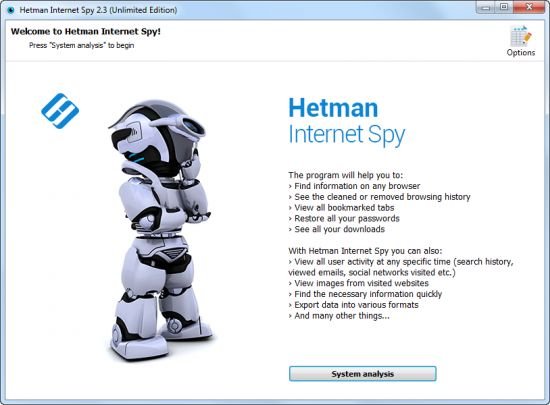 Hetman Internet Spy 4.1 Multilingual
Windows x86/x64 | File size: 34.09 MB
This program analyzes the contents of both existing and deleted browser system files and collects detailed information on a user's online activity. The utility allows you to analyze browsing history, social media messages, search history, emails, videos watched on YouTube, etc.
The user-friendly interface is good not only for parents who would like to monitor their children's online activity, but also for detectives working on digital evidence. The application will give you certain information even if the browsing history was deleted, the data was removed, or the disk was formatted.
Ways you can use it
If you've decided to clear your search history, browsing history, or the history of any other past online activities, you shouldn't assume it will be gone forever. Browsing history can be read easily, and even restored, if necessary.
Show a list of opened web pages
The application collects the history of opened URLs and displays the opening date, total number of visits, and the time spent viewing a certain webpage. For convenient analysis, all websites are broken into categories, and you can filter or sort them by any category.
Analyzes a user's online activity on social media
Communications on social media also leave a track in the operating system. There is a special section to show URLs, the accounts used, the people with whom the user interacted, and the total time spent on communication. Using the saved logins and passwords, you can get direct access to the private information of a person's account - messaging history, photos and videos.
Analyzes search queries and use of machine translation
The history of all search queries is given as a separate section. It contains all the information about searches made with popular search engines such as Google or Bing, in online stores like Amazon or Ebay, online maps by Google, social media like Facebook and YouTube, dating websites such asBeNaughty, Match, Tinder or OkCupid, and millions of other web sites and services.
Shows the user's emails
All emails - viewed or sent - are available for review in a separate section. In addition to the date, it shows you the name of the resource where the email was viewed, the user account, and the subject. By using the received passwords, you can read someone else's correspondence.
Shows created bookmarks and downloads
All bookmarks created by the user will be shown after scanning the browser. You will have access to bookmarks created both from a desktop computer or a smartphone. The saved web page URLs contain the date of creation and are arranged as a directory tree. The history of all downloaded objects is given as a separate section. For every download, the complete address and the time of starting and finishing the download are shown, as well as the path to the file on the disk.
Analyses the browser cache contents
When visiting any webpage, Chrome, Yandex, Opera and Mozilla Firefox copy numerous images and other objects onto the hard disk - into the browser cache. Hetman Internet Spy restores the files and the date of first access from the browser cache and shows it for review.
Shows saved passwords and entered addresses
For convenience, modern browsers suggest remembering passwords to user accounts in Facebook, Instagram, Twitter, email services, etc. This utility extracts saved passwords and addresses entered in contact forms from a person's user account. Using the login keys, you can view someone's emails and social media messages. Entering a person's accounts in Google and Facebook gives you access to complete browsing history and search queries, all movements (via Geolocation), all the person's contacts, and lots of other private information.
Recover browsing history after disk formatting
Deleting browser system files from the hard disk with Shift + Del or formatting the partition with subsequent reinstallation of a Windows operating system gives no protection against the Internet Spy. Hetman Internet Spy scans the disk directly and recovers the deleted browsing history.
Restores browsing history after it's cleaned, or after Incognito or Private Mode have been used
You will be able to recover browsing history after it is cleaned, reset to default settings, and even after the browser is uninstalled and reinstalled. Using an Incognito tab in Chrome and Yandex, or a Private tab in Opera and Mozilla Firefox does not hide the browsing history, and you'll be able to view it.
Exporting reports to Excel, HTML or PDF
You can save all the received data to Excel, HTML or PDF for further use or to import to other systems. The Report Wizard will help you select and export any useful information.
Browsers and operating systems
You can download and try Hetman Internet Spy for free. This product supports 32-bit and 64-bit versions of Windows 10, 8, 7, Vista, XP, and can recover browsing history for
Amigo
Blisk
Cent Browser
Cốc Cốc
Comodo Dragon
Epic Privacy Browser
FreeU
GhostBrowser
Google Chrome
Internet Explorer
Maelstrom
Mirosoft Edge
Mozilla Firefox
Opera Browser
Orbitum
Safari
SeaMonkey
Slimjet
SRWare Iron
Torch
UC Browser
Vivaldi
Yandex Browser
Rambler Browser
What's new
• official site does not provide any info about changes in this version
Editions: Unlimited / Commercial / Office / Home
HOMEPAGE
Код:
https://hetmanrecovery.com/
DOWNLOAD
Код:
https://rapidgator.net/file/2487802dc280a0c174dc68431f8e5c08/Hetman.Internet.Spy.4.1.rar.html
Код:
https://nitroflare.com/view/53DC1F632968A9E/Hetman.Internet.Spy.4.1.rar
|
|
|
|
|
07.03.2026, 06:42
|
#116998
|
|
Местный
Регистрация: 04.10.2017
Сообщений: 125,003
Сказал(а) спасибо: 0
Поблагодарили 7 раз(а) в 7 сообщениях
|
Hetman Office Recovery 5.0 Multilingual
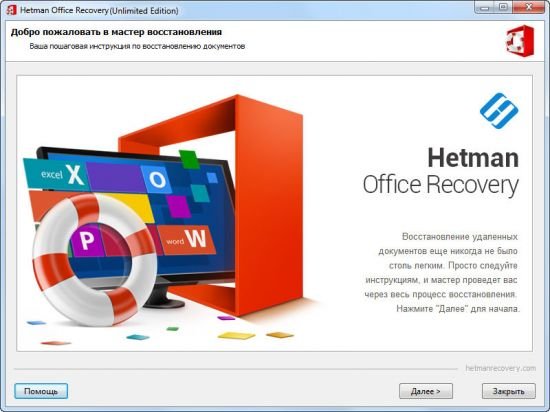 Hetman Office Recovery 5.0 Multilingual
Windows x86/x64 | File size: 28.3 MB
Microsoft Office or OpenOffice Recovery Software. Lost one or more office documents after an accident? Formatted or repartitioned the disk containing important files? Hetman Office Recovery will help you get your documents back! Don't know how to recover the documents? A step by step wizard will guide you through the entire recovery process!
Hetman Office Recovery is designed to help when your office documents go missing. Implementing a range of highly sophisticated low-level disk analysis algorithms, Hetman Office Recovery can retrieve the missing documents even if the disk is corrupted, inaccessible, or does not appear as a drive letter. A special extra-safe recovery more is available for heavily worn and physically unstable devices.
Using Hetman Office Recovery is just as easy as installing it. A step by step wizard guides you through the entire recovery process, helping you choose the right options to achieve maximum recovery rates. From simple undelete to heavy duty recovery, Hetman Office Recovery solves all your data recovery needs when it comes to office documents.
HOMEPAGE
Код:
https://hetmanrecovery.com/
DOWNLOAD
Код:
https://rapidgator.net/file/68fc511b7dfdbcf403d8668b512e3431/Hetman.Office.Recovery.5.0.rar.html
Код:
https://nitroflare.com/view/31F06C284F70FD8/Hetman.Office.Recovery.5.0.rar
|
|
|
|
|
07.03.2026, 06:44
|
#116999
|
|
Местный
Регистрация: 04.10.2017
Сообщений: 125,003
Сказал(а) спасибо: 0
Поблагодарили 7 раз(а) в 7 сообщениях
|
Hetman Partition Recovery 5.2 Multilingual
 Hetman Partition Recovery 5.2 Multilingual
Windows x86/x64 | File size: 74.04 MB
Hetman Partition Recovery is designed to reliably recover information and fix all types of issues with healthy, damaged, corrupted, formatted and inaccessible hard drives. This hard drive data recovery software offers a complete, all-in-one solution to take care of typical problems you're your computer's storage. The This hard drive data recovery software will help you recover lost and deleted files, recover missing documents, photos, audio and video files.
In addition, Hetman Partition Recovery comes with a comprehensive set of tools to fix corrupted volumes, recover deleted partitions, unformat formatted disks, and repair all types of damage to your disk system structures.
Hetman Partition Recovery can recover partition tables and MBR records, FAT and NTFS file systems complete with alternative data streams, recovering the entire hard drive complete with all volumes, files and original folder structure. All 32-bit and 64-bit versions of Windows are supported including the latest Windows 7.
Key features
- Recover all types of deleted files including documents, compressed archives, photos, music and videos;
- Recover files and folders from formatted, repartitioned, corrupted and inaccessible disks;
- Unformat formatted partitions and restore original volumes from repartitioned hard drives;
- Fix corrupted file systems, partition tables, master boot records (MBR) and other system information;
- Recover files and folders from built-in and external hard disks, USB flash drives, and all types of memory cards.
What's new
• official site does not provide any info about changes in this version
Edition: Unlimited / Commercial / Office / Home
HOMEPAGE
Код:
https://hetmanrecovery.com/
DOWNLOAD
Код:
https://rapidgator.net/file/639b436dd179ab9574948159a43b9d23/Hetman.Partition.Recovery.5.2.rar.html
Код:
https://nitroflare.com/view/F0B0679FC4331CD/Hetman.Partition.Recovery.5.2.rar
|
|
|
|
|
07.03.2026, 06:48
|
#117000
|
|
Местный
Регистрация: 04.10.2017
Сообщений: 125,003
Сказал(а) спасибо: 0
Поблагодарили 7 раз(а) в 7 сообщениях
|
Hetman Photo Recovery 7.0 Multilingual
 Hetman Photo Recovery 7.0 Multilingual
Windows x86/x64 | File size: 65.66 MB
Looking for a tool to recover deleted photos? Corrupted memory card made last shooting session inaccessible? Formatted a memory card full of pictures and want to get them back, or simply deleted a photo album from your hard drive? Look no further! Hetman Photo Recovery will restore pictures no matter what!
Hetman Photo Recovery recovers digital pictures from all types of storage media. Undelete photos from hard disks, recover from USB drives, or restore from formatted, corrupted or inaccessible memory cards - Hetman Photo Recovery can do all this, and more. The tool can even recover pictures directly from the smartphones, tablets and many digital camera models. Simply connect your device to the computer via a USB cord and run Hetman Photo Recovery.
Using Hetman Photo Recovery is easy as 1-2-3. You'll run a step-by-step wizard guiding you through the entire recovery process from choosing the device that has your files to selecting pictures to recover and finally saving them onto another disk. Try Hetman Photo Recovery free!
Key Features in Hetman Photo Recovery 4
Quick Start
Start using Hetman Photo Recovery right away! Watch the video demonstration to discover how easy it is to recover your pictures. A fully visual image preview is available in the free evaluation version. If you can successfully preview a picture in the demo, then you can definitely recover it after purchasing the full copy!
Recovering Pictures that Go Missing
Hetman Photo Recovery is a highly specialized tool dedicated to recovering digital pictures that go missing. The tool supports a wide range of image formats including RAW files, and can successfully recover pictures from a huge variety of storage media.
Recoverable Digital Pictures
Hetman Photo Recovery can recover pictures in all popular image formats. This includes raster and vector images in JPEG, PSD, TIFF, PNG, BMP, GIF and many other formats. The list of supported formats is constantly growing. In addition, Hetman Photo Recovery fully supports the recovery of RAF files ("digital negatives") produced by Canon, Nikon, Pentax, SONY, Olympus, Panasonic and other cameras. The tool recognizes CR2, CRW, RAW, TIFF, TIF, NEF, PEF, X3F and many other RAW formats.
Supported Devices and Storage Media
- The tool can recover images from all types of memory cards used in popular electronic devices such as digital cameras, smartphones, tablets etc. We tested the tool with a bunch of SD, micro SD, SDHC, Compact Flash, Memory Stick and other memory cards.
- Hetman Photo Recovery fully supports all desktop, laptop and external hard drives regardless of make and model. The images can be successfully recovered from healthy, formatted and corrupted disks.
- USB pen drives of all makes and models are supported including devices manufactured by A-Data, Corsair, Goodram, HP, Kingston, LaCie, PhotoFast, PNY, SanDisk, Silicon Power, TDK, Team, Toshiba, Transcend, Verbatim etc.
- Hetman Photo Recovery can recover images stored in the internal memory of many digital cameras. On order to recover the pictures, connect your camera to the PC via a USB cord and make sure a new drive letter appears. You can then use Hetman Photo Recovery to recover photos from that new drive. We tested multiple camera models manufactured by Canon, Casio, Ergo, Fujifilm, HP, Kodak, Logitech, Leica, Nikon, Olympus, Panasonic, Pentax, Praktica, Premier, Samsung, Sony, Toshiba, UFO and other makers.
Three Easy Steps to Recover Pictures
Hetman Photo Recovery is extremely easy to use. Equipped with a fully guided, step by step wizard, the tool guides you through the entire recovery process. You don't have to be a pro photographer or an IT specialist to use Hetman Photo Recovery. A comprehensive manual is available, basically explaining how to hit the "Next" button three times (but also talking about the necessary safety precautions such as using a separate disk or memory card for saving images you're about to recover).
Pre-Recovery Preview
Hetman Photo Recovery comes with a built-in picture viewer displaying a full-size preview of deleted pictures. Recoverable files are displayed as thumbnails, making it easy to choose exactly the images you want to recover. Hetman Photo Recovery is available in both paid and free versions of the tool.
Data Safety
Hetman Photo Recovery puts data safety a top priority, strictly enforcing read-only access to the device holding the images you're about to recover. If you need absolute safety, you can make a virtual image of the disk, and recover information from that virtual image instead of the actual device. This technique allows capturing a bit-precise image of the volume you're about to recover in a single sweep, effectively minimizing the number of disk access operations and reducing the chance of a sudden failure of a damaged device.
Data Recovery Algorithms
Hetman Photo Recovery can be launched in Quick and Comprehensive analysis modes. The Quick mode is blazing fast, allowing you to quickly restore recently deleted images. This mode analyzes records in the file system, so it can restore the original locations and names of the files. Unfortunately, this mode cannot be used on formatted disks and memory cards.
Supported File Systems and System Requirements
Hetman Photo Recovery supports all versions of FAT and NTFS file systems used in all versions of Windows since Windows 95. The tool supports Windows XP / 2003 and 2008 Server / Vista / Windows 7 / Windows 8 and Windows 10. Hetman Photo Recovery runs in both 32-bit and 64-bit editions of Windows.
What's new
• official site does not provide any info about changes in this version
Edition: Unlimited / Commercial / Office / Home
HOMEPAGE
Код:
https://hetmanrecovery.com/
DOWNLOAD
Код:
https://rapidgator.net/file/48fbfe88b301c9428ec2d4589e693074/Hetman.Photo.Recovery.7.0.rar.html
Код:
https://nitroflare.com/view/50931D83AE977E1/Hetman.Photo.Recovery.7.0.rar
|
|
|
|
      
Любые журналы Актион-МЦФЭР регулярно !!! Пишите https://old.nado.in/private.php?do=newpm&u=12191 или на электронный адрес pantera@nado.ws
|
Здесь присутствуют: 1 (пользователей: 0 , гостей: 1)
|
|
|
 Ваши права в разделе
|
Вы не можете создавать новые темы
Вы не можете отвечать в темах
Вы не можете прикреплять вложения
Вы не можете редактировать свои сообщения
HTML код Выкл.
|
|
|
Текущее время: 20:04. Часовой пояс GMT +1.
| |






