 20.04.2025, 09:45
|
#112171
|
|
Местный
Регистрация: 04.10.2017
Сообщений: 125,003
Сказал(а) спасибо: 0
Поблагодарили 7 раз(а) в 7 сообщениях
|
 DxO PhotoLab 6 ELITE Edition 6.20.0 macOS
DxO PhotoLab 6 ELITE Edition 6.20.0 macOS

Language: Multilingual | File size: 701 MB
DxO PhotoLab provides a complete set of smart assisted corrections that you can manually fine-tune at any time. Take control on every aspect of your photos: effectively remove noise, get rid of light constraints, recover color details, apply sophisticated optical corrections, and enhance details.
Reducing digital noise in RAW images is an ongoing challenge for most photo-editing software. But with DxO DeepPRIME we are breaking new ground. The first artificial intelligence-based (AI) technology of its kind, DeepPRIME enables you to demosaic and denoise images simultaneously. Try it out - the results speak for themselves.
Demosaicing and denoising are usually two separate processes. But with DxO DeepPRIME we've combined them to achieve even better results.
The outcome is spectacular. DxO DeepPRIME removes noise and renders photographic information without reducing color detail. Transitions are smoother and more natural, and you gain nearly two ISO sensitivity values compared to our earlier version, DxO PRIME, the benchmark software for all comparable programs currently available.
If you are an expert photographer, DxO DeepPRIME will open up a world of new possibilities by enabling you to shoot at very high sensitivities. As an amateur photographer, DeepPRIME will allow you to compensate for the drawbacks of small sensors in compact and bridge cameras that produce digital noise even at low ISO sensitivities. And if you're struggling with low quality, or older-generation cameras that are no longer suitable because of the scale of digital noise, DxO DeepPRIME will give your images a new lease of life.
New features in DxO PhotoLab 6
• Introducing DxO Wide Gamut working color space: Harness the potential of the latest printers and monitors with DxO's new color space. Avoid clipping in highly saturated areas and ensure accuracy across your workflow. Easily switch between the legacy color space (for all images coming from previous versions of DxO PhotoLab) and the new DxO Wide Gamut working color space (for your new images loaded in DxO PhotoLab 6);
• New Soft Proofing mode: For beautiful, accurate reproduction, whatever the screen or print type. Preparing your images for different output has never been easier. Achieve accurate color at every stage of your workflow;
• New DeepPRIME XD denoising option: Alongside DeepPRIME, DeepPRIME XD adds another level of performance when required. Expect less noise, more detail and smoother bokeh;
• New ReTouch tool: The brand-new ReTouch Tool gives you unprecedented control when cloning and repairing. Rotate, flip, or transform source points, and edit source areas for absolute precision;
• New nested Projects: Organize your virtual collections of images more efficiently with the new hierarchy of Projects. Create Projects and groups of Projects and simply organize them by drag-and-drop;
• Crop tool improvement: You can now rotate your images when in Crop mode;
• Embedded Perspective tools: Perspective correction tools (keystoning) are now natively available in the ELITE
version;
• New Color labels support: Identify, classify, and cull your images more easily with the new Color tags;
• New Exif & IPTC fields: For complete metadata management;
• New sticky headers in the source tree: The user interface of the source tree has been revamped;
• Keyword tokens improvement: Keyword tokens now show the full hierarchy if children have the same name;
• More than 77,000 camera/lens combinations are now available.
Release Notes
Updates: official site does not provide any info about changes in this version
Supported Operation Systems
macOS 11.6 or later
Homepage:
Download link
rapidgator.net:
Код:
https://rapidgator.net/file/e510e1a690ab6fb9a637eec66aaa0426/atcdc.DxO.PhotoLab.6.ELITE.Edition.6.20.0.macOS.dmg.html
nitroflare.com:
Код:
https://nitroflare.com/view/46685E4BE83B4ED/atcdc.DxO.PhotoLab.6.ELITE.Edition.6.20.0.macOS.dmg
|

|

|
|
20.04.2025, 09:46
|
#112172
|
|
Местный
Регистрация: 04.10.2017
Сообщений: 125,003
Сказал(а) спасибо: 0
Поблагодарили 7 раз(а) в 7 сообщениях
|
DxO PhotoLab 7 ELITE Edition 7.13.0 macOS
DxO PhotoLab 7 ELITE Edition 7.13.0 macOS

Language: Multilingual | File size: 763 MB
DxO PhotoLab provides a complete set of smart assisted corrections that you can manually fine-tune at any time. Take control on every aspect of your photos: effectively remove noise, get rid of light constraints, recover color details, apply sophisticated optical corrections, and enhance details.
Reducing digital noise in RAW images is an ongoing challenge for most photo-editing software. But with DxO DeepPRIME we are breaking new ground. The first artificial intelligence-based (AI) technology of its kind, DeepPRIME enables you to demosaic and denoise images simultaneously. Try it out - the results speak for themselves.
Demosaicing and denoising are usually two separate processes. But with DxO DeepPRIME we've combined them to achieve even better results.
The outcome is spectacular. DxO DeepPRIME removes noise and renders photographic information without reducing color detail. Transitions are smoother and more natural, and you gain nearly two ISO sensitivity values compared to our earlier version, DxO PRIME, the benchmark software for all comparable programs currently available.
If you are an expert photographer, DxO DeepPRIME will open up a world of new possibilities by enabling you to shoot at very high sensitivities. As an amateur photographer, DeepPRIME will allow you to compensate for the drawbacks of small sensors in compact and bridge cameras that produce digital noise even at low ISO sensitivities. And if you're struggling with low quality, or older-generation cameras that are no longer suitable because of the scale of digital noise, DxO DeepPRIME will give your images a new lease of life.
Release Notes
Updates: official site does not provide any info about changes in this version
Supported Operation Systems
macOS 12.6 or later
Homepage:
Download link
rapidgator.net:
Код:
https://rapidgator.net/file/e019bb708a721218d55957dd39d07418/zqoyi.DxO.PhotoLab.7.ELITE.Edition.7.13.0.macOS.dmg.html
nitroflare.com:
Код:
https://nitroflare.com/view/0ED1F0AA7FBB580/zqoyi.DxO.PhotoLab.7.ELITE.Edition.7.13.0.macOS.dmg
|
|
|
|
|
20.04.2025, 09:48
|
#112173
|
|
Местный
Регистрация: 04.10.2017
Сообщений: 125,003
Сказал(а) спасибо: 0
Поблагодарили 7 раз(а) в 7 сообщениях
|
DxO PhotoLab 8 ELITE Edition 8.5.0 macOS
DxO PhotoLab 8 ELITE Edition 8.5.0 macOS

Language: Multilingual | File size: 884 MB
DxO PhotoLab provides a complete set of smart assisted corrections that you can manually fine-tune at any time. Take control on every aspect of your photos: effectively remove noise, get rid of light constraints, recover color details, apply sophisticated optical corrections, and enhance details.
Reducing digital noise in RAW images is an ongoing challenge for most photo-editing software. But with DxO DeepPRIME we are breaking new ground. The first artificial intelligence-based (AI) technology of its kind, DeepPRIME enables you to demosaic and denoise images simultaneously. Try it out - the results speak for themselves.
What's new DxO PhotoLab 8
Enjoy a host of upgrades including new tools and an improved workflow.
Image correction & enhancement
DxO's pioneering Optics Modules are renowned for giving photographers the best possible performance from their gear, and are applied automatically depending on metadata. Lens softness adjustments are tailored according to the idiosyncrasies of individual lenses. They don't simply sharpen uniformly across the entire image like in other software.
Groundbreaking denoising technologies
Noise reduction powered by machine learning. DeepPRIME, DeepPRIME XD, and DeepPRIME XD2s eliminate noise, recover detail, and improve color reproduction. Two legacy technologies - PRIME and High Quality - are included when speed is crucial. Choose the automatic settings or dial them in manually. Use the new large live preview magnifier to see the impact of denoising - plus all of your other edits.
Color rendering and fidelity
Extra-wide gamut working color space (DxO Wide Gamut) ensures accurate rendering throughout the workflow. Soft Proofing mode ensures accurate colors when preparing files for print or display. Simulate ink and paper via ICC profiles. Create calibrated color profiles using industry-standard color charts to ensure precision.
Control exposure, contrast, color & tonality
Use ColorWheel to manipulate colors and customize color channels. Adjust Exposure compensation, edit the Tone Curve (enhanced in v8), tweak Contrast and Microcontrast. Plus White Balance with color picker, Color Accentuation to set saturation/vibrancy, Black-and-white palette with channel mixer, and Selective Tone for greater control over tonal ranges.
Color rendering
As well as DxO's camera-calibrated profiles and classic film renderings, import and apply DCP profiles, or apply color rendering from your camera. Start your editing process with DxO Styles to open up new creative possibilities.
Smart, automated tools
DxO PhotoLab contains two innovative tools to speed up your editing: DxO Smart Lighting quickly balances brightness levels between shadows and highlights. DxO Clearview Plus reduces atmospheric haze and enhances local contrast.
LUTs
Import and apply LUTs to open up endless creative color options. Choose from 32 pre-installed LUTs and set intensity.
Presets and toning
Create and share presets. Duplicate, rename, import/export presets, and organize into folders. Edit existing presets and create partial presets. Use the Style / Toning palette to apply Simple Toning (e.g., Sepia) and access Split Toning by installing DxO FilmPack.
ReTouch tool
More than just a cloning/healing tool, rotate, scale, and mirror the source area for absolute control. Edit the shape of the area to be retouched using a brush/eraser. Switch between Clone/Repair modes. Remove unwanted elements with automatic source selection (or set manually).
Crop, horizon & perspective tools
Adjust the horizon and crop images using a common or custom ratio - all automatically or manually. Adjust perspective distortion with dedicated tools: force parallels, rectangle, or 8-point guides.
Local Adjustment tools
U Point™ technology features Control Points and Control Lines for intelligent masks without the need for complex layers. Use Brush, Gradient, Eraser, and Auto Mask tools. Create complex adjustments using Hue Masks (new in v8). Toggle visibility and set opacity of masks, and duplicate/invert mask content. Set Control Point/Control Line sensitivity according to Luminance or Chrominance.
Available corrections
The corrections available as local adjustments include
- Exposure, Contrast, Microcontrast
- Highlights, Midtones, Shadows, Blacks
- Hue, Saturation, Luminance (via ColorWheel)
- Vibrancy, Saturation, Hue, Sharpness, Blur
- White Balance and Tint (RAW only)
Advanced History & Quick Compare
Advanced History palette provides a full editing history including specific values and changes. Grouped corrections can be expanded when applying presets in order to track individual changes. Quick Compare Mode puts your edit alongside the original image with a vertical or horizontal split. You can compare your current image with output versions and virtual copies, or choose a reference image (new in v8).
Virtual Copies
Create Virtual Copies for multiple variations of an image without copying the RAW file. Compare quickly with the original image, and selectively copy/paste settings between images.
Customizable workspaces
Highly customizable workspace: reposition/hide panels, collapse/expand palettes, and use a search field to quickly find tools. Add your most-used tools to a favorites palette, or create custom palettes. Filter displayed corrections by category. Display only the tools actively making changes to an image. Use multiple monitors and palettes. Place the grid view navigator on a second display.
Histogram
Display RGB, individual colors, and luminosity channels. Indicate where highlights and/or shadows have been clipped. Display the RGB value of an individual pixel.
Powerful functionality, catalog-free
Don't import images; simply browse your disk and edit your images on the fly. Select/search/filter photos with ease. Apply star ratings, color tags, pick/reject images, and choose from a range of criteria when searching, including color tags. For faster searching, simply direct PhotoLab to index specific folders.
Metadata management
Add and manage keywords, create keyword hierarchies, drag/drop keywords to organize them in a tree view list. Import and manage Exif and IPTC metadata, and selectively copy/paste metadata from one image to multiple others. Synchronize metadata changes with third-party applications.
Projects & other organizational tools
Create Projects to gather selections of images, independent of their folder. Create groups of Projects and drag/drop to organize virtual collections. Batch rename files, adjust capture time, drag files to folders to copy/move them, and sort/select files according to flexible options.
Customizable export settings
Choose the size/location of files, set up custom export presets, create multiple parallel exports, and apply original or custom ICC profile, sRGB, or Adobe RGB profiles. Right-click to export to a specific application. Send images directly to other applications. With Nik Collection installed, you have direct access to all plugins.
Watermarks
Create your own watermarks. Use both text and images together, adjust the size, opacity, blend modes, and save as presets.
Release Notes
Updates: official site does not provide any info about changes in this version
Supported Operation Systems
macOS 13.6 or later
Homepage:
Download link
rapidgator.net:
Код:
https://rapidgator.net/file/b6e570df28490485964798b92122b0cd/svrjk.DxO.PhotoLab.8.ELITE.Edition.8.5.0.macOS.dmg.html
nitroflare.com:
Код:
https://nitroflare.com/view/70F4D15891D5D15/svrjk.DxO.PhotoLab.8.ELITE.Edition.8.5.0.macOS.dmg
|
|
|
|
|
20.04.2025, 09:50
|
#112174
|
|
Местный
Регистрация: 04.10.2017
Сообщений: 125,003
Сказал(а) спасибо: 0
Поблагодарили 7 раз(а) в 7 сообщениях
|
Fig Player - play mp4 mkv mp3 1.3.19 macOS
Fig Player - play mp4 mkv mp3 1.3.19 macOS

File size: 73 MB
Fig Player, is a media player for Mac that supports a wide variety of media files and allows you to listen to music, watch videos and movies.
If you have an extensive media library but don't have a good media player for Mac, here's a good solution. Fig Player. It's free to use and comes with a friendly interface. On the screen, you'll be able to see all of the buttons that give you control over your experience, such as the play and stop button, playback options, volume slider, preview section, screenshot, and recording.
More Advanced Features
* Smooth, seamless video play, support 4K.
* Auto deinterlacing.
* H/W-acceleration.
* A-B loop.
* Frame by Frame playback.
* PIP mode.
* Support various Subtitle formats(Text subtitles(SRT), Vobsub
and ASS/SSA, etc.).
* Choose which one when you have multiple sound output devices.
* Create the scene poster with snapshots.
* Playlist with upper-level folder name.
* Support multiple windows and play multiple videos at the same time.
* Support Wireless display to DLNA, Chromecast, Roku devices.
* OCR Text Recognition(macOS 12+)
Supported Formats
Videos: mkv, rmvb, rm, avi, mov, wmv, flv, f4v, f4p, f4a, f4b, swf, mpg, mpeg, mpeg1, mpeg2, m1v, m2v, mpv, mp4, mpeg4, m4v, 3gp, 3gpp, 3g2, 3gp2, m2p, ps, ts, m2ts, mts, mt2s, ogm, ogv, divx, dv, asf, wtv, webm, etc.
Audios: flac, ape, m2a, mp1, mp2, mpa, mp3, mpg3, m4a, m4b, wma, wav, wv, xm, aiff, aif, ac3, a52, aac, opus, ogg, oga, mid, midi, mka, etc.
Subtitles: ASS, SSA, SRT, IDX&SUB Top In-App Purchases: Full Version - included.
Код:
https://geo.itunes.apple.com/app/id1612400976
Supported Operation Systems
macOS 11.0 or later
Homepage:
Код:
https://geo.itunes.apple.com/app/id1612400976
Download link
rapidgator.net:
Код:
https://rapidgator.net/file/d3ca04b7dca6163ce3cc3e69d9686b66/yklvx.Fig.Player..play.mp4.mkv.mp3.1.3.19.macOS.dmg.html
nitroflare.com:
Код:
https://nitroflare.com/view/52A5ABEF3CD68E9/yklvx.Fig.Player..play.mp4.mkv.mp3.1.3.19.macOS.dmg
|
|
|
|
|
20.04.2025, 09:51
|
#112175
|
|
Местный
Регистрация: 04.10.2017
Сообщений: 125,003
Сказал(а) спасибо: 0
Поблагодарили 7 раз(а) в 7 сообщениях
|
FiveNotes 3.1.4 macOS
FiveNotes 3.1.4 macOS

File size: 8 MB
Five notes with one click. Anytime. FiveNotes (formerly known as Quick) is a small text editor that you can always access by clicking (or pressing shortcut keys) on its Status bar icon. Even if you're working on a full screen app. If you prefer, it can stay on top of the window, so it can be used as a cheat-sheet app.
FiveNotes offers exactly 5 notes that can be switched using colourful circles under the text area or by pressing shortcut (cmd+shift+[ and cmd+shift+] or cmd+number of note).
Release Notes
Release notes were unavailable when this listing was updated.
Supported Operation Systems
macOS 10.12 or later
Homepage:
Код:
https://www.apptorium.com/fivenotes
Download link
rapidgator.net:
Код:
https://rapidgator.net/file/601e731a82d75d2e451b6bdeebafd5ff/rrniq.FiveNotes.3.1.4.macOS.dmg.html
nitroflare.com:
Код:
https://nitroflare.com/view/19C06A5C5A804CB/rrniq.FiveNotes.3.1.4.macOS.dmg
|
|
|
|
|
20.04.2025, 09:52
|
#112176
|
|
Местный
Регистрация: 04.10.2017
Сообщений: 125,003
Сказал(а) спасибо: 0
Поблагодарили 7 раз(а) в 7 сообщениях
|
Fork 2.52.0 macOS
Fork 2.52.0 macOS

File size: 59 MB
Fast and friendly git client. Fork is getting better and better day after day and we are happy to share our results with you. Commit List - Working Directory Changes - Side by Side Diff - Repository Manager Summary and Statistics
Basic features:Fetch, pull, push | Commit, amend | Create and delete branches and tags | Create and delete remote repos | Checkout branch or revision | Cherry-pick, revert | Merge, rebase | Stashes | Submodules Work with repository: Create, clone or add existing repos | Open recent repository quickly Commit view: Stage / unstage changes line-by-line | Access to recent commit messages More features: Browse the repository file tree at any commit | Intuitive merge conflict resolving | See your stashes right in the commit list
Release Notes
Updates: official site does not provide any info about changes in this version
Supported Operation Systems
macOS 10.13 or later
Homepage:
Код:
https://git-fork.com/
Download link
rapidgator.net:
Код:
https://rapidgator.net/file/775c934ca7a8ed2a084efe67e69c7f6f/guzgz.Fork.2.52.0.macOS.dmg.html
nitroflare.com:
Код:
https://nitroflare.com/view/60ECDEC646E1878/guzgz.Fork.2.52.0.macOS.dmg
|
|
|
|
|
20.04.2025, 09:54
|
#112177
|
|
Местный
Регистрация: 04.10.2017
Сообщений: 125,003
Сказал(а) спасибо: 0
Поблагодарили 7 раз(а) в 7 сообщениях
|
FotoMagico 6.7.8 macOS
FotoMagico 6.7.8 macOS

Language: Multilingual | File size: 76 MB
FotoMagico lets you create professional slideshows from your photos and music with just a few, simple mouse clicks. It sports a very clean and intuitive yet powerful user interface. High image quality, fast performance, and user flexibility were some of the design goals for this application.
Release Notes
Updates: official site does not provide any info about changes in this version
Supported Operation Systems
macOS 10.14 or later
Homepage:
Код:
https://fotomagico.com/
Download link
rapidgator.net:
Код:
https://rapidgator.net/file/6b4197a0780979a102bb29418e1cec75/ypagm.FotoMagico.6.7.8.macOS.dmg.html
nitroflare.com:
Код:
https://nitroflare.com/view/4DF6348AF2FCF18/ypagm.FotoMagico.6.7.8.macOS.dmg
|
|
|
|
|
20.04.2025, 09:55
|
#112178
|
|
Местный
Регистрация: 04.10.2017
Сообщений: 125,003
Сказал(а) спасибо: 0
Поблагодарили 7 раз(а) в 7 сообщениях
|
iZotope Equinox 1.0.0 macOS
iZotope Equinox 1.0.0 macOS

File size: 114.24 MB
Elevate every scene, song, and sound with Equinox, a premium reverb plugin for post and music production. Transport, transcend, and transform with a spectrum of sonic possibilities, comprehensive controls, and lightning-fast workflows.
Immerse yourself
An industry first in immersive and surround reverb, Equinox fuses legendary Exponential Audio algorithms with iZotope's adaptive unmasking tech to keep your mixes crystal clear.
Flexible and customizable with advanced controls, macro tone settings, and 1250+ pro presets, this is your blueprint for realistic reflections, eccentric experiments, and everything in between.
Legendary reverb engines
Equinox is built on the legendary reverb engines from Exponential Audio's Stratus and Symphony, bringing both hyper-realistic and creative reverb sounds into a single plugin. Place your instruments, dialogue, and more into a real space, or get creative and take them into new worlds.
Dynamic adaptive unmasking
Featuring easy-to-use dynamic unmasking, Equinox carves out space for your reverb, ensuring your mix is clean and focused. Keep dialogue present, vocals and lead instruments up front in your mix, and more.
Overhauled preset exploration
It's never been easier to find the perfect starting point for your reverb. Quickly and easily explore over 1250 presets from Stratus and Symphony with an all-new preset browsing experience, letting you search by multiple keywords and save your presets for later.
Refinable reverb character
The beauty of algorithmic reverb is that every aspect of your sound is yours to tweak. Dive into the advanced controls to sculpt the perfect space for any project and open the Balance tab to easily adjust and automate your reverb in surround audio formats.
Global tone control
Time is money, and sometimes you just need to make small adjustments and keep moving. Equinox's global tone control lets you apply a simple tilt EQ to your reverb signal, offering a quick way to make your reverb darker or brighter to match your needs.
Creative reverb effects
Whether you're working on a music mix or sound dsign for film/TV, Equinox has tons of features to make your reverb more unique. Experiment with creative "unnatural" functions like reverb Freeze for infinite drones, Chorus, and Gate, and use tempo sync and tail suppression to ensure that your reverb sits musically in the mix.
Preset compatibility
Ready to upgrade? Save any custom Stratus or Symphony patches as user presets, then import your entire Stratus and Symphony preset libraries into Equinox in one click. Take your old favorites to new heights with adaptive unmasking, global tone control, and more.
Release Notes
Код:
https://www.izotope.com/en/products/release-notes/equinox-release-notes.html
Supported Operation System
• macOS 13.7.4 or later
• Apple Silicon or Intel Core processor
Homepage:
Код:
https://www.izotope.com/en/products/equinox
Download link
rapidgator.net:
Код:
https://rapidgator.net/file/3b82a77f09d537c162736c8c32787fc8/prfaf.iZotope.Equinox.1.0.0.macOS.dmg.html
nitroflare.com:
Код:
https://nitroflare.com/view/5BD4EA9AD15A833/prfaf.iZotope.Equinox.1.0.0.macOS.dmg
|
|
|
|
|
20.04.2025, 09:56
|
#112179
|
|
Местный
Регистрация: 04.10.2017
Сообщений: 125,003
Сказал(а) спасибо: 0
Поблагодарили 7 раз(а) в 7 сообщениях
|
Jettison 1.9.1 macOS
Jettison 1.9.1 macOS
File size: 6 MB
Jettison automatically ejects external disks from your Mac before your computer goes to sleep.
Simplify those last few seconds when you grab your MacBook and run out the door. Just close the lid and Jettison will automatically eject your backup drive, iPod, or whatever is connected so you can safely unplug it. Say goodbye to "disk was not ejected properly" errors and waking your computer back up because you forgot to eject everything.
Jettison even makes sure that Time Machine backups and file server volumes are properly shut down before they're removed. Your backups and shared files are safe and sound.
And what if you decide not to leave, and open your MacBook back up? Jettison will check to see if your drives are still connected and will mount them back on the Desktop if they're there.
Release Notes
Release notes were unavailable when this listing was updated
Supported Operation Systems
macOS 10.13 or later
Homepage:
Код:
https://stclairsoft.com
Download link
rapidgator.net:
Код:
https://rapidgator.net/file/420b12a9429438b45329ef17eddb0710/zivgt.Jettison.1.9.1.macOS.dmg.html
nitroflare.com:
Код:
https://nitroflare.com/view/358910FA1DD76AF/zivgt.Jettison.1.9.1.macOS.dmg
|
|
|
|
|
20.04.2025, 09:58
|
#112180
|
|
Местный
Регистрация: 04.10.2017
Сообщений: 125,003
Сказал(а) спасибо: 0
Поблагодарили 7 раз(а) в 7 сообщениях
|
MarsEdit 5.3.4 macOS
MarsEdit 5.3.4 macOS

File size: 24 MB
Write, preview, and publish your blog. MarsEdit is a blog editor for macOS that makes editing your blog like writing email, with spell-checking, drafts, multiple windows, and even AppleScript support. It works with with most blog services including WordPress, Blogger, Drupal, Movable Type, TypePad, and many others.
Release Notes
Код:
https://redsweater.com/marsedit/whatsnew.html
Supported Operation Systems
macOS 10.15.4 or later
Homepage:
Код:
https://red-sweater.com
Download link
rapidgator.net:
Код:
https://rapidgator.net/file/8e09b01ba52e3d5d056cf9cfa821f94d/qpqip.MarsEdit.5.3.4.macOS.dmg.html
nitroflare.com:
Код:
https://nitroflare.com/view/AE1C360834B60D7/qpqip.MarsEdit.5.3.4.macOS.dmg
|
|
|
|
|
20.04.2025, 09:59
|
#112181
|
|
Местный
Регистрация: 04.10.2017
Сообщений: 125,003
Сказал(а) спасибо: 0
Поблагодарили 7 раз(а) в 7 сообщениях
|
Fort Firewall 3.17.3
Fort Firewall 3.17.3
File Size : 6.1 Mb
Protecting your computer against threats on the internet usually means one has to filter internet access more strictly. What better way to do that if not by using a firewall? Windows comes packed with a firewall by default. If you're not satisfied with it and are looking for more ways to control and monitor your PC's access to the internet, Fort Firewall could be one particular way to go.
What can this application do for me?
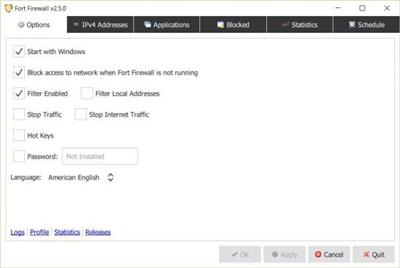
As far as its features are concerned, you get the full package. Start with filtering content by network addresses or by grouping the apps on your PC. Limit internet access and speed or usage for certain applications. Keep an eye on the evolution of your PC's connections by analyzing the stored traffic statistics. Get the help you desire from graphical displays showing bandwidth development. If one adds the fact that the whole program is based on WFP, otherwise known as Windows Filtering Platform, you come to the conclusion that this application integrates very well with Windows operating systems.
More security or simply more control
Probably the most interesting aspect for basic users is the added security it can provide for your PC. Practically, by giving more room for control and more options to tailor internet usage to one's tastes, you might be able to increase the security on your PC, but it's up to you. Fear not though, if there are certain exceptions to be made, you can simply add them to a whitelist, thus not overprotecting your machine.
Fort Firewall is an application that does not necessarily bring something new to the table. On the contrary, it employs a classic formula. Still, it offers more control over your PC's internet connections, the way certain apps use your bandwidth, and how your machine interacts with the internet for achieving various tasks. Every aspect of this application is there to simplify the way one interacts with their PC's firewall security system.
Код:
https://github.com/tnodir/fort/releases
Homepage:
Код:
https://github.com/tnodir/fort
Download link
rapidgator.net:
Код:
https://rapidgator.net/file/ad05786d7ca5f0533ea80426cd5d441b/mbmtq.Fort.Firewall.3.17.3.rar.html
nitroflare.com:
Код:
https://nitroflare.com/view/9D9EC28BE8FEA7D/mbmtq.Fort.Firewall.3.17.3.rar
|
|
|
|
|
20.04.2025, 10:01
|
#112182
|
|
Местный
Регистрация: 04.10.2017
Сообщений: 125,003
Сказал(а) спасибо: 0
Поблагодарили 7 раз(а) в 7 сообщениях
|
Fotor Basic v5.0.6 (x64)
Fotor Basic v5.0.6 (x64)
File Size : 28 Mb
Fotor is a simple but easy-to-use desktop photo editor that enables you to edit photos without being an expert in Photoshop.
Fotor brings high-level photo editing to anyone who feels creative enough to use it. Let's face it, not everyone is a Photoshop guru, and with Fotor, you don't need to be. Its state-of-the-art photo processing engine makes it easy to tweak some nice-looking photos easily and quickly. Fotor has many adjustments you would expect in an editor, such as; Adjusting exposure, brightness, contrast, white balance, saturation, sharpen/blur, etc. Much of that is accomplished by clicking slides to taste. However, it shines in the effects sections, where more than enough programmed customization effects can bring out the best in almost any array of shots you can dream up.
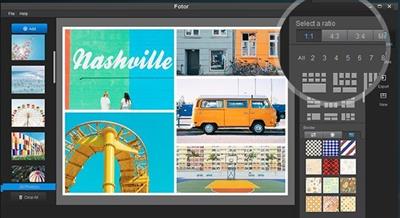
When you're done editing, the collage feature is also effortless to create a multi-layout image. There are many layout examples; you choose one and drag and drop photos you like. You can then size and rotate each image to get your preferred look.
Afterward, share on Facebook, Twitter, or Flicker with a mouse click. It's that easy.
Fotor Features
Basic edit adjustment
Basic photo effects
Basic portrait touch up
Classic contents (collage, templates, etc.) to start with
Edit and save your work in basic formats
Basic HDR Tech
Sync photos and works in Fotor Cloud
Код:
https://www.fotor.com/windows/release-notes.html
Homepage:
Код:
https://www.fotor.com/
Download link
rapidgator.net:
Код:
https://rapidgator.net/file/99a4c444fb0a0b8a5b56da1290c749ec/tdvxh.Fotor.Basic.v5.0.6.x64.rar.html
nitroflare.com:
Код:
https://nitroflare.com/view/6654608F95D0C07/tdvxh.Fotor.Basic.v5.0.6.x64.rar
|
|
|
|
|
20.04.2025, 10:03
|
#112183
|
|
Местный
Регистрация: 04.10.2017
Сообщений: 125,003
Сказал(а) спасибо: 0
Поблагодарили 7 раз(а) в 7 сообщениях
|
gSyncit for Microsoft Outlook 5.8.36
gSyncit for Microsoft Outlook 5.8.36
File Size: 19.1 MB
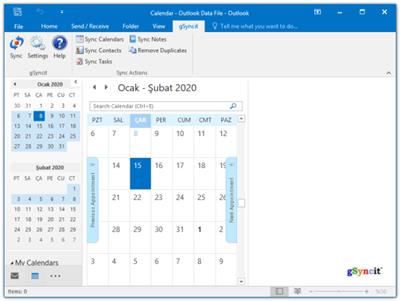
gSyncit enables syncing Outlook calendars, contacts, notes, and tasks with your Google, Toodledo, Todoist, Pocket Informant Online, Evernote, Simplenote, Nozbe accounts. It also supports syncing Calendars and Contacts with iCloud, AOL, Yahoo! many other services that support CardDav and CalDav access.
What's New in gSyncit 5
Improved Sync Performance
Faster sync with Google and other supported services.
Google Calendar Attachments
Sync attachments between Outlook and Google events.
Google Contact Domain Contact
Sync Google Apps Domain Global Address List with Outlook contacts.
CalDav Keyword Filtering
Filter CalDav events using keyword filtering options.
Informant Online Attendees
Sync attendees between Outlook and Informant Online.
Todoist Sync
Basic task sync with Todoist (requires Todoist premium account).
Product Features
- Use gSyncit to sync Outlook with mobile/table devices or another Outlook installation.
- Sync with Google account calendars, contacts, tasks and notes.
- Sync with Toodledo, Todoist, Pocket Informant, Evernote, Simplenote, DropBox, and Nozbe
- Sync with CalDav and CardDav services like iCloud, AOL, Yahoo, and Memotoo
- Syncing calendar attachments with Google and CalDav events
- Duplicate removal wizard for finding & removing duplicates in Outlook folders.
- ONE and TWO WAY syncing of Outlook calendars, contacts, notes and tasks.
- Sync Outlook categories with Google calendar event colors.
- Sync with multiple Outlook profiles and service accounts (e.g. multiple Google accounts).
- Automatically matches entries to avoid duplicate items when syncing.
- Customize sync options to control how, when and what you want to sync.
- Keyword and Outlook category filters to control the Outlook content you want to sync.
- Advanced options to sync Outlook items based on categories.
Feature Highlights in gSyncit 5
GOOGLE EVENT ATTACHMENTS
Sync Google/Outlook event attachments.
GOOGLE DOMAIN CONTACT SYNC
Sync Google Domain contact list to Outlook (including photos).
TODOIST SYNC
Basic sync support between Todoist and Outlook
CALDAV KEYWORD FILTERING
Advanced event keyword filtering for CalDav and Google events.
CALDAV DEFAULTS
Ability to assign default availability/visibility when syncing with CalDav services.
GOOGLE EVENT COLOR SUPPORT
Added ability to sync Google event colors with Outlook categories.
TWO-WAY NOTE SYNC WITH GMAIL
Sync Outlook notes to a Gmail mailbox for two-way note syncing between Outlook and Gmail notes.
GOOGLE ACCOUNT OPEN AUTHENTICATION SUPPORT
Updated all Google syncing operations to use Open Authentication for improved security.
CONTACT DISTRIBUTION LIST SYNC
Sync Outlook distribution lists with Google groups.
ADVANCED KEYWORD FILTERS
Updated keywork filtering to support combinding criteria like starts with, contains, ends with and equals.
TODOIST SYNC
Support for syncing Outlook tasks with Todoist task lists.
CALDAV & CARDDAV SUPPORT
Support syncing with CalDav and CardDav for exchange of calendar, contact and task information with with iCloud, AOL, Fruxx, Yahoo, Memotoo and many other "DAV" enabled services. Also includes support for syncing attachments for calendar events.
MICROSOFT .NET v4.0.3 COMPATABILITY
Migrated all legacy components to the latest Microsoft .Net v4.0 compliant releases for future compatibility with Windows and .Net releases.
POWER SAVING
Disable syncing when using battery power.
Код:
https://www.fieldstonsoftware.com/software/gsyncit5/Updates.aspx
Homepage:
Код:
https://www.fieldstonsoftware.com
Download link
rapidgator.net:
Код:
https://rapidgator.net/file/6e33e09b795298b3205311bde3075ba1/eeqnp.gSyncit.for.Microsoft.Outlook.5.8.36.rar.html
nitroflare.com:
Код:
https://nitroflare.com/view/CED08969A7A08D7/eeqnp.gSyncit.for.Microsoft.Outlook.5.8.36.rar
|
|
|
|
|
20.04.2025, 10:04
|
#112184
|
|
Местный
Регистрация: 04.10.2017
Сообщений: 125,003
Сказал(а) спасибо: 0
Поблагодарили 7 раз(а) в 7 сообщениях
|
iSumsoft BkeyFixer 3.1.3.9
iSumsoft BkeyFixer 3.1.3.9
File size: 15.01 MB
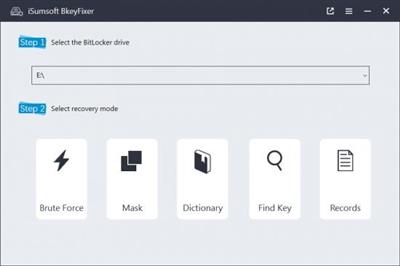
iSumsoft BkeyFixer, a BitLocker password recovery tool, unlocks your encrypted drives with three robust methods: Brute Force, Mask, and Dictionary. With its fast-searching capability, BkeyFixer enables you to find lost recovery keys effortlessly.
- Effortlessly recover your BitLocker password, whether you have completely forgotten it or only remember part of it.
- Retrieve your BitLocker passcode with a high success rate.
- Find your lost recovery keys quickly and effectively.
- Unlock all BitLocker encrypted drives, including HDDs, SSDs, USB Drives, and partitions.
- Supports Windows 11/10/8.1/8/7.
Recover BitLocker Password If Forgotten
Are you struggling with unlocking BitLocker passwords on encrypted drives because the passwords are forgotten? Only remember part of characters and unable to access data stored on the drive? Lost your recovery key and didn't have a backup?
BkeyFixer is for you, ensuring you recover your BitLocker password without additional knowledge!
Three Robust Recovery Methods
BkeyFixer offers you three Recovery modes: Brute Force, Mask, and Dictionary, and allows you to provide possible password combinations, which greatly improve the success rate of password retrieval.
Find Lost Recovery Key with One Click
When you're not clear on where the file of the recovery key is stored, BkeyFixer navigates the file from a large amount of data with its effective search capability. With only one click can you find your lost key!
What's new
• official site does not provide any info about changes in this version
Homepage:
Код:
https://www.isumsoft.com/
Download link
rapidgator.net:
Код:
https://rapidgator.net/file/6887ed253d36fdde3a37e11326dceffa/peago.iSumsoft.BkeyFixer.3.1.3.9.rar.html
nitroflare.com:
Код:
https://nitroflare.com/view/578E553153ACF0F/peago.iSumsoft.BkeyFixer.3.1.3.9.rar
|
|
|
|
|
20.04.2025, 10:06
|
#112185
|
|
Местный
Регистрация: 04.10.2017
Сообщений: 125,003
Сказал(а) спасибо: 0
Поблагодарили 7 раз(а) в 7 сообщениях
|
iSumsoft DupFile Refixer 3.1.1.6
iSumsoft DupFile Refixer 3.1.1.6
File size: 7.71 MB
iSumsoft DupFile Refixer is a secure and efficient tool that can help you easily locate and delete identical/similar files on Computer, so as to save disk space.
• Accurately scan, classify and delete all tpyes of duplicate files.
• Selectively search for duplicate files on Windows/external drive/USB.
• Clearly show you the detected duplicate files by detail report.
• Safely enable a delete confirmation to prevent from mistaken cleanup.
• Easily optimize disk space and increase your Computer performance.
Identify Duplicates with 100% Accuracy
With smart MD5 Message-Digest Algorithm, iSumsoft DupFile Refixer can help you precisely catch and erase all types of duplicate files on your Computer with one click, including photos, videos, documents, music, archive, etc. Moreover, it also allows you to make a specific scan with customized settings, choosing scan file type and skipping hidden files, system files, program files or recycle bin files.
Delete Duplicates with 100% Safety
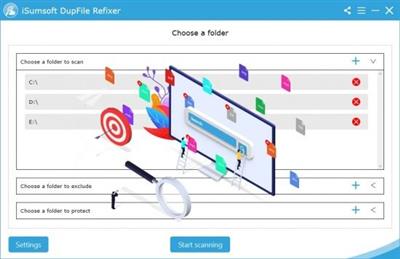
iSumsoft DupFile Refixer can identify any identical or similar file in Windows local & external hard drive/USB drive and generate a detail report of the duplicates containing file name, file path, file type, file size and so on. In this way, you are able to review the duplicates and decide if you want to remove them. For safer deletion, it will ask for your confirmation to avoid removing your wanted files accidently.
How It Works
Step 1: Click on Start scanning to find out duplicate files on your Computer.
Step 2: Click on Delete to easily remove the duplicate files on Computer.
What's new
• official site does not provide any info about changes in this version
Homepage:
Код:
https://www.isumsoft.com/
Download link
rapidgator.net:
Код:
https://rapidgator.net/file/40dd87180283e81f695bf2df8551cbbb/fprrx.iSumsoft.DupFile.Refixer.3.1.1.6.rar.html
nitroflare.com:
Код:
https://nitroflare.com/view/DCB06AE22A11BD3/fprrx.iSumsoft.DupFile.Refixer.3.1.1.6.rar
|
|
|
|
      
Любые журналы Актион-МЦФЭР регулярно !!! Пишите https://old.nado.in/private.php?do=newpm&u=12191 или на электронный адрес pantera@nado.ws
|
Здесь присутствуют: 1 (пользователей: 0 , гостей: 1)
|
|
|
 Ваши права в разделе
|
Вы не можете создавать новые темы
Вы не можете отвечать в темах
Вы не можете прикреплять вложения
Вы не можете редактировать свои сообщения
HTML код Выкл.
|
|
|
Текущее время: 19:17. Часовой пояс GMT +1.
| |






