 21.10.2025, 08:27
|
#114646
|
|
Местный
Регистрация: 04.10.2017
Сообщений: 125,003
Сказал(а) спасибо: 0
Поблагодарили 7 раз(а) в 7 сообщениях
|
 On1 Photo Raw / On1 Photo Raw Max 2026 20.0.5.17637 (x64) Multilingual
 On1 Photo Raw / On1 Photo Raw Max 2026 20.0.5.17637 (x64) Multilingual
File size: 502/508 MB
ON1 Photo RAW 2025 is powerful photo editing software that provides photographers with many tools and features to enhance and retouch their images. With a user-friendly interface, it offers advanced editing capabilities, including non-destructive editing, AI-powered adjustments, and precise control over color and tone. It also supports raw files from over 800 cameras and works with JPEG, TIF, PSD, PSB, PNG, and DNG files.
It's the go-to choice for professionals and enthusiasts seeking top-notch photos. ON1 Photo RAW also includes photo organizational tools for managing your photo library, making it a complete solution for editing and organizing your photography workflow.
Instantly Make Your Photos Look Brilliant!
The all-new Brilliance AI is a game-changer! This tool intelligently enhances the color and tone in your unprocessed photos (and raw images) with the power of AI. You'll get incredible-looking images in a single click. But it doesn't stop there! Brilliance AI also goes a step further by automatically adding local adjustments to different parts of your photo. For example, if there's a sky, people, plants, or a background in your picture, it will make those parts look even more eye-catching!
Get Your Photos Organized
It's easy to organize your photo libraries with ON1 Photo RAW. It's a modern photo organizer where you can just navigate to where your photos live like you would using a file browser, and you are off and running. It includes everything you need to keep your photo libraries in order. The new Keyword AI lets you search objects, people, colors, places, etc., all automatically.
Fast Raw Processing
ON1 Photo RAW is a state-of-the-art raw photo processor that delivers the perfect tone and the ultimate image color and clarity while maintaining the finest details in your photos. The all-new Brilliance AI is the fastest ways to make your photos look brilliant instantly! The new color fringe reduction automatically detects the color fringe, or chromatic aberrations, and removes it. It comes with every tool photographers need to create stunning images.
AI-Powered Raw Photo Editing Software
ON1 Photo RAW includes powerful AI to assist in photo editing without taking away your creative control. Whether you're looking to mask photos quickly, swap out skies, reduce image noise, sharpen images, retouch portraits, or upscale photos, our raw photo editor does it all in one application.
Amazing Photo Effects
ON1 Photo RAW sets itself apart from other photo editing software applications by including an extensive library of professional photo effects. We've curated hundreds of the most popular looks and styles seen throughout the industry. The new AI-powered adaptive presets are the one-click solution to tough problems like brightening the subject, darkening the sky, or adding detail to foliage automatically.
Easily Combine Photos
ON1 Photo RAW is like having Lightroom & Photoshop under one roof. It comes with the tools you need for compositing, HDR editing, hundreds of the hottest presets and filters built-in, and world-class masking tools.
The Raw Photo Editing Solution for Desktop & Mobile
With ON1 Photo RAW for Mobile, you can capture, edit, and organize on the go. The camera captures pro-grade raw format photos with all the manual controls you need. You can edit anywhere, too; adjust color and tone using the same raw processing engine as your desktop version of Photo RAW. With an ON1 Everything Subscription plan you also get ON1 Cloud Sync which lets you send your photos and edits across your computers with ON1 Photo RAW and mobile devices with ON1 Photo RAW for Mobile.
Supported Languages: English, German, Spanish, French, Japanese, Korean, Simplified Chinese, Russian, Portuguese, Italian, Dutch Photo RAW MAX Edition adds plugin compatibility so you can launch your favorite ON1 tools from inside other editors like Adobe Ps/Lr, Affinity, Apple Photos, and others, for a more flexible workflow.
DOWNLOAD
Код:
https://rapidgator.net/file/7bbd141edb7c38dbf816543e1777b4d3/ON1PhotoRAW2026.rar.html
https://rapidgator.net/file/7a951d0310a2d54f5e9780c9ce7ee999/ON1PhotoRAWMAX2026.rar.html
Код:
https://ddownload.com/6z1blxfctv4x/ON1PhotoRAW2026.rar
https://ddownload.com/rarbnmjex961/ON1PhotoRAWMAX2026.rar
|

|

|
|
21.10.2025, 08:29
|
#114647
|
|
Местный
Регистрация: 04.10.2017
Сообщений: 125,003
Сказал(а) спасибо: 0
Поблагодарили 7 раз(а) в 7 сообщениях
|
PilotEdit Pro 20.4.0 Multilingual
 PilotEdit Pro 20.4.0 Multilingual
File size: 72.5 MB
PilotEdit is a handy file editor designed to help users execute scripts, extract strings and edit large files. There is also support if you want to edit or upload FTP files.
Simple user interface
All the program's functions are displayed using a single window. The app's workspace is divided in three smaller windows. The first provides access to the files and folders stored in your computer. The second lets you view and edit the text, while the third is an output window where you can see the program's messages for different actions.
Edit your text
The inserted text can be viewed in a column mode, word wrapped or have the HEX values displayed for the it. The utility can remove tabs and spaces automatically. You can switch the text to upper or lower case letters and increase or decrease text indentation. The app can insert the system date and time into the document. Moreover, words can be browsed, selected or removed using the "Edit" tab.
Different encoding modes
You can change the encoding to ANSI or UTF and set the output to work on different systems like DOS, UNIX or MAC. The tool can apply different predefined scripts which can change the date format and remove empty lines or HTML tags. PilotEdit can sort, find and remove duplicate lines or be used to extract strings from the text and copy it to the Clipboard.
FTP capability
The utility can search and replace in multiple directories and files the custom item, useful in case you have a big text file with a lot of lines. It can open an encrypted FTP file or be used in the decryption process for your files. The program can store your FTP login details and connect to your FTP server.
Conclusion
Overall, PilotEdit is a handy utility for users who want to edit their documents and then upload them to their FTP server. The program does not burden system resources and did not display any errors during tests.
HOMEPAGE
Код:
https://www.pilotedit.com/
DOWNLOAD
Код:
https://rapidgator.net/file/c094227725a06933edf8d5a203e7d81a/PilotEdit20..rar.html
Код:
https://ddownload.com/adxiw2s7op2v/PilotEdit20..rar
|
|
|
|
|
21.10.2025, 08:30
|
#114648
|
|
Местный
Регистрация: 04.10.2017
Сообщений: 125,003
Сказал(а) спасибо: 0
Поблагодарили 7 раз(а) в 7 сообщениях
|
reaConverter Pro 8.0.145 Multilingual
 reaConverter Pro 8.0.145 Multilingual
File size: 439.02 MB
Easily process full batches of files and folders. reaConverter combines powerful automation with intuitive tools to streamline image conversion and eliminate repetitive editing.
700+ File Formats
reaConverter delivers high-efficiency batch conversion for an extensive range of file formats.
Efficient Conversion
A powerful file conversion toolkit with advanced processing features - giving you precise, granular control over every output.
Image Editing
reaConverter simplifies batch image editing - apply touch-ups, transformations, and effects to unlimited images simultaneously.
Automation
Professional-grade automation features for high-volume file conversion and batch processing.
Development
Integrate reaConverter's functionality into scripts, applications, or websites using its command-line tool or DLL.
What's new
• official site does not provide any info about changes in this version
HOMEPAGE
Код:
https://www.reaconverter.com/
DOWNLOAD
Код:
https://rapidgator.net/file/1b3124dc51fe3836f37a118c9a061b46/reaConverter.Pro.8.0.145.rar.html
Код:
https://ddownload.com/zj81b8dlgi45/reaConverter.Pro.8.0.145.rar
|
|
|
|
|
21.10.2025, 08:33
|
#114649
|
|
Местный
Регистрация: 04.10.2017
Сообщений: 125,003
Сказал(а) спасибо: 0
Поблагодарили 7 раз(а) в 7 сообщениях
|
Room Arranger 10.3.0.735 (x64) Multilingual
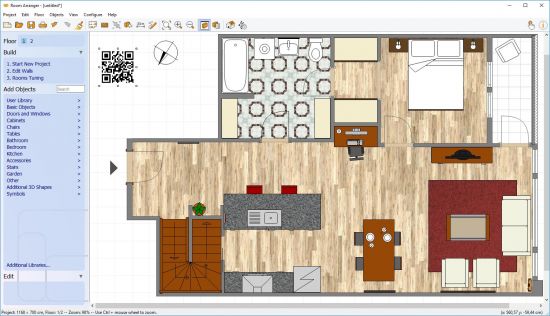 Room Arranger 10.3.0.735 (x64) Multilingual
File size: 23.5 MB
Room Arranger is 3D room / apartment / floor planner with simple user interface. Once you get the basics, you can draw whatever you imagine. While having wide library of objects, you can easily create your own piece of furniture.
Features
Easy to Use
Room Arranger is small and compact piece of software. Still it lets you design nearly anything you imagine. Once you understand the basics it's easy to bring it to next level.
Nearly all functions have keyboard shortcuts, so you can learn to be pretty fast in Room Arranger.
3D Visualization
3D can give you a better impression of your design. Room Arranger will not only let you fly around the scene, but you can also walk through it like in reality.
Wide Object Library
There are nearly 300 objects in the standard object library. Furniture, and other equipment. For each of them, you can modify their dimensions exactly as you need - you are not limited to what we think is the most common.
Additionally you can quickly and easily design all your special objects directly in Room Arranger, there is a set of 3D objects just for such needs. Some users contributed to our On-line object library and shared their work.
Measurement
There is a measurement tool in Room Arranger that helps you to check if there is enough space left for other objects, or just visualize the dimensions in the project.
The software also measures the room areas, wall areas and other useful values. It will let you copy - paste them to Excel for further processing.
Print in Scale
Printing is the integral part of designer's work. We try to make this output precisely and in high quality. Professional architects usually require printouts in exact 1:50 or 1:100 scale, which is possible in Room Arranger.
In case you have only small A4 printer, the software manages to print the project over more pages. You will just glue all sheets of paper together.
Build on Floor Plan Image
Drawing walls can be quite time consuming for apartment or house design. So there is a way to make it easier in case you have an image or photo of the floor plan.
Just load the image of the floor plan into the Wall Editor, calibrate it, and draw walls on top of it.
HOMEPAGE
Код:
https://www.roomarranger.com/
DOWNLOAD
Код:
https://rapidgator.net/file/407c5aeb184efdbbd4af38d085488ef9/RoomArranger10..rar.html
Код:
https://ddownload.com/x1chgbqn8f7b/RoomArranger10..rar
|
|
|
|
|
21.10.2025, 08:34
|
#114650
|
|
Местный
Регистрация: 04.10.2017
Сообщений: 125,003
Сказал(а) спасибо: 0
Поблагодарили 7 раз(а) в 7 сообщениях
|
SIVISI SLURP 1.1.11 (Win/macOS/Linux)
Free Download ISIVISI SLURP 1.1.11 (Win/macOS/Linux) | 62 Mb
Explore the fusion of FM synthesis and spatial dynamics with SLURP, a fully featured digital synthesizer plugin.
Creative Rotations
SLURP is a digital synthesizer that convert traditional oscillations into rotations. Control these rotational dynamics with 3 oscillating sources of your choice.
Modulatable
Control any parameter with your DAW or SLURP's assortment of built in modulators.
Home Page -
Код:
https://isivisi.ca/slurp
Rapidgator
Код:
https://rapidgator.net/file/d0e6c7bb852185a5f05280ddefdae895/xwm7b.ISIVISI.SLURP.1.1.11.WinmacOSLinux.zip.html
Код:
https://ddownload.com/g8m615bc4hry/xwm7b.ISIVISI.SLURP.1.1.11.WinmacOSLinux.zip
|
|
|
|
|
21.10.2025, 08:35
|
#114651
|
|
Местный
Регистрация: 04.10.2017
Сообщений: 125,003
Сказал(а) спасибо: 0
Поблагодарили 7 раз(а) в 7 сообщениях
|
Synchredible Professional 9.003 Multilingual
 Synchredible Professional 9.003 Multilingual
File size: 9.0 MB
Synchredible: Synchronize, copy and back up your data. Individual folders or entire drives: Synchredible synchronizes, copies and backs up - with just one mouse click! A well-thought-out wizard helps you to define jobs that can be executed on request on a time-controlled basis, in the event of changes (real-time monitoring) or when connecting an external drive. This is how you keep your data in sync - fully automatically!
Our technology, which has been tried and tested for many years, not only makes it possible to copy from A to B - Synchredible also performs two-sided synchronizations. It automatically detects changes and synchronizes the last edited file safely and reliably! Thanks to the sophisticated technology for recognizing identical files, Synchredible saves valuable time; unchanged files can be skipped on request and thus also extensive data sets can be compared within a few seconds!
Synchredible can be used for local synchronization, but also for synchronizing folders in networks and on USB devices. Whether for data synchronization or data backup - Synchredible brings your data reliably to the desired location!
New Functions v8.0
+ Automatic synchronization in case of changes
+ Pause after real-time monitoring
+ Display folder/direction in the status field
+ Send report: TLS 1.2 supported
+ Move to recycle-bin & UNC
+ Save interval remaining time
+ Group sorting alphanumeric
+ Load last automation tab
+ Report: 4GT technology
+ Report: Speed increased
+ Performance counter improved
+ Program interface optimized
+ Speed optimized
HOMEPAGE
Код:
https://www.ascompsoftware.com/en/
DOWNLOAD
Код:
https://rapidgator.net/file/b912543dd6661bfa40766e06e5cd10bf/Synchredible_Professional_9.003.rar.html
Код:
https://ddownload.com/ybrl9ifmfwc7/Synchredible_Professional_9.003.rar
|
|
|
|
|
21.10.2025, 08:37
|
#114652
|
|
Местный
Регистрация: 04.10.2017
Сообщений: 125,003
Сказал(а) спасибо: 0
Поблагодарили 7 раз(а) в 7 сообщениях
|
Syncovery Premium 11.9.3.113 (x64)

Syncovery Premium 11.9.3.113 (x64)
File Size: 58.8 MB
Syncovery - file synchronization and backup software! Your sync and back-up solution is here - now in all-new version 7! Syncovery will copy your files the way you need it. Back up your data and synchronize PCs, Macs, servers, notebooks, and online storage space.
Back up your data and synchronize PCs, Macs, servers, notebooks, and online storage space.
You can set up as many different jobs as you need and run them manually or using the scheduler. Syncovery works with local hard drives, network drives and any other mounted volumes. In addition, it comes with support for FTP, SSH, HTTP, WebDAV, Amazon S3, and Google Docs. You can use ZIP compression and data encryption. On Windows, the scheduler can run as a service - without users having to log on. There are powerful synchronization modes, including Standard Copying, Exact Mirror, and SmartTracking.
Online Backup
We have been backing up our data over the Internet since the 90's, and highly recommend it. Encryption will keep your data safe.
Block Level Copying
Save bandwidth and disk space by copying only the changed blocks of large files.
Real-Time Sync
Real-time sync can be a fantastic speed up for your replication or backup.
File Synchronization
As a generic synchronizer, you can set up our software to fulfill all kinds of tasks, including one-way and two-way syncs, backup, replication, updating or downloading web sites and more.
Profile Groups
You can organize your profiles in groups. Find out how easy this is and how you will benefit from it.
DOWNLOAD
Код:
https://rapidgator.net/file/11b8daccaed6555e6868fc98ec6d4986/Syncovery.11.rar.html
Код:
https://ddownload.com/lbpjpu9j6ylg/Syncovery.11.rar
|
|
|
|
|
21.10.2025, 08:39
|
#114653
|
|
Местный
Регистрация: 04.10.2017
Сообщений: 125,003
Сказал(а) спасибо: 0
Поблагодарили 7 раз(а) в 7 сообщениях
|
Thea For Rhino 4.5.257.168 (x64)
 Free Download Thea For Rhino 4.5.257.168 (x64) | 298.3 Mb
Thea for Rhino integrated plugin takes full advantage of Thea Render functionality and allows you to create high-quality photorealistic renders within Rhino 6. With advanced features such as interactive render, true physically-based materials, innovative material layering, IES & HDRI light support along with a versatile rendering system comprised of biased, unbiased and GPU engines, rendering within Rhino has become really powerful.
Viewport Rendering:
Thea for Rhino can be used for interactive rendering inside Rhino Viewports. Select the desired Viewport and simply let Thea Render engines give you an immediate visualization of your scene.
Advanced Material Editor:
The advanced Thea material editor has been fully integrated into Rhino, bringing all the advanced and unique features of Thea materials. The user interface has been redesigned from scratch making the creation of complex materials an easy task.
Content Browser with Online Repository:
The Online Repository [link] can now be accessed directly from the Thea content browser. It is now just a single click to download an online material and add it to the material list. On top of that, it is also possible to load materials in the Advanced Material Editor using the Content Browser and make use of the Interactive Preview functionality that allows you to interactively preview materials before making the final decision.
Darkroom Refreshed:
Darkroom has been refreshed with new features and a new modular user interface. Batch rendering can be started from within Darkroom using Rhino's Named Views allowing the user to define different render settings and termination criteria for each one.
Features:
Back face material support:
-The back face of any surface can have a different material and this makes it now possible to create advanced materials like labels, sheets of papers and tree leaves.
Enhanced Material Presets:
-Material presets have been enhanced with extra functionality that allows the creation of nearly every possible material. Plastic material has been enhanced with translucency, semi-transparent and coating options while the Metalling Paint preset, now supports Metallic Flakes too.
Faster Position Updates:
-Moving objects while rendering interactively is now times faster than the previous version allowing you to move, rotate and scale objects in the scene easily.
Stereoscopic Rendering:
-Stereoscopic image output exports two 360-degree images for both eyes, letting you see the model in 3D using simple red-cyan glasses or VR headset.
Batch Rendering:
-Batch Rendering makes it possible to bring all the Named Views straight into Thea Darkroom and render them one after the other. Also, custom properties can be defined per Named View.
New Tone Mapping Methods:
-Two new tone mapping operators have been added in Thea Render. Filmic allows the user to have complete control over Highlights and Shadows while Reinhard provides a robust way to automatically compress high dynamic range renders.
Additional Features:
-Geometry subdivision (on render time)
-Assign containers (medium)
-Native Rhino materials support
-Split frame functionality
-Custom light evaluation
-Clipping planes
System Requirements:
OS:Windows 7/8/10 64-bit, Intel SSE3 CPU (or compatible),
GPU:Nvidia CUDA Graphics Card (Compute Capability 2.x/3.x/5.x/6.x/7.0/7.5) with latest graphics driver or AMD Graphics Card (Hawaii, Tahiti, Pitcairn, Capeverde, Bonaire) with latest OpenCL and graphics drivers,
Compatible:with Rhino 6 SR8 and above
Home Page -
Код:
https://www.thearender.com/
Rapidgator
Код:
https://rapidgator.net/file/6f764b390dd2d6cb3bd6778130ba981f/60y7n.Thea.For.Rhino.4.5.257.168..x64.rar.html
Код:
https://ddownload.com/ijz9bfazua2z/60y7n.Thea.For.Rhino.4.5.257.168..x64.rar
|
|
|
|
|
21.10.2025, 08:40
|
#114654
|
|
Местный
Регистрация: 04.10.2017
Сообщений: 125,003
Сказал(а) спасибо: 0
Поблагодарили 7 раз(а) в 7 сообщениях
|
Thea Render for Rhino v4.5.257.168 (x64)
 Thea Render for Rhino v4.5.257.168 (x64)
WiN x64 | Rhino 6-9 | File size: 298 MB
Thea for Rhino takes full advantage of Thea Render functionality to create high-quality photorealistic renders within Robert McNeel & Associates Rhinoceros® 6 / 7 / 8. With advanced features such as interactive render, true physically-based materials, innovative material layering, IES & HDRI light support along with a versatile rendering system comprised of unbiased and GPU engines, rendering within Rhino has become really powerful.
Key features
? Scatter tool
Scatter is a versatile tool designed to help you distribute and populate instances within your scenes efficiently. It allows you to place multiple objects or elements across a designated area, ensuring a natural and randomized arrangement. Additionally, Scatter is perfect for adding greenery to your scenes, enabling you to seamlessly integrate plants, trees, and other vegetation, creating a more vibrant and lifelike environment.
? Fur tool
Fur is a practical tool that enhances the visual appeal of various surfaces by covering them with realistic fur strands. This tool is particularly useful for creating detailed and attractive rugs, cloth, and other items that benefit from a textured, furry appearance. By using Fur, you can add a layer of depth and realism to your projects, making them more engaging and lifelike.
?Reworked user interface
The user interface has been redesigned to improve the user experience. It is now fully integrated and available in both dark and light themes.
? Intel® Open Image Denoise (GPU Accelerated)
Nitro engine is making use of the latest GPU accelerated version providing stunning results and the ability to use it for interactive rendering.
Viewport interactive rendering
Thea for Rhino can run interactively in both Rhino's viewport and the Thea rendering window. Select the desired viewport and simply let Thea Render give you an immediate visualization of your scene. With the addition of the NVIDIA and Intel AI denoisers, it is also possible to make use of denoising while in interactive mode.
Adaptive tracing
Adaptive tracing is a technique that solves difficult lighting scenarios, such as caustics from point lights, sun pool caustics and diffuse interreflections. This results in images with a higher dynamic range and lighting effects.
Powerful material editor
The advanced Thea material editor brings all the advanced and unique features of Thea materials. The user interface has been designed to the creation of complex materials either using presets or the layer-based editor.
Content Browser
Browse Thea materials & models from a unified window. With the online repository integrated in the materials tab, you get access to thousands of materials ready to download. The models tab contains all the stored Thea models with the option to import them as proxies in Rhino without overloading Rhino's viewport.
ΑI denoising
Thea for Rhino supports both NVIDIA and Intel ΑΙ denoisers offering GPU and CPU accelerated denoising for both interactive and production renderings. They dramatically reduce the render time, creating high-quality and noise-free images.
Rhino animation support
Thea for Rhino supports the rendering of Rhino animation types such as: One-day sun study, Fly-through, path animation and turntable. It is possible to render the whole animation or select a specific frame range.
Powerful material editor
The advanced Thea material editor brings all the advanced and unique features of Thea materials. The user interface has been designed, following SketchUp's simplicity and ease of use. Start from a preset or switch to the advanced layer-based editor.
Content browser
The integrated content browser provides access to local and online Thea Render assets such as: materials, models and environments. The online repository gives access to thousands of Thea materials submitted by the community.
What's New
Added
- New Feature: Parallax Mapping for nitro engine.
- New Feature: Object as focal point.
- New Feature: Smart resolution upscaling (nitro only).
- New Feature: Sheen for nitro materials.
- New Feature: Advanced material override (nitro only) .
- New Feature: Projector spot lights.
- New Feature: Finite Sphere IBL (nitro only).
- Scatter: Support for multiple base surfaces per scatter collection.
- Scatter: Remove objects based on surface slope.
- Alpha channel support added to nitro.
- Glare display added to nitro.
- Spherical projection added to nitro.
- Nitro Material Editor: added bigger thumbnails on bitmap preview hover.
- Texture UV randomization for nitro.
- Added random bitmaps feature to nitro.
- Added a new application where you can see new versions of Thea Render products and news.
- Added motion vector channel for better temporal denoising with Optix denoiser.
Fixed
- Fix for two point perspective cameras incorrect conversion in nitro.
- Fix for self intersection in nitro.
- Fix for nitro sub-sampling not working.
- Fix for ies lights in nitro.
- Fix for blackbody lights in presto.
- Fix for aspect ratio and portrait/landscape button not being in sync in camera settings tab.
- Fix for camera auto focus on nitro.
- Fix for interactive updates to bevel in presto.
- Fix for soft shadows radius not matching between nitro and presto.
- Fix for interactive updates to medium in presto.
- Fix for fur in incorrect distribution in polysurfaces in presto.
- Fix for medium evaluation with area lights back surface in nitro.
- Fix for GPU detection in nitro.
- Fix for enabling/disabling base surfaces and instances in scatter.
- Fix scene caching doubling the camera resolution at every render start with supersampling.
- Fix updating the material lists in the ui on material name change.
- Fix for scatter instances not being removed when inserting the same object twice.
- Fix for scatter settings not being reset on new document.
- Fix for scatter invert density map button not showing as enabled.
- Fix for ui values being 0 on plugin first run in new installation.
- Fix environment preview always having sun icon.
Changed
- Upgraded to OptiX 9.0.0 (you may need a driver update for using Optix denoiser).
- Intel denoiser should now perform better when camera has no depth of field enabled.
System requirements
Windows
Windows 8.1 / 10 64-bit, Intel SSE3 CPU (or compatible)
Presto GPU
Nvidia CUDA Graphics Card (Compute Capability 5.x / 6.x / 7.x / 8.x / 9.0 / 10.x / 12.0) with latest graphics driver
Nitro GPU
NVIDIA: RTX 20 Series or newer (hardware acceleration), GTX 10 SERIES
AMD: RX7000 series or newer
Intel: Arc GPUs A310-A770
NVIDIA OptiX Denoiser
Nvidia 5.0 min compute capability required for Nvidia OptiX denoising in interactive rendering.
Nvidia 3.0 min compute capability card required for Nvidia OptiX denoising in production rendering.
Intel Open Image Denoiser
Intel SSE4.1 CPU (or compatible) required for Intel Open Image Denoiser.
Compatible with Rhino 6.33 and 7.17 and later, 8.
HOMEPAGE
Код:
https://www.thearender.com/products/thea-for-rhino/
DOWNLOAD
Код:
https://rapidgator.net/file/6809a3625c119b5385748c029ede19a0/imfamous.TheaRenderv45RH69.rar.html
Код:
https://ddownload.com/xpxyhzp3d7sl/imfamous.TheaRenderv45RH69.rar
|
|
|
|
|
21.10.2025, 08:42
|
#114655
|
|
Местный
Регистрация: 04.10.2017
Сообщений: 125,003
Сказал(а) спасибо: 0
Поблагодарили 7 раз(а) в 7 сообщениях
|
Ultrasearch Pro 4.8.3.1183 Multilingual
Ultrasearch Pro 4.8.3.1183 Multilingual
File size: 20.4 MB
UltraSearch does not maintain an index which is stored on your harddisk, but achieves its speed by working directly on the Master File Table (MFT) of the NTFS partitions. UltraSearch even identifies NTFS hardlinks.
Search And Find Extremely Fast
The simple user interface provides fast and easy access, Windows integration and offers excellent performance for your file search.
Highly Customizable File Search
Use the efficient search syntax and optimize your search results by combining search attributes. The Query Composer will assist you.
System-wide search on all drives
Find files not only on local hard disks but also on your network drives, USB flash drives and SD cards.
DOWNLOAD
Код:
https://rapidgator.net/file/eb94047c1670f10898398d4d87643782/UltraSearchPro4.rar.html
Код:
https://ddownload.com/dsb7lmq4modu/UltraSearchPro4.rar
|
|
|
|
|
21.10.2025, 08:43
|
#114656
|
|
Местный
Регистрация: 04.10.2017
Сообщений: 125,003
Сказал(а) спасибо: 0
Поблагодарили 7 раз(а) в 7 сообщениях
|
Vovsoft Tree Notes 2.5
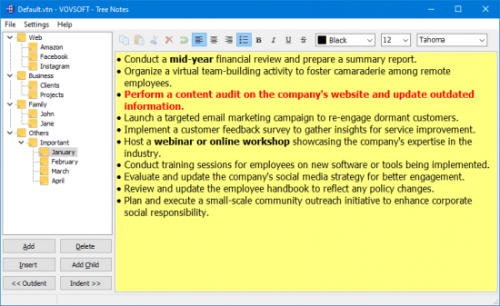
Vovsoft Tree Notes 2.5
File size: 5.6 MB
Vovsoft Tree Notes is a hierarchical note-taking application designed to enhance your organizational efficiency and streamline your information management process. This powerful software provides users with a user-friendly platform to create, organize, and access their notes effortlessly.
Hierarchical Structure: Organize your thoughts, ideas, and information seamlessly using a hierarchical structure. Create a tree-like arrangement of notes, allowing you to categorize and subdivide your content for a clear and intuitive overview.
Rich Text Editing: Enjoy a versatile note-taking experience with rich text editing capabilities. Format your notes with bold, italics, underline, bullet points, and more. Customize fonts and styles to create visually appealing and easily readable content.
Single File Storage: Simplify data management by storing all your notes in a single file. This not only ensures easy backup and portability but also promotes a tidy and efficient workspace.
Tree Notes for Windows is a versatile and robust note-taking solution that caters to the needs of individuals, students, professionals, and creative minds alike. Enhance your productivity, stay organized, and unlock the full potential of your ideas with this application.
DOWNLOAD
Код:
https://rapidgator.net/file/a35b3a4810b700b7b6221e1b56278a8a/VovSoftTreeNotes2.rar.html
Код:
https://ddownload.com/qbf6u8ayfh6j/VovSoftTreeNotes2.rar
|
|
|
|
|
21.10.2025, 08:45
|
#114657
|
|
Местный
Регистрация: 04.10.2017
Сообщений: 125,003
Сказал(а) спасибо: 0
Поблагодарили 7 раз(а) в 7 сообщениях
|
Windows 10 Consumer Esu Enrollment V0.0.7
Windows 10 Consumer Esu Enrollment V0.0.7
File Size: 35 KiB | Language: English
If you're not ready to upgrade to Windows 11 and want to keep your Windows 10 system secure, this utility is a practical solution.
With this script, you can extend protection for Windows 10 by one year until October 13, 2026. You will receive updates free of charge until this date.
Extended Security Updates (ESU) will ensure your Windows 10 computer continues to receive important security updates until October 13, 2026.
The Consumer ESU Enrollment for Windows 10 is part of Microsoft's Extended Security Updates program, designed to help users continue receiving critical security updates after official support for Windows 10 ends on October 14, 2025.
Consumer ESU Enrollment is a Windows PowerShell script to enroll in Windows 10 Consumer Extended Security Updates (ESU) program via the free Backup option.
Screenshots
DOWNLOAD
Код:
https://rapidgator.net/file/f758e16e872fcaaf7b08e980254e3347/Windows10-Consumer-ESU-Enrollment-v0.0.7.rar.html
Код:
https://ddownload.com/dqmhgayujfg0/Windows10-Consumer-ESU-Enrollment-v0.0.7.rar
|
|
|
|
|
21.10.2025, 08:46
|
#114658
|
|
Местный
Регистрация: 04.10.2017
Сообщений: 125,003
Сказал(а) спасибо: 0
Поблагодарили 7 раз(а) в 7 сообщениях
|
WinTools.one Home / Professional 25.10.1 Multilingual
 WinTools.one Home / Professional 25.10.1 Multilingual
File size: 8.8 MB
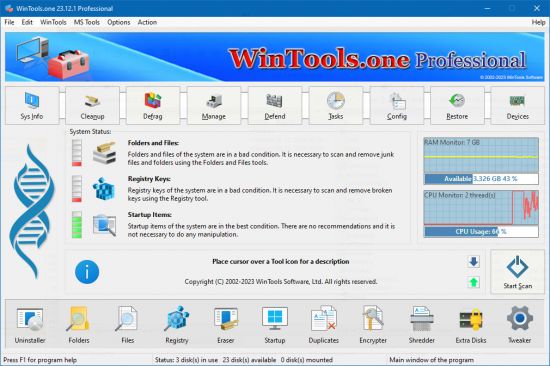
WinTools.one - this program is designed to help both ordinary users and advanced users, as well as computer engineers, fine-tune the MS Windows operating system. It allows you to increase the performance of the operating system, maintain its performance at a high level, correct operating system errors, free up space on the hard drives of your computer, and control the operation of installed programs. In addition, the program allows you to store and protect your confidential and secret information, as well as work with virtual disks.
WinTools.one contains the following tools: Clean Uninstaller, Scan Folders, Scan Files, Scan Shortcuts, Scan Registry, Objects Eraser, Startup Manager, Duplicate Files, File Encryptor, File Shredder, Extra Disks and System Tweaker, that contains dozens of useful settings and fixes.
The WinTools.one program is available in two editions: Home and Professional. WinTools.one Professional is the premium edition of the WinTools.one Home program. It includes an additional tool for managing Duplicate Files and an expanded set of features in the System Tweaker tool.
Here are the key differences between WinTools.one and WinTools.net
It no longer supports older operating systems such as MS Windows XP and Me.
It is optimized for modern MS Windows 11 systems.
It features completely new code for x64 architecture.
The program boasts a newly modified interface.
It includes tools for working with both regular and encrypted virtual disks.
It offers an additional tool specifically for encrypting secret files.
The System Tweaker tool has been completely redesigned to cater to modern operating systems.
HOMEPAGE
Код:
https://wintools.one/
DOWNLOAD
Код:
https://rapidgator.net/file/069c0a7fd1fc88f3e863665fd013c288/WinTools.one25..rar.html
Код:
https://ddownload.com/wb4hxcxjly7q/WinTools.one25..rar
|
|
|
|
|
21.10.2025, 08:55
|
#114659
|
|
Местный
Регистрация: 04.10.2017
Сообщений: 125,003
Сказал(а) спасибо: 0
Поблагодарили 7 раз(а) в 7 сообщениях
|
Windows 11 Pro 24H2 Build 26100.6899 Preactivated Multilingual October 2025
 Windows 11 Pro 24H2 Build 26100.6899 Preactivated Multilingual October 2025
Windows (x64) | Languages: English, Arabic, Spanish, French, Italian, German, Polish, Portuguese, Portuguese-Brazil, Turkish | File Size: 6.07 GB
Windows 11, version 24H2, also known as the Windows 11 2024 Update, is now available through Windows Server Update Services (WSUS) and Windows Update for Business.
Today marks the start of 36 months of support for Enterprise and Education editions of Windows 11, version 24H2. We recommend that you begin a targeted deployment in your organization now to validate that your apps, devices, and infrastructure work as expected with the new release. To help you plan, this post outlines some of the features and enhancements that help you power exceptional experiences while helping secure your corporate data, apps, and people on any device.
Windows 11, version 24H2 includes all the features and capabilities delivered as part of continuous innovation to Windows 11, now enabled by default. These include
Windows Local Administrator Password Solution (LAPS) policy improvements and new automatic account management feature
Personal Data Encryption (PDE) so that known Windows folders (Documents, Desktop, and Pictures) are protected using user authenticated encryption
App Control for Business (formerly Windows Defender Application Control) to better protect your digital property from malicious code
Windows protected print mode, eliminating the need to rely on third-party software installers for Morpia certified printers
Local Security Authority (LSA) protection to help protect against the theft of secrets and credentials used for logon
Support for Wi-Fi 7
Bluetooth® LE audio support for assistive devices
New controls to help manage which apps have access to the list of Wi-Fi networks around you
Rust in the Windows kernel
SHA-3 support
With Windows 11, version 24H2, we've also introduced numerous Server Message Block (SMB) protocol changes. These include firewall rule changes, support for blocking NTLM, dialect management, alternative network port connections, SMB over QUIC (an alternative to TCP and RDMA), and changes to SMB signing and encryption.
This scoped release also features enhancements designed to improve your overall experience with Windows 11, such as
A scrollable list (vs. single pane) of Quick Settings in the system tray that can be arranged in the way that makes sense for how you work best
Text labels to the cut, copy, rename, share, and delete actions available at the top of the File Explorer context menu
Support for creating 7-zip and TAR archives
Energy saver, an easy way to extend battery life and reduce energy use that can be configured to run automatically or toggled on and off manually via Quick Settings
Extended adaptive brightness control[3] on laptops and 2-in-1s even when they are plugged in
Expanded availability of Voice Clarity, which cancels echo, suppresses background noise, and reduces reverberation in real-time
We've also added new capabilities to control audio presets, ambient sounds, and more for Bluetooth® LE Audio. We made it so that people can adjust audio presets for their hearing aids from Settings or Quick Settings.
Whats New
System Requirements
Processor: 1 gigahertz (GHz) or faster with two or more cores on a compatible 64-bit processor or system on a chip (SoC).
Memory: 4 gigabytes (GB) or more.
Storage: 64 GB or more free disk space.
Graphics Card: Compatible with DirectX 12 or later with WDDM 2.0 driver.
System firmware: UEFI, with secure boot support.
TPM: Trusted Platform Module (TPM) version 2.0.
Display: High resolution display (720p), 9" or higher resolution monitor, 8 bits per color channel.
Internet connection. An Internet connection is required to perform updates and to download and use some features.
HOMEPAGE
Код:
https://www.microsoft.com/en-pk/
DOWNLOAD
Код:
https://rapidgator.net/file/8ff8fd45f4183fc23d63702ff9bddbaa/Windows_11_Pro_24H2_Build_26100.6899_Preactivated_.part1.rar.html
https://rapidgator.net/file/40a70893074a7a1ef633a4bd91bbedc5/Windows_11_Pro_24H2_Build_26100.6899_Preactivated_.part2.rar.html
https://rapidgator.net/file/c685083af2a84425cae842c21eecc038/Windows_11_Pro_24H2_Build_26100.6899_Preactivated.part3.rar.html
https://rapidgator.net/file/727a0f5373edaa0aa36a029e8b4581b2/Windows_11_Pro_24H2_Build_26100.6899_Preactivated_.part4.rar.html
https://rapidgator.net/file/a52f9f48118e186e24dd0b5a76890d1a/Windows_11_Pro_24H2_Build_26100.6899_Preactivated_.part5.rar.html
https://rapidgator.net/file/72f2fb2adcaaf46785dfdde662385d3f/Windows_11_Pro_24H2_Build_26100.6899_Preactivated_.part6.rar.html
Код:
https://ddownload.com/nn04i1abom3r/Windows_11_Pro_24H2_Build_26100.6899_Preactivated_.part1.rar
https://ddownload.com/p9zb19yt3yrv/Windows_11_Pro_24H2_Build_26100.6899_Preactivated_.part2.rar
https://ddownload.com/p8h4lq3lp4ey/Windows_11_Pro_24H2_Build_26100.6899_Preactivated.part3.rar
https://ddownload.com/7clp0qktw57w/Windows_11_Pro_24H2_Build_26100.6899_Preactivated_.part4.rar
https://ddownload.com/weskv9jz1a6u/Windows_11_Pro_24H2_Build_26100.6899_Preactivated_.part5.rar
https://ddownload.com/3mrkb16l09yp/Windows_11_Pro_24H2_Build_26100.6899_Preactivated_.part6.rar
|
|
|
|
|
21.10.2025, 08:57
|
#114660
|
|
Местный
Регистрация: 04.10.2017
Сообщений: 125,003
Сказал(а) спасибо: 0
Поблагодарили 7 раз(а) в 7 сообщениях
|
Windows 11 Pro 25H2 Build 26200.6899 (No TPM Required) With Office 2024 Pro Plus M...
 Windows 11 Pro 25H2 Build 26200.6899 (No TPM Required) With Office 2024 Pro Plus Multilingual Preactivated October 2025
Windows (x64) | Languages:Arabic,English,German,Greek,French,Spani sh,Italian,Portuguese-Portuguese,Portuguese-Brazil,Turkish,Dutch,Czech,Norwegian | File Size: 8.44 GB
Windows 11, version 25H2 is an enablement update that builds on the features of 24H2 by enabling new, "continuous innovation" features, rather than introducing entirely new features itself. Key updates include a Braille Viewer for the Narrator, improvements to Click-to-Do (including a new "Convert to Table" feature), support for plug-in credential managers for passkeys, and enhancements to the mobile device companion experience. Microsoft is also implementing IT admin-focused features like the ability to remove pre-installed Store apps and a new Quick Machine Recovery system to reduce downtime.
For Users
Accessibility
The Narrator now includes a Braille Viewer, allowing users to see the braille equivalent of on-screen text on a refreshable braille display.
Passkeys
Users can now utilize plug-in credential managers for setting up and using passkeys, offering improved security and management.
Time & Language
Ported settings from the Control Panel to the Settings app, including configuring additional clocks and changing the NTP time server.
Mobile Experience
The mobile device companion has a new, more accessible layout to view calls, messages, photos, and more from your phone.
Click-to-Do
New AI features for Click-to-Do are included, such as a new "Convert to Table" capability for converting text to an Excel table and more flexible selection methods.
For IT Administrators
Quick Machine Recovery
This new feature in the recovery system aims to reduce downtime and simplifies the process for recovering a system, according to PCMag.
Removable Apps
IT admins can now remove certain pre-installed Microsoft Store apps via Group Policy or MDM CSP on Enterprise/EDU devices.
Feature Removals
25H2 removes older components like PowerShell 2.0 and WMIC for greater security and efficiency.
Whats New
Update Windows To 25H2 Build 26200.6899
Update Office To v2509 Build 19231.20194
Screenshots
Windows 11 Pro 25H2 Build 26200.6899 (No TPM Required) With Office 2024 Pro Plus Multilingual October 2025Preactivated
Windows 11 Pro 25H2 Build 26200.6899 (No TPM Required) With Office 2024 Pro Plus Multilingual October 2025Preactivated
Windows 11 Pro 25H2 Build 26200.6899 (No TPM Required) With Office 2024 Pro Plus Multilingual October 2025Preactivated
Windows 11 Pro 25H2 Build 26200.6899 (No TPM Required) With Office 2024 Pro Plus Multilingual October 2025Preactivated
System Requirements
Processor: 2 gigahertz (GHz) or faster.
RAM: 2 gigabyte (GB).
Free space on hard disk: 40 gigabytes (GB).
Graphics card: DirectX 9 graphics device or a newer version.
Additional requirements to use certain features.
To use touch you need a tablet or monitor that supports multitouch.
To access the Windows store to download and run apps, you need an active Internet connection and a screen resolution of at least 1024 x 768 pixels
HOMEPAGE
Код:
https://www.microsoft.com/en-pk/
DOWNLOAD
Код:
https://rapidgator.net/file/702536ebb168ddaea1c04ad09c7c765a/Windows.11.Pro.26200.6899.Office..part1.rar.html
https://rapidgator.net/file/7e259b81be39e35f7b90c24b99c5972e/Windows.11.Pro.26200.6899.Office..part2.rar.html
https://rapidgator.net/file/83224d9683a93a57d31d26aa647c4a1b/Windows.11.Pro.26200.6899.Office..part3.rar.html
https://rapidgator.net/file/92ae46ec658b8cebc42e0b5c754c97c7/Windows.11.Pro.26200.6899.Office..part4.rar.html
https://rapidgator.net/file/7e0a21e9a2f27acb4e8deb64a6d2fb07/Windows.11.Pro.26200.6899.Office..part5.rar.html
Код:
https://ddownload.com/e5gbwcbj98no/Windows.11.Pro.26200.6899.Office..part1.rar
https://ddownload.com/4uxdbrr9gdgz/Windows.11.Pro.26200.6899.Office..part2.rar
https://ddownload.com/fsps0odqjt4c/Windows.11.Pro.26200.6899.Office..part3.rar
https://ddownload.com/lalcx86ztm5q/Windows.11.Pro.26200.6899.Office..part4.rar
https://ddownload.com/hj0m09chre02/Windows.11.Pro.26200.6899.Office..part5.rar
|
|
|
|
      
Любые журналы Актион-МЦФЭР регулярно !!! Пишите https://old.nado.in/private.php?do=newpm&u=12191 или на электронный адрес pantera@nado.ws
|
Здесь присутствуют: 1 (пользователей: 0 , гостей: 1)
|
|
|
 Ваши права в разделе
|
Вы не можете создавать новые темы
Вы не можете отвечать в темах
Вы не можете прикреплять вложения
Вы не можете редактировать свои сообщения
HTML код Выкл.
|
|
|
Текущее время: 20:20. Часовой пояс GMT +1.
| |







