 15.07.2021, 10:29
|
#65851
|
|
Местный
Регистрация: 04.10.2017
Сообщений: 125,003
Сказал(а) спасибо: 0
Поблагодарили 7 раз(а) в 7 сообщениях
|
 Sublime Text 4 Build 4113 macOS
 File size: 44.39 MB
Sublime Text is a sophisticated text editor for code, markup, and prose. You'll love the slick user interface, extraordinary features, and amazing performance.
Goto Anything
Use Goto Anything to open files with only a few keystrokes, and instantly jump to symbols, lines, or words.
Triggered with ⌘P, it is possible to:
* Type part of a file name to open it
* Type @ to jump to symbols, # to search within the file, and : to go to a line number
These shortcuts can be combined, so may take you to a function read_file within a file text_parser.py. Similarly, tp:100 would take you to line 100 of the same file.
Multiple Selections
Make ten changes at the same time, not one change ten times. Multiple selections allow you to interactively change many lines at once, rename variables with ease, and manipulate files faster than ever. Try pressing ⇧⌘L to split the selection into lines and ⌘D to select the next occurrence of the selected word. To make multiple selections with the mouse, take a look at the Column Selection documentation.
Command Palette
The Command Palette holds infrequently used functionality, like sorting, changing the syntax, and changing the indentation settings. With just a few keystrokes, you can search for what you want, without ever having to navigate through the menus or remember obscure key bindings. Show the Command Palette with ⌘⇧P.
Distraction-Free Mode
When you need to focus, Distraction-Free Mode is there to help you out. Distraction-Free Mode is full-screen, chrome-free editing, with nothing but your text in the center of the screen. You can incrementally show elements of the UI, such as tabs and the find panel, as you need them. You can enter Distraction Free Mode using the View/Enter Distraction Free Mode menu.
Split Editing
Get the most out of your wide-screen monitor with split-editing support. Edit files side-by-side, or edit two locations in the one file. You can edit with as many rows and columns as you wish. Take advantage of multiple monitors by editing with multiple windows, and using multiple splits in each window. Take a look at the View/Layout menu for split-editing options. To open multiple views into the one file, use the File/New View into File menu item.
Instant Project Switch
Projects in Sublime Text capture the full contents of the workspace, including modified and unsaved files. You can switch between projects in a manner similar to Goto Anything, and the switch is instant, with no save prompts. All your modifications will be restored next time the project is opened.
Plugin API
Sublime Text has a powerful, Python-based plugin API. Along with the API, it comes with a built-in Python console to interactively experiment in real time.
Customize Anything
Key bindings, menus, snippets, macros, completions and more - just about everything in Sublime Text is customizable with simple JSON files. This system gives you flexibility as settings can be specified on a per-file type and per-project basis.
Cross-Platform
Sublime Text is available for macOS, Windows and Linux. One license is all you need to use Sublime Text on every computer you own, no matter what operating system it uses. Sublime Text uses a custom UI toolkit, optimized for speed and beauty, while taking advantage of native functionality on each platform.
Supported Operation System:
* OS X 10.9 or later
* Apple Silicon or Intel Core processor
Download link:
Код:
rapidgator_net:
https://rapidgator.net/file/8853ea446534054ccfca66b316f01247/y5076.Sublime.Text.4.Build.4113.macOS.dmg.html

uploadgig_com:
https://uploadgig.com/file/download/c99FdbA886f6fA0b/y5076.Sublime.Text.4.Build.4113.macOS.dmg

nitroflare_com:
https://nitroflare.com/view/99390ADC9002BD2/y5076.Sublime.Text.4.Build.4113.macOS.dmg
Links are Interchangeable - No Password - Single Extraction
|

|

|
|
15.07.2021, 10:30
|
#65852
|
|
Местный
Регистрация: 04.10.2017
Сообщений: 125,003
Сказал(а) спасибо: 0
Поблагодарили 7 раз(а) в 7 сообщениях
|
Techtool Pro 14.0.2 Build 7175 macOS
 Languages: Multilingual | File Size: 261.28 MB
Your Macintosh counts on you to keep it running at its best. And other people may count on you to keep their own computers running at their best as well. Whether you're a single user or you support many other Macintosh users at work, you'll want to get the latest version of Techtool Pro. After many, many months of development, we're proud to announce version 14 of the ultimate utility for Macintosh. Shipping now, this is the most feature-rich release of Techtool Pro ever.
Diagnostics and Repair
Start with Check Computer to perform a complete diagnostic check of your Mac and hard drives. A single click of your mouse runs a SMART Check of your hard drive to detect impending drive failure, a RAM test, analysis of disk directories and more. If problems are found, advice is provided on how to proceed to repair the problem. Use Check Computer regularly as a part of your preventive maintenance program. Customize testing using built-in preferences.
Drive Testing and Repair
Techtool Pro will test, rebuild, and repair damaged directories on corrupted Mac OS Extended hard drives, and optimize the data directories when they are repaired. Techtool Pro can also repair Apple's APFS file system, standard Mac OS Extended volumes, as well as MS-DOS (FAT32) and ExFAT formatted volumes. When rebuilding Mac OS Extended volumes, Volume Rebuild will display a comparison chart before directory data is replaced. Use Volume Rebuild to keep your drives operating at their peak performance.
Smarter SMART Check
Hard drives include a technology called SMART (Self-Monitoring, Analysis and Reporting Technology) which can inform a computer about the health of its hard drives. In most utilities, just the overall results - passed or failed - are reported to the user. In the failed state, often there is little or no time to back up data before the drive fails entirely. Previous versions of Techtool Pro reported the overall status of each attribute, but some attributes don't contribute to the failure of a drive. Now, the SMART Check has gotten smarter. Techtool Pro now knows which attributes contribute to drive failure, and will report a failing result before the drive fails completely. Giving you time to rescue your data.
eDrive
Using Techtool Pro, you can easily create an eDrive, an extra startup partition based on the active system volume, which can be used as an emergency startup partition or to perform regular maintenance on your Mac.* The eDrive is based on your specific Macs system and includes Techtool Pro's tools for Mac repair. Using the eDrive, there's no need to reformat or to boot from a DVD or secondary hard drive. If needed, the eDrive's size can be expanded to fit your needs.
Partition Map
Techtool Pro will test and repair hard drive partition maps. The Partition Map test will verify the health of the partition map and the Partition Repair tool will repair any errors found in the partition map.
Memory Test
RAM problems are quite prevalent and can cause a variety of crashes, program errors and even data loss. We've seen many cases where a user will be chasing down a disk or extension problem when their issue was simply a faulty and inexpensively replaced memory module. As part of the RAM test, we've also added an SPD report that shows you an enormous amount of technical and other interesting information about your computer's memory.
Volume Cloning
Volume Cloning creates exact duplicates of your volumes for trouble-free archiving to backup your data and applications. Cloning volumes can also be helpful if you are upgrading from a smaller size hard drive to a larger drive. You have the options of creating a duplicate of an entire disk, file syncing by adding only the changed files to a clone, or cloning to numerous disc image formats. If you have an available drive, you can even use the tool to optimize disks that are especially fragmented.
Volume and File Optimization
Techtool Pro performs both file and volume optimization. File optimization defragments individual files on the hard drive. Volume optimization consolidates the free space on a hard drive. For full optimization, perform Volume Optimization after File Optimization. The resulting optimization simplifies the file storage layout and may enhance the overall performance of your drive.**
Disk Speed
Use Techtool Pro to measure disk speed. Drive manufacturers advertise speeds that may not be realistic for real-world use, depending on the connection used, etc. Find out how your drive actually performs using the Drive Speed tool.
Internet Speed
Use the Internet Speed tool to measure your real-wold internet connection speed. Many speed test websites optimize to give the best speed possible. The Internet speed tool uses the same servers used to host a large percentage of the internet so you can gauge realistic performance.
APFS Snapshot Recovery
Techtool Pro includes data recovery options for APFS volumes. Create longer lasting APFS snapshots that can be used to recover accidentally deleted files, even if a backup is unavailable. Create snapshots automatically using the new Snapshot Usage feature in Techtool Protection, and mount and recover from your snapshots using the Snapshot Recovery tool.
Battery Check Test
Techtool Pro tests internal Mac laptop batteries as well as the batteries in iOS devices. For iOS battery testing, trusted devices can be tested over WiFi as well as through a wired connection.
Data Recovery
Techtool Pro helps you recover your data from corrupted drives or volumes that don't mount on the desktop to save the data to another location.† Use the Trash History feature to track the location of deleted files and increase the chance of their recovery in the case of an accidental deletion. Use the Snapshot Recovery tool to recover data on APFS formatted SSDs from saved snapshots.
Processor Benchmarking
Get an objective measurement of your Mac's processor performance. The Processor Benchmark tool uses industry-standard measurement algorithms to test processor performance. Using this tool, you can get metrics that can be used to compare processor speeds apples-to-apples. Avoids the confusion of comparison using Clock Frequency.
Network and Connectivity Testing
Techtool can test your Bluetooth, Wi-Fi, Ethernet and any other network interface. Troubleshoot problems staying connected to Wi-Fi, or problems connecting to Bluetooth peripherals such as speakers, keyboards, and more
Network Monitoring and Connectivity
Techtool Pro will monitor the configuration of your local area network (LAN) by revealing the active services and ports on each selected machine or Bonjour supported device on your LAN. This information is important for strengthening security on a specific machine, Bonjour supported device or your overall LAN, and is also helpful in tracking what devices have been in use in the past that are no longer available since the last time monitoring was performed.
Protection Preferences
Techtool Pro includes the option to install the Techtool Protection system preference, where you configure automatic functions that operate in the background. In particular, you can configure Protection to track deleted files, monitor the free space on your hard drives, save backups of critical directory data to help with recovery in the event of drive corruption, and to monitor the SMART routines of your hard drives. Checks include scanning for input/output (I/O) errors, power on self-test alerts, battery problems and RAID errors. If problems are found, Protection delivers onscreen and email alerts.
New In Techtool Pro 14:
APPLE SILICON COMPATIBILITY
Techtool Pro 14 is a Universal Mac app, and runs natively on both Apple Silicon* and Intel Macs. Techtool Pro is deeply connected to your Mac's hardware, so nearly every test and tool has been updated to support Apple's latest processor technology.
VOLUME INITIALIZATION
Techtool Pro 14 can now reformat volumes connected to your Mac. Use the Volume Initialization tool to quickly reformat drives as either APFS, Mac OS Extended, or even Ex-Fat or FAT 32.
APP CHECK
Techtool Pro 14 introduces a new tool to quickly inspect your apps to ensure that they full support Apple Silicon, as well as whether they support Apple's latest security features.
LIVE STARTUP DISK REPAIR
Techtool Pro 14 now supports "live" volume repair on your APFS startup volume. Perform volume repairs without restarting to a separate startup disk.
Release Notes
- Updated eDrive and TechTool Protogo to use APFS as the volume format for macOS Big Sur users.
- Additional support for iMac (24-inch, M1, 2021) in the Sensors Test and the Processor Check tool.
- Fixed Snapshot Recovery tool to operate as expected when booted from the eDrive.
- Fixed TechTool Protogo to prevent incorrectly displaying unmounted system volumes.
- Fixed the Snapshot Recovery search results window to resize correctly for macOS Big Sur users.
- Fixed Snapshot Recovery to correctly handle localized dates and date formatting.
- Added French, German and Japanese versions of the TechTool Pro 14 PDF manual.
- Added model identification strings for the Check Computer configuration panel.
- Other minor fixes and enhancements.
System Requirements:
- Apple Silicon and Intel-based Macs
- OS X 10.11 or greater, including macOS 11 'Big Sur'
Homepage
[Ссылки доступны только зарегистрированным пользователям
. Регистрируйся тут...]
Download link:
Код:
rapidgator_net:
https://rapidgator.net/file/27faf8f3be84b86fdf2d4c4f7361731d/egvos.Techtool.Pro.14.0.2.Build.7175.macOS.zip.html

uploadgig_com:
https://uploadgig.com/file/download/b64733acbee16b9b/egvos.Techtool.Pro.14.0.2.Build.7175.macOS.zip

nitroflare_com:
https://nitroflare.com/view/597E470FD9CCDF7/egvos.Techtool.Pro.14.0.2.Build.7175.macOS.zip
Links are Interchangeable - No Password - Single Extraction
|
|
|
|
|
15.07.2021, 10:32
|
#65853
|
|
Местный
Регистрация: 04.10.2017
Сообщений: 125,003
Сказал(а) спасибо: 0
Поблагодарили 7 раз(а) в 7 сообщениях
|
Topaz DeNoise AI 3.2.0 (x64)
 File size: 1.3 GB
Shoot anywhere in any light with no reservations. Eliminate noise and recover crisp detail in your images with the first AI-powered noise reduction tool. You may be surprised at the results you get.
Shoot anywhere in any light
Great noise reduction is like a lens upgrade. You'll be able to get much higher-quality results when you're shooting fast action shots, night images, or any other situation that requires a high ISO. Use DeNoise AI to help you create a pixel-perfect photo in any situation.
Groundbreaking technology
Noise reduction technology has basically been the same for a decade, with only minor incremental improvements here and there. (We would know - we made one!) DeNoise AI is different: we fed an algorithm millions of noisy/clear images until it actually learned what noise is and how best to remove it.
Recover true detail
DeNoise AI examines the whole image and holistically determines the difference between detail and noise in that photo. (Other NR tools only look at pixel-level detail.) After understanding what noise vs detail looks like for that specific image, DeNoise AI recovers a surprising amount of detail from noise.
Lightroom vs DeNoise AI
When you need pixel-level perfection in your results, DeNoise AI offers the absolute best quality currently available anywhere. Existing noise reduction tools like Lightroom give you a choice: keep some noise or remove some detail. DeNoise AI's technology allows you to get the best of both worlds: to remove noise while actually strengthening detail.
- Enhance real detail
- Remove noise naturally with no smudging
- Best for moderate to ultra-high ISOs
Any noise reduction tool can remove noise - the really tricky part is to tell the difference between noise and detail. DeNoise AI helps you get the best quality at 100% by removing noise while recovering original image detail. Give it a try to see the difference for yourself!
Download link:
Код:
rapidgator_net:
https://rapidgator.net/file/be3b7c29eb517f5f5072c48e0478ecf5/djsoz.Topaz.DeNoise.AI.3.2.0.x64.part1.rar.html
https://rapidgator.net/file/514f33095173a5eca5f9580714f1f065/djsoz.Topaz.DeNoise.AI.3.2.0.x64.part2.rar.html

uploadgig_com:
https://uploadgig.com/file/download/4ab177722754Bd89/djsoz.Topaz.DeNoise.AI.3.2.0.x64.part1.rar
https://uploadgig.com/file/download/3787bFfB4b72d68c/djsoz.Topaz.DeNoise.AI.3.2.0.x64.part2.rar

nitroflare_com:
https://nitroflare.com/view/A870520D5C7A42E/djsoz.Topaz.DeNoise.AI.3.2.0.x64.part1.rar
https://nitroflare.com/view/6380CCB1AD8F57E/djsoz.Topaz.DeNoise.AI.3.2.0.x64.part2.rar
Links are Interchangeable - No Password - Single Extraction
|
|
|
|
|
15.07.2021, 10:33
|
#65854
|
|
Местный
Регистрация: 04.10.2017
Сообщений: 125,003
Сказал(а) спасибо: 0
Поблагодарили 7 раз(а) в 7 сообщениях
|
TuneFab DVD Ripper 2.1.8 (x64) Multilingual
 File size: 63 MB
Fed up with ordinary DVD Ripper? If yes, TuneFab DVD Ripper is your best option. TuneFab DVD Ripper enables you to convert all DVD movies to more than 300 formats such as MP3, MP4, AVI, MOV, WMV, etc. and make them available on almost all devices, like Samsung Galaxy S9, iPhone X, One Plus 6 and so on. Time is money, so TuneFab is unwilling to waste your time on ripping your DVD. With TuneFab DVD Ripper, you are able to get the converted contents in DVD with up to 6X faster speed than other rippers but with fantastic output quality.
Audio tracks and subtitles will be the indispensable parts for your DVD watching. When ripping videos from DVDs, TuneFab DVD Ripper can also help you preserve the original audio tracks and subtitles in your preferences. Moreover, you can select your favorites audio tracks and subtitles for your converted DVD files.
With one-click action, you can edit the DVD movie with some special effects such as the 3D Settings, Brightness, Saturation, etc. and you can merge several videos into one.
Rip DVD to Whatever Format in 3 Steps
Step 1. Load Disc Before Rip Your DVD
Launch TuneFab DVD Ripper and load the DVD disc you want to rip to common video by clicking on "Load disc" button.
Step 2. Select Video File Format
Select 3D or 2D format from the drop-down list under "Profile", or input the format you need in the quick search box.
Step 3. Click on Convert to Enjoy DVD Freely
Don't wait and click on "Convert" to rip DVD to common video formats like MP4, MOV, AVI, etc.
Whats New:
official site does not provide any info about changes in this version.
Download link:
Код:
rapidgator_net:
https://rapidgator.net/file/c37f1ffd3b6f794500eed36dc7610eaf/2oct5.TuneFab.DVD.Ripper.2.1.8.x64.Multilingual.rar.html

uploadgig_com:
https://uploadgig.com/file/download/7e441269578617b8/2oct5.TuneFab.DVD.Ripper.2.1.8.x64.Multilingual.rar

nitroflare_com:
https://nitroflare.com/view/9D425B5F0DACDC5/2oct5.TuneFab.DVD.Ripper.2.1.8.x64.Multilingual.rar
Links are Interchangeable - No Password - Single Extraction
|
|
|
|
|
15.07.2021, 10:35
|
#65855
|
|
Местный
Регистрация: 04.10.2017
Сообщений: 125,003
Сказал(а) спасибо: 0
Поблагодарили 7 раз(а) в 7 сообщениях
|
TuneFab Screen Recorder 2.2.28 (x64) Multilingual
 Languages: Multilingual | File size: 34 MB
TuneFab Screen Recorder, a professional video screen recording software will capture your screen for Windows computer in several steps. Create your own video for specific region/webcam with or without audios here.
Screen Recording Made Easy
Record Screen & Webcam
Record screen activity, webcam, live streaming video, gameplay, program activity, online meeting and more with or without sound.
Make Real-Time Editing
Make outstanding screen recording with a real-time drawing panel. You can add text, arrow and outline to recorded video or screenshot.
Select Recording Area
Record your screen or capture screenshot in any customized region or full screen. You can record locked window and fixed region.
Convert Video/Audio
Save video and audio recordings as high quality MP4, WMV, MOV, F4V, AVI, GIF, MP3, M4A, AAC and more popular formats.
Take Screenshots
Easily take and save screenshot as JPG, PNG, BMP, GIF and TIFF file. You also have the option to pin the screenshot to your screen.
Upload & Share
You are allowed to export, upload and share video to social network sites such as YouTube, Facebook, Instagram, Twitter, etc.
Whats New:
Updates: official site does not provide any info about changes in this version.
Download link:
Код:
rapidgator_net:
https://rapidgator.net/file/f61bd27ae46b43de3d8af421f6306154/8j139.TuneFab.Screen.Recorder.2.2.28.x64.Multilingual.rar.html

uploadgig_com:
https://uploadgig.com/file/download/9079c9bd96a27746/8j139.TuneFab.Screen.Recorder.2.2.28.x64.Multilingual.rar

nitroflare_com:
https://nitroflare.com/view/A73AAA6B4496E24/8j139.TuneFab.Screen.Recorder.2.2.28.x64.Multilingual.rar
Links are Interchangeable - No Password - Single Extraction
|
|
|
|
|
15.07.2021, 10:36
|
#65856
|
|
Местный
Регистрация: 04.10.2017
Сообщений: 125,003
Сказал(а) спасибо: 0
Поблагодарили 7 раз(а) в 7 сообщениях
|
UpdatePack7R2 21.7.14 Multilingual
 File size: 791.7 MB
UpdatePack7R2 - the set allows you to update the operating system, and also to integrate updates into the distribution. Can be installed on any revision of Windows 7 and Server 2008 R2, any bit depth and any language. Includes updates for all versions of Internet Explorer, all critical, recommended and security updates.
Using:
The system must have at least 10 GB of free space on the hard drive and preferably not less than 1 GB of free RAM.
For flexible installation of the set, you can use the following keys and their combinations:
- Key / Reboot to automatically reboot, if required.
- / S key for completely silent installation without windows and messages. The register matters.
- Key / Silent for passive installation - you can see the progress, but the installation is completely automatic.
- Key / IE11 to install Internet Explorer 11 and localize it.
- The / Temp = key allows you to specify a temporary working directory. It does not have to be empty, but it must exist.
- The / NoSpace key allows you to skip checking for free space on the system partition, it is not recommended to use it.
Examples:
- You must automatically install all the updates, IE11 and restart the computer: UpdatePack7R2.exe / ie11 / silent / reboot
- You need to hide all updates to existing products, do not change the version of IE, you do not have to restart the computer: UpdatePack7R2.exe / S
The following keys are intended to integrate updates into the distribution:
- The / WimFile = key specifies the location of the wim file, you must specify an absolute path.
- / Index = specifies the index of the system in the wim-file, for each index it is necessary to perform the integration again.
- The / Index = * key allows one-by-one integration of updates into all indexes of the wim-file.
Notes:
- Before you specify an index, it's useful to run the command: Dism / Get-WimInfo /WimFile:C:\install.wim (replace the path with your own).
- Not all updates can be integrated (see table), but they will not affect the security of the system.
Examples:
- It is necessary to integrate IE11 and all updates into 1 index: UpdatePack7R2.exe / ie11 /WimFile=C:\install.wim / Index = 1
- It is necessary to integrate IE11 and all updates into all indexes: UpdatePack7R2.exe / ie11 /WimFile=C:\install.wim / Index = *
- It is necessary to integrate only updates to existing products, the version of IE does not change: UpdatePack7R2.exe /WimFile=C:\install.wim / Index = 1
Additional functionality:
1. It is possible to automatically install SP1 if it is not installed on the system. To do this, you need to place the Windows6.1-KB976932-X86.exe and Windows6.1-KB976932-X64.exe files in the same directory as the set.
2. If there is UpdatePack7R2Start.cmd next to the set, it will be performed before installing updates, UpdatePack7R2Finish.cmd - after installation, UpdatePack7R2Wim.cmd - after integration of updates. By default, the console windows will be displayed. To hide them, the first line in the cmd file should start with ": hide" (without the codes). The set of updates tracks the exit code from the cmd-files, in case of need to reboot. This code is 3010 (exit 3010).
3. If you want to apply your tweaks after installing Internet Explorer 11 on the production system, place the ie11.reg file in the folder with the set and it will be imported automatically.
4. Some keys can be replaced by renaming the file of the set itself. So to install IE11, you can add the word "ie11" to any place in the file name of the set, "-" for automatic reboot and "++" for passive installation.
Examples:
It is necessary to automatically install the set on the working system together with IE11 and restart the computer: Rename UpdatePack7R2.exe to UpdatePack7R2 - ie11 ++. Exe
This will be the same as using the following keys: UpdatePack7R2.exe / ie11 / silent / reboot
OS: Windows 7 SP1 and Server 2008 R2 SP1
Whats New:
Added KB5004289-x86-x64 with disabling telemetry and processor checking (replaces KB5004953-x86-x64)
Added KB5004378-x86-x64 (replaces KB4592510-x86-x64)
Download link:
Код:
rapidgator_net:
https://rapidgator.net/file/05b94a9698a963fa38190675f244e2d6/flhkq.UpdatePack7R2.21.7.14.Multilingual.part1.rar.html
https://rapidgator.net/file/a23dd97eb6383528b332f716ea933a23/flhkq.UpdatePack7R2.21.7.14.Multilingual.part2.rar.html

uploadgig_com:
https://uploadgig.com/file/download/06CB7AdeA3134199/flhkq.UpdatePack7R2.21.7.14.Multilingual.part1.rar
https://uploadgig.com/file/download/53606587f673c01c/flhkq.UpdatePack7R2.21.7.14.Multilingual.part2.rar

nitroflare_com:
https://nitroflare.com/view/9751B9649A90C07/flhkq.UpdatePack7R2.21.7.14.Multilingual.part1.rar
https://nitroflare.com/view/3C9AAE00929FA5A/flhkq.UpdatePack7R2.21.7.14.Multilingual.part2.rar
Links are Interchangeable - No Password - Single Extraction
|
|
|
|
|
15.07.2021, 11:15
|
#65857
|
|
Местный
Регистрация: 04.10.2017
Сообщений: 125,003
Сказал(а) спасибо: 0
Поблагодарили 7 раз(а) в 7 сообщениях
|
URL Manager Pro 5.8.3 macOS
 File size: 23.01 MB
URL Manager Pro solves many of the problems of keeping track of your bookmarks. URL Manager Pro offers you an array of powerful features for collecting, manipulating, and using very large collections of URLs. Not just URLs of Web pages, but also the URLs of email addresses, newservers, FTP sites, Telnet hosts, and more.
URL Manager Pro allows you to manage your bookmarks independently from a web browser, yet use your bookmarks with any web browser, like Safari, Chrome, Edge, Chromium, Opera, Firefox, Vivaldi, Brave, Tor, iCab, OmniWeb etc.
- You can create and save several separate bookmark documents and you can access them all from the system-wide bookmarks menu.
- Using a system-wide bookmarks menu, you have access to your bookmarks in any app or web browser.
- You can also bookmark the current web page directly to URL Manager Pro from within your favourite web browser. It can also bookmark all your tabs in one command.
- In the URL Manager Pro documents, you can manage and organise your bookmarks easily with drag and drop. You can add tags, notes and colours to your bookmarks.
- You will have a powerful search function and you also can use Spotlight. You can also find duplicates and check your bookmarks for broken links.
- You can import and export bookmarks from (and to) several popular browsers, like Safari, Chrome, Edge, Firefox, Vivaldi, Brave, iCab, Opera etc. You can also scan TEXT files for URLs and import links and bookmarks from HTML and XBEL format. You can also scan your current email message for links.
- You can also export your bookmarks to HTML, XBEL, TEXT and Internet Location files.
URL Manager Pro's features include:
* System-Wide Access: You can access your bookmarks in any application through a Menu Extra. You can search for them using Spotlight (the ? icon in the upper right of your menu bar).
* Integration: You can access your bookmarks from the browser's menu bar and from the Dock.
* Accessible: Your bookmarks are stored in URL Manager Pro bookmark files, which you can store and manipulate in an intuitive way. No need to hunt for your bookmarks in browser preferences folders. You can set the app to automatically save at certain intervals as well as backup copies of bookmark documents to external devices on each save. You can easily save your bookmarks to iCloud or Dropbox.
* Validate: URL Manager Pro can find broken links, duplicates and web pages that moved.
* History: You can surf the web using several different browsers, and URL Manager Pro will keep a History record of each.
* Import and Export: URL Manager Pro can import from and export to Safari, Chrome, Edge, Chromium, Opera, Vivaldi, Brave, Firefox and iCab. It lets you 'harvest' bookmarks by importing XML (XBEL), HTML and text files for bookmarks and URLs. Create Internet Location files.
MacAppStore
* macOS app: features like : Auto Save, Versions, Large Type, Menu Extra and support for iCloud and Dropbox. Includes Share Extension and Safari Extension. Available also from the Mac App Store and reviewed by Apple.
AppStore
* iOS app: features : Syncs with macOS version (via iCloud, Dropbox etc.). Document-based app. Includes Share extension for Safari and other apps. Available from the App Store and reviewed by Apple.
Release Notes
Supported Operation System:
* macOS 10.13 or later
* Apple Silicon or Intel Core processor
Download link:
Код:
rapidgator_net:
https://rapidgator.net/file/73e732347a4cd34b4df844992b4de562/5rv9k.URL.Manager.Pro.5.8.3.macOS.dmg.html

uploadgig_com:
https://uploadgig.com/file/download/03466654fC8aE9A3/5rv9k.URL.Manager.Pro.5.8.3.macOS.dmg

nitroflare_com:
https://nitroflare.com/view/B23495A2F238D70/5rv9k.URL.Manager.Pro.5.8.3.macOS.dmg
Links are Interchangeable - No Password - Single Extraction
|
|
|
|
|
15.07.2021, 11:16
|
#65858
|
|
Местный
Регистрация: 04.10.2017
Сообщений: 125,003
Сказал(а) спасибо: 0
Поблагодарили 7 раз(а) в 7 сообщениях
|
VideoProc 4.2 (2021071201) macOS
 File size: 49.75 MB
VideoProc (former WinX HD Video Converter Deluxe) - the strongest video processing software designed to edit, cut, crop, merge, adjust, convert and compress (4K) videos with Full Hardware Acceleration. As the greatly enhanced successor, VideoProc integrates UHD video converter/compressor, (YouTube) video downloader with video editor, giving you an ultimate control over any multi-track, SD, HD and 4K video files on your PC. With Level-3 Hardware Acceleration tech, it makes the utmost of Intel QSV, NVIDIA CUDA/NVENC and AMD to encode and decode videos, which can averagely speed up video processing 64x faster than real time!
VideoProc is skilled at editing oversized videos recorded from GoPro, DJI, 4K cameras for stabilizing, denoising, cutting, filtering, splitting, merging and subtitling. In parallel, it is a video converter and compressor whiz that helps transcode HEVC / H.264 videos, convert any videos, audios and DVDs, such as MKV to MP4, M4A to MP3, and DVD to MP4, and make such media content playable on large TV screens or portable devices. Besides, it is one part video audio downloader and one part screen / webcam video recorder.
Convert video and fix video playback problems
* Built in 370+ video & audio codecs
* Convert 4K/1080p HD video
* MKV to MP4, AVI, MTS, AVCHD
* HEVC/H.265, H.264, MPEG4
* YouTube to MP3, iPhone ringtone
* Edit video, Merge, Crop, Cut, Trim, Subtitle
* Customize video quality & file size
* Adjust codec, resolution, bit rate & FPS; import or export subtitle files.
Download video/music from 1000+ sites
Fast download 4K/1080p video from Vevo, YouTube, Facebook, DailyMotion, Vimeo, Yahoo, SoundCloud, MTV, etc. Save video streams, live videos, playlist & channel.
Record video from computer's screen or webcam
* Stabilize videos from GoPro DJI
* Process videos fast. Denoise easily.
* Compress large 4K video files
* Resize HD/4K videos with minimum quality loss.
64x Real-time Faster Driven by Level-3 Hardware Acceleration
Because of WinX-built level-3 hardware acceleration, Video Audio Passthrough (Auto Copy), Hyper-threading and AMD 3DNow! Tech, VideoProc has defeated the absolute majority of competitors for over 64x real-time fast speed, stutter-free video conversion, and minimum CPU usage / temperature control. Besides, the exclusive video processing delivers over 90% compression ratio for resizing large video footage smoothly.
Full Hardware Acceleration Powered by Intel, NVIDIA, AMDProcess 4K Videos Fast
Input: Support 370+ Built-in Video Audio Codecs
VideoProc enfolds nearly all types of videos, audios and DVDs, ranging from ISO images, HEVC, H.264, MPEG-4, AVI, MKV, MOV, M2TS, MOD camcorder videos to 1080p multi-track HD videos and 4K @60fps videos from GoPro, DJI, DSLRs, Blu-ray, Apple iPhone X and Android smartphones. Both mainstream and niche videos can be converted, edited and adjusted at one go for easier playback and sharing.
Output: 420+ Profiles for Apple Android Devices
Not all videos can be accepted by all of your media players and devices. Besides converting between video formats like multi-track MKV to MP4, this HD video converter for Windows (10) can make any incompatible videos friendly with SNS, game consoles, HDTV and portable players to share them to YouTube, Vlog, or enjoy on iPhone, iPad, Xbox, PSP, Android tablets, smartphones, etc.
Strongest Edit/Cut/Merge/Subtitle Features
Strongest desktop video editor: It allows you to cut, split, crop, rotate, flip, subtitle, merge video clips, mix multiple video audio subtitle tracks to an MKV, add watermark, apply off-the-shelf filters and adjust video color effects such as image brightness, contrast, hue, gamma and saturation. Better still, you can remove or lessen shakiness and noise in GoPro videos, fix fisheye distortion, make GIFs, take snapshots, transform 3D video to 2D or convert video to M3U8 at one click.
Get Highest Quality Video at Smallest Size
The embedded High Quality Engine, "Yadif Double Frames" De-interlacing Engine and Auto Copy tech can optimize image quality dynamically, reduce noise and adjust definition to make the output video clearer. Thanks to cutting-edge GPU acceleration and video compression algorithm, the file size of a video with high resolution and bitrate can be reduced largely without compromise in quality at all.
Download Videos, Music, Playlist
With advanced Video Download Engine, it enables you to download any sharp 1080p/4K video (also playlist or channel) and 5.1 surround audio from YouTube, Yahoo, Facebook, DailyMotion, Vimeo, Vevo, SoundCloud etc. over 1000 UGC sites in about 20 sec. You can preset time to record live videos, search subtitles online, add videos to Watch Later Playlist for batch download, etc.
Record Videos from Screen or Webcam
VideoProc allows you to record videos from screen or webcam in standard or full HD 1080p quality in MP4, FLV, MOV, MKV, TS formats. It is a go-to tool to record gameplay, webinars, online courses, and make video tutorials, Vlogs or software reviews for ultimate livestreaming, editing, interaction, uploading and sharing.
Widgets: #PaintTool #Adjustable recording window #Record in picture-in-picture mode #Show mouse and key input during recording
Supported Operation System:
* OS X 10.9 or later
* Intel Core processor
Download link:
Код:
rapidgator_net:
https://rapidgator.net/file/049cea2010e31471c950ee4d14fc3aa6/ygibi.VideoProc.4.2.2021071201.macOS.dmg.html

uploadgig_com:
https://uploadgig.com/file/download/afa9efB15d6e7d69/ygibi.VideoProc.4.2.2021071201.macOS.dmg

nitroflare_com:
https://nitroflare.com/view/E66ABD27BF30EC1/ygibi.VideoProc.4.2.2021071201.macOS.dmg
Links are Interchangeable - No Password - Single Extraction
|
|
|
|
|
15.07.2021, 11:18
|
#65859
|
|
Местный
Регистрация: 04.10.2017
Сообщений: 125,003
Сказал(а) спасибо: 0
Поблагодарили 7 раз(а) в 7 сообщениях
|
VideoProc 4K 4.2 (2021071201) macOS
 File size: 49.76 MB
VideoProc 4K - the strongest video processing software designed to edit, cut, crop, merge, adjust, convert and compress (4K) videos with Full Hardware Acceleration. As the greatly enhanced successor, VideoProc integrates UHD video converter/compressor, (YouTube) video downloader with video editor, giving you an ultimate control over any multi-track, SD, HD and 4K video files on your PC. With Level-3 Hardware Acceleration tech, it makes the utmost of Intel QSV, NVIDIA CUDA/NVENC and AMD to encode and decode videos, which can averagely speed up video processing 64x faster than real time!
VideoProc 4K is skilled at editing oversized videos recorded from GoPro, DJI, 4K cameras for stabilizing, denoising, cutting, filtering, splitting, merging and subtitling. In parallel, it is a video converter and compressor whiz that helps transcode HEVC / H.264 videos, convert any videos, audios and DVDs, such as MKV to MP4, M4A to MP3, and DVD to MP4, and make such media content playable on large TV screens or portable devices. Besides, it is one part video audio downloader and one part screen / webcam video recorder.
Convert video and fix video playback problems
* Built in 370+ video & audio codecs
* Convert 4K/1080p HD video
* MKV to MP4, AVI, MTS, AVCHD
* HEVC/H.265, H.264, MPEG4
* YouTube to MP3, iPhone ringtone
* Edit video, Merge, Crop, Cut, Trim, Subtitle
* Customize video quality & file size
* Adjust codec, resolution, bit rate & FPS; import or export subtitle files.
Download video/music from 1000+ sites
Fast download 4K/1080p video from Vevo, YouTube, Facebook, DailyMotion, Vimeo, Yahoo, SoundCloud, MTV, etc. Save video streams, live videos, playlist & channel.
Record video from computer's screen or webcam
* Stabilize videos from GoPro DJI
* Process videos fast. Denoise easily.
* Compress large 4K video files
* Resize HD/4K videos with minimum quality loss.
64x Real-time Faster Driven by Level-3 Hardware Acceleration
Because of WinX-built level-3 hardware acceleration, Video Audio Passthrough (Auto Copy), Hyper-threading and AMD 3DNow! Tech, VideoProc has defeated the absolute majority of competitors for over 64x real-time fast speed, stutter-free video conversion, and minimum CPU usage / temperature control. Besides, the exclusive video processing delivers over 90% compression ratio for resizing large video footage smoothly.
Full Hardware Acceleration Powered by Intel, NVIDIA, AMDProcess 4K Videos Fast
Input: Support 370+ Built-in Video Audio Codecs
VideoProc enfolds nearly all types of videos, audios and DVDs, ranging from ISO images, HEVC, H.264, MPEG-4, AVI, MKV, MOV, M2TS, MOD camcorder videos to 1080p multi-track HD videos and 4K @60fps videos from GoPro, DJI, DSLRs, Blu-ray, Apple iPhone X and Android smartphones. Both mainstream and niche videos can be converted, edited and adjusted at one go for easier playback and sharing.
Output: 420+ Profiles for Apple Android Devices
Not all videos can be accepted by all of your media players and devices. Besides converting between video formats like multi-track MKV to MP4, this HD video converter for Windows (10) can make any incompatible videos friendly with SNS, game consoles, HDTV and portable players to share them to YouTube, Vlog, or enjoy on iPhone, iPad, Xbox, PSP, Android tablets, smartphones, etc.
Strongest Edit/Cut/Merge/Subtitle Features
Strongest desktop video editor: It allows you to cut, split, crop, rotate, flip, subtitle, merge video clips, mix multiple video audio subtitle tracks to an MKV, add watermark, apply off-the-shelf filters and adjust video color effects such as image brightness, contrast, hue, gamma and saturation. Better still, you can remove or lessen shakiness and noise in GoPro videos, fix fisheye distortion, make GIFs, take snapshots, transform 3D video to 2D or convert video to M3U8 at one click.
Get Highest Quality Video at Smallest Size
The embedded High Quality Engine, "Yadif Double Frames" De-interlacing Engine and Auto Copy tech can optimize image quality dynamically, reduce noise and adjust definition to make the output video clearer. Thanks to cutting-edge GPU acceleration and video compression algorithm, the file size of a video with high resolution and bitrate can be reduced largely without compromise in quality at all.
Download Videos, Music, Playlist
With advanced Video Download Engine, it enables you to download any sharp 1080p/4K video (also playlist or channel) and 5.1 surround audio from YouTube, Yahoo, Facebook, DailyMotion, Vimeo, Vevo, SoundCloud etc. over 1000 UGC sites in about 20 sec. You can preset time to record live videos, search subtitles online, add videos to Watch Later Playlist for batch download, etc.
Record Videos from Screen or Webcam
VideoProc allows you to record videos from screen or webcam in standard or full HD 1080p quality in MP4, FLV, MOV, MKV, TS formats. It is a go-to tool to record gameplay, webinars, online courses, and make video tutorials, Vlogs or software reviews for ultimate livestreaming, editing, interaction, uploading and sharing.
Widgets: #PaintTool #Adjustable recording window #Record in picture-in-picture mode #Show mouse and key input during recording
Supported Operation System:
* OS X 10.9 or later
* Intel Core processor
Download link:
Код:
rapidgator_net:
https://rapidgator.net/file/c2618108cd53aa11ea94829cb20e0e97/v6mjb.VideoProc.4K.4.2.2021071201.macOS.dmg.html

uploadgig_com:
https://uploadgig.com/file/download/bE2f4ad9e743e7Ae/v6mjb.VideoProc.4K.4.2.2021071201.macOS.dmg

nitroflare_com:
https://nitroflare.com/view/05C27CAE61FA46F/v6mjb.VideoProc.4K.4.2.2021071201.macOS.dmg
Links are Interchangeable - No Password - Single Extraction
|
|
|
|
|
15.07.2021, 11:18
|
#65860
|
|
Местный
Регистрация: 04.10.2017
Сообщений: 125,003
Сказал(а) спасибо: 0
Поблагодарили 7 раз(а) в 7 сообщениях
|
WiFi Explorer Pro 3.3 macOS
 File size: 11.99 MB
The leading Wi-Fi scanner for WLAN professionals.
WiFi Explorer Pro 3 is a Wi-Fi scanner and analyzer for Mac built to assist WLAN and IT professionals in the design, validation and troubleshooting of wireless networks.
Expert Features
Get an expert overview of the Wi-Fi landscape to quickly assess and find common problems that might be affecting the performance or connectivity of your wireless network.
Built For All Environments
Filter and organize scan results by name, physical access point, or vendor to better visualize and troubleshoot networks on any type of environment.
Additional Integrations
Visualize information from other wireless and non-802.11 energy sources using available integrations to better understand the effects of interference and channel utilization on your wireless network.
Designed for Wi-Fi professionals and enthusiasts
Traditional Wi-Fi scanners give you just basic information of nearby networks. WiFi Explorer Pro 3 goes beyond to provide you with a set of expert features to help you analyze and assess home, small office, and enterprise networks.
Polished in every detail
WiFi Explorer Pro 3 has been developed to be fast and clean. Its visualizations are designed to let you focus on important information as you navigate through the scan results. In addition, graphs can be customized to adjust to different screen sizes and to hide or show network information depending on your needs, including labels, device name or annotations.
Better than a Wi-Fi scanner
The spectrum analysis integration in WiFi Explorer Pro 3 lets you visualize RF information and correlate it with Wi-Fi data to identify non-802.11 energy sources and better understand the effects of interference and channel utilization on your wireless network.
Compatible spectrum analyzers:
* MetaGeek's Wi-Spy 2.4x (Version 2) & Wi-Spy DBx
* Oscium's WiPry 2500x
* RF Explorer Wi-Fi Combo
* Ubertooth One
Flexible and powerful
WiFi Explorer Pro 3 offers different ways to find and monitor Wi-Fi networks. Whether you're using your Mac's built-in Wi-Fi adapter, a supported remote sensor or access point, a capture file, results from AirPort Utility, Aruba Utilities, Analiti, or an external adapter, WiFi Explorer Pro 3 will show you the information of all the networks it can find in the same, useful manner.
Release Notes
* Release notes were unavailable when this listing was updated.
Supported Operation System:
* Apple Silicon or Intel Core processor
* macOS 10.13 or later
Download link:
Код:
rapidgator_net:
https://rapidgator.net/file/6f136af3cc303e1a894e0d9def854ce2/0ld3a.WiFi.Explorer.Pro.3.3.macOS.dmg.html

uploadgig_com:
https://uploadgig.com/file/download/2Fd9981e3741933b/0ld3a.WiFi.Explorer.Pro.3.3.macOS.dmg

nitroflare_com:
https://nitroflare.com/view/2D06DE8239C28F8/0ld3a.WiFi.Explorer.Pro.3.3.macOS.dmg
Links are Interchangeable - No Password - Single Extraction
|
|
|
|
|
15.07.2021, 11:19
|
#65861
|
|
Местный
Регистрация: 04.10.2017
Сообщений: 125,003
Сказал(а) спасибо: 0
Поблагодарили 7 раз(а) в 7 сообщениях
|
Wondershare UniConverter 13.0.0.41 macOS
 Language: Multilingual | File size: 193 MB
Wondershare UniConverter is a complete video toolbox that lets you convert, edit, enhance, download, burn, organize, capture and watch video files. Convert videos to and from virtually any video format out there, with 30X faster conversion speed.
Wondershare Video Converter Ultimate will make your movies versatile by instantly converting them to AVI, WMV, MP4, MKV, FLV, 3GP, MPG - even convert video to 3D and 4K Ultra HD video format at ultrafast speeds. 159 formats supported and counting! Burn video files to Blu-Ray/ DVD disc, DVD folder, or ISO files, download or record videos from YouTube, Google, Yahoo and other video-sharing sites, convert home movies to any video/audio, for playback on any devices.
Release Notes
Release notes were unavailable when this listing was updated.
Supported Operation Systems:
macOS 10.10 or later
Download link:
Код:
rapidgator_net:
https://rapidgator.net/file/9099861211b6bb436996563a668069fa/1bt8e.Wondershare.UniConverter.13.0.0.41.macOS.dmg.html

uploadgig_com:
https://uploadgig.com/file/download/27f593AA1a961f8C/1bt8e.Wondershare.UniConverter.13.0.0.41.macOS.dmg

nitroflare_com:
https://nitroflare.com/view/A62CB8D6DD20DEE/1bt8e.Wondershare.UniConverter.13.0.0.41.macOS.dmg
Links are Interchangeable - No Password - Single Extraction
|
|
|
|
|
15.07.2021, 11:20
|
#65862
|
|
Местный
Регистрация: 04.10.2017
Сообщений: 125,003
Сказал(а) спасибо: 0
Поблагодарили 7 раз(а) в 7 сообщениях
|
Zee Timer 8.2 MAS
 File size: 3.26 MB
Convenient multi timer for every day.
Release Notes
- Saving timers on pause after restarting the app.
- At the app close, active timers sets on pause.
- Ability to reset all dots for all chains.
Supported Operation System:
* macOS 11.0 or later
* Apple Silicon or Intel Core processor
Download link:
Код:
rapidgator_net:
https://rapidgator.net/file/70e82377713038ce0e0f4042fcf35d5b/nss91.Zee.Timer.8.2.MAS.dmg.html

uploadgig_com:
https://uploadgig.com/file/download/3a1d23974cace836/nss91.Zee.Timer.8.2.MAS.dmg

nitroflare_com:
https://nitroflare.com/view/EF46D1334A45940/nss91.Zee.Timer.8.2.MAS.dmg
Links are Interchangeable - No Password - Single Extraction
|
|
|
|
|
15.07.2021, 11:21
|
#65863
|
|
Местный
Регистрация: 04.10.2017
Сообщений: 125,003
Сказал(а) спасибо: 0
Поблагодарили 7 раз(а) в 7 сообщениях
|
YT Downloader 7.6.2
 File size: 36 MB
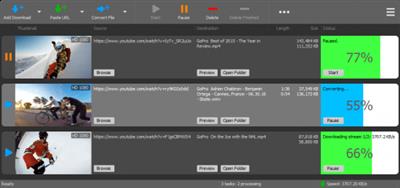
YT Downloader (ex YTD Youtube Downloader) is a simple and easy-to-use video download application. It helps you to download and convert videos from YouTube and hundreds of other video sites. YT Downloader increases your download speeds by up to 500%.
Save media content from hosting sites
YTD enables you to save your favorite clips from Youtube, Facebook, Vimeo and Dailymotion to your computer. The software supports URLs from multiple media hosting websites and allows you to download the desired content within seconds.
Simply copy the URL onto the clipboard then import it in the software, or drag and drop it into YTD's interface. The software can process the URL instantly, then download the clip when prompted. It can extract the entire video, in high quality, or save only the audio stream as MP3.
Easily manage and convert files
YTD supports downloading high definition videos to your computer, without compromising their quality, but it also can save the audio stream alone. Simply set the desired options before starting the file download. The software is capable of converting media to a multitude of video or audio formats.
Additionally, it supports saving the clip as a suitable file for mobile devices. You may select the proper device brand and let the software apply the preset format and quality settings to the file. Apple, Amazon, Android, BlackBerry, HTC, or Nokia are examples of the supported devices. When converting the YouTube content to video formats, you may also choose the desired resolution: from low 240p quality, up to HD 1080p or custom resolution.
Useful download manager, media converter and player
YTD comes bundled with a reliable media player, suitable for watching the downloaded videos or music. Moreover, you may preview the files in the queue, as they are being downloaded or converted. The software is reliable and highly capable when it comes to preserving the video or audio quality. It can also download multiple videos at once without slowing down your computer.
Whats New:
Updates: official site does not provide any info about changes in this version.
Download link:
Код:
rapidgator_net:
https://rapidgator.net/file/dbb43c676b7c3e6043c2856af9d64653/dm200.YT.Downloader.7.6.2.rar.html

uploadgig_com:
https://uploadgig.com/file/download/e0296833c3cf93eD/dm200.YT.Downloader.7.6.2.rar

nitroflare_com:
https://nitroflare.com/view/A4143FFE8C1E549/dm200.YT.Downloader.7.6.2.rar
Links are Interchangeable - No Password - Single Extraction
|
|
|
|
|
15.07.2021, 11:23
|
#65864
|
|
Местный
Регистрация: 04.10.2017
Сообщений: 125,003
Сказал(а) спасибо: 0
Поблагодарили 7 раз(а) в 7 сообщениях
|
YouTube Movie Maker Gold Platinum 20.6 (x64)
 File size: 92.1 MB
YouTube Movie Maker offers 3 main functions; Easy to make wonderful 2D/3D Video from various formats of videos, photos, musics, lyrics, texts, etc. Easy to Make and Upload videos onto YouTube in batches without worrying about format, profile, etc. Easy to manage and promote uploaded Youtube videos, get more views on YouTube.
Main Features:
Make and Edit 2D/3D Movies
Use any format photos and video clips to make cool 2D or 3D YouTube movies to share with millions of YouTube viewers, Perhaps you will be the next famous YouTuber or social media star.
Add Text, Titles, Credits and Logos
Who are you? You can personalize your video or movie with captions, titling and credits using your own logo, maintain your copyright. What was your role in the production? It's easy to add text, the Credits and descriptions to your movies, and let the world know exactly who you are and what you can do.
Add Transitions, Particles, Mask and Special Effects
Make your movies more polished with great special effects, particle effects, light and shadow effects, and professional-looking transition effects between scenes.
Add Motion Effects
Have you ever imagined videos, pictures and texts moving on-screen? It's so cool and YouTube Movie Maker makes it easy to add motion effects into the videos, pictures, texts, lyrics, subtitles, etc. Its easy interface makes it straightforward to produce cool animation movies for YouTube.
Mix multiple videos, pictures in picture
Mix multiple videos on the same screen(PIP effect, videos in video, pics in pic). It's easy to customize each video's size and position, or add special and animation effects, etc. For example, you can easily merge a facecam video with a gaming video. No lag, High quality.
Add/Mix multiple audios
Set the mood for your movie by giving it soundtracks. It's easy to add/mix multiple audio, music, instrument sounds, or use your own voice to describe the scenes in your movie. A voice-over is effective and also simple to add.
Green Screen
Video Chroma Key is often called green screen because we usually use a green screen to remove and replace all the background of a video. The color that is being removed is referred to as "Color Range or Key Color".
Karaoke Video Maker
Built-in the best Karaoke and Lyric video maker, you can create superb 2D or 3D Karaoke or Lyrics videos with cool motion and special effects for popular songs. It's an easy way to get a very large number of views on YouTube.
Handwriting Lyrics Video
Create a unique Lyrics video with your own handwriting digitally on-screen. You will be special one, no one can replace you.
Draw Graffiti
Graffiti is a personally expressive way to showcase your work or your thinking. Drawing digital graffiti with YouTube Movie Maker can give creators' work a unique look and style which they can easily superimpose into a video.
3D Group Effects
Make multiple video clips or images as a Group, then add cool 3D Group Effects into this Group to help you easily create cool 3D videos.
Take Snapshots
Today more and more people are using action cams(e.g. Gopro) to capture every special moment. With the "Take Snapshots" feature, you can easily to capture your favorite moments with a few clicks as you preview your video.
Playback Speed
Want to speed up or slow down your video? It's simple with YouTube Movie Maker. Now you can customize the video and audio playback speed directly. It's also easy to add a fast motion or slow motion effect onto your video.
Capture/Record Audio
Want to share your voice, songs, narration, speech, etc? Now it's easy. Use YouTube Movie Maker to capture/record audio from your computer audio device or audio input pin, then make video and easily share on YouTube, and tell everybody what you want to say.
Record/Capture Videos
Want to make an instant, interesting presentation to spontaneously share your beauty, mood or views? Now it's easy. Use YouTube Movie Maker to record/capture videos from your computer camera or capture card, then make video and easily share on YouTube to let more people remember you.
Record/Capture Screen Videos
Want to share your game playing, tutorial, product demo, etc? Now it's easy. Use YouTube Movie Maker to record your computer screen as a video, and then share on YouTube to help viewers to follow you. High efficiency and lossless quality.
Beautify/Enhance Video
It's easy to adjust video color, hue, saturation, brightness, contrast, etc. Now it's easy to enhance and beautify your videos and pictures.
Change Shape of Video
Change the shape of video clips using a circle, star, heart shape, etc. Now it's easy. You can even make a unique custom static or dynamic shape.
Powerful Video Editor
Built-in powerful video and audio editor, helps you edit any format of video and audio easily, then cut, trim, split, join, merge, mix, rotate, crop, resize, stretch/keep ratio, fill blur, zoom in/out, mute, adjust volume, fade in/out, change video color, etc.
Movie Making Wizard
No experience with video editing and movie making? Don't worry - just follow the Step By Step Wizard to create your first video, and everything will be easy.
4K Ultra HD Video
Easy to Make and Upload 4K Ultra HD Videos for YouTube. Lets your viewers enjoy the highest quality video on YouTube.
60fps Pro-Quality
Easy to Make and Upload 60fps Pro-Quality videos for YouTube. Also supports all other YouTube video frame rates, including 24fps, 25fps, 30fps, 48fps, 50fps, etc.
make and upload YouTube videos with 96kHz Audio
Easy to Make and Upload YouTube videos with 96kHz High-Res Audio. Lets your viewer enjoy the highest quality audio on YouTube.
Make and Upload YouTube videos in batch
Make and upload YouTube videos in batch, simply save a project as a Template and then you can always start each new videos with the same object(s)/element(s) as the program will automatically keep or adjust each object/element duration, position and effects, etc.
TimeLine Mode
Allows you to arrange video clips and pictures using Timeline, and it's then easy to add motion, transitions, special effects, text, lyrics, titles, subtitles, background music, etc. at just the right moment.
Drag & drop - Easy To Use
Just drag-and-drop YouTube movie making/editing, drag and drop to organize and edit the movie, for a newbie, still easy to use.
Predefined Profiles for YouTube
Uploaded YouTube videos can looks bad or fuzzy with distortion, etc. because the settings can be hard to recall. But now with YouTube Movie Maker's predefined profiles, you can easily make the best YouTube videos, and it even supports 4K/2K/HD YouTube Videos.
Directly Upload onto YouTube
Batch uploading multiple videos to YouTube sounds simple, but usually it can cause a lot of frustration with long waits, format errors, length limits, size limits, etc. But with YouTube Movie Maker, it's much simpler and faster to upload multiple videos.
Promote Your YouTube Videos
Already have a YouTube channel with many uploaded videos but few or no views, no subscribers and likes? Now you can use Youtube Movie Maker to promote your videos and give yourself a greater chance of gaining more views on YouTube.
High Compatibility
Most movie maker software only supports just a few special video/audio formats, so video creators experience the hassle of converting them between different formats. YouTube Movie Maker does away with that because it supports all popular video and audio formats.
High Performance
All-in-one YouTube Movie Maker, helps you design, create, make, edit, capture, upload, publish, manage and promote YouTube videos very effectively, quickly and easily, in a short space of time and wish a minimum of effort and expense.
Real x64 Youtube Movie Maker
Real x64 Engine, works well on 64Bit Win7/Win8/Win10, etc. Supports multi-core CPU, and Hardware Acceleration is available(17x faster) making the program much faster, more powerful, and more stable.
Whats New:
Updates: official site does not provide any info about changes in this version
Download link:
Код:
rapidgator_net:
https://rapidgator.net/file/0e0068904b4a296078f39b90af8e72c5/hiubs.YouTube.Movie.Maker.Gold..Platinum.20.6.x64.rar.html

uploadgig_com:
https://uploadgig.com/file/download/105a760Df16ee847/hiubs.YouTube.Movie.Maker.Gold..Platinum.20.6.x64.rar

nitroflare_com:
https://nitroflare.com/view/10FE0EE3399FF17/hiubs.YouTube.Movie.Maker.Gold..Platinum.20.6.x64.rar
Links are Interchangeable - No Password - Single Extraction
|
|
|
|
|
15.07.2021, 11:24
|
#65865
|
|
Местный
Регистрация: 04.10.2017
Сообщений: 125,003
Сказал(а) спасибо: 0
Поблагодарили 7 раз(а) в 7 сообщениях
|
XYplorer 22.10.0000 Multilingual
 File size: 6.0 MB
XYplorer is a file manager for Windows. It features tabbed browsing, a powerful file search, a versatile preview, a highly customizable interface, optional dual pane, and a large array of unique ways to efficiently automate frequently recurring tasks. It's fast, light, and portable.
It's Tabbed
Tabs let you switch between folders most easily. Drag them around, hide them, lock them, name them, or drop files onto them. The tabs remember their configuration individually and across sessions. On top of this you get tabsets and dual pane.
It's Functional
XYplorer has been designed to make you faster. Numerous usability enhancements in an attractive interface help to streamline your workflow and increase your efficiency. You will definitely save a lot of time.
It's Scriptable
Yes, you can program this app. Individual solutions for individual tasks. No plugins needed, scripts run out-of-the-box. Even beginners can benefit from this feature since many ready-to-use scripts are available in the forum.
It's Fast
Speed has always been a major design goal with XYplorer. The code is constantly optimized for performance, zero tolerance for slowness. On top of that the app uses very little RAM, the executable is light (7 MB), and it loads almost instantly.
It's Reliable and Robust
You can trust XYplorer. It works as intended and expected, and is very hard to destroy. Any issues are immediately attended and usually fixed within hours. A large community is closely watching the development and permanently testing the frequent beta versions.
It's Customizable
You can fine-tune the app to look and behave exactly as you want it. This ranges from fonts and colors to custom toolbar buttons and even file icons and program associations. And every bit of it is fully portable. Even the dark mode.
It's Responsive
Your customer voice is listened to and taken seriously, most of the time you get instant feedback, and your wish might actually get implemented sooner than you'd think.
Download link:
Код:
rapidgator_net:
https://rapidgator.net/file/f8d520d49fb0703e4de9d6230f8a7e36/c4tx7.XYplorer.22.10.0000.Multilingual.rar.html

uploadgig_com:
https://uploadgig.com/file/download/d0607e01b2035921/c4tx7.XYplorer.22.10.0000.Multilingual.rar

nitroflare_com:
https://nitroflare.com/view/62BC02D3466FAA1/c4tx7.XYplorer.22.10.0000.Multilingual.rar
Links are Interchangeable - No Password - Single Extraction
|
|
|
|
      
Любые журналы Актион-МЦФЭР регулярно !!! Пишите https://old.nado.in/private.php?do=newpm&u=12191 или на электронный адрес pantera@nado.ws
|
Здесь присутствуют: 1 (пользователей: 0 , гостей: 1)
|
|
|
 Ваши права в разделе
|
Вы не можете создавать новые темы
Вы не можете отвечать в темах
Вы не можете прикреплять вложения
Вы не можете редактировать свои сообщения
HTML код Выкл.
|
|
|
Текущее время: 15:28. Часовой пояс GMT +1.
| |







