 01.07.2021, 05:52
|
#64186
|
|
Местный
Регистрация: 04.10.2017
Сообщений: 125,003
Сказал(а) спасибо: 0
Поблагодарили 7 раз(а) в 7 сообщениях
|
 O&O DiskImage Professional / Server 16.5 Build 230
 File size: 230.7 MB
O&O DiskImage lets you back up an entire computer or single files whenever you want - even while the computer is being used. In the event you should lose your personal data it can be quickly restored with just a few mouse clicks - even when Windows is no longer able to start. It also supports SSD drives and the latest UEFI System. O&O DiskImage lets you carry out a system restore and to duplicate or clone an entire PC or hard drive. You can even restore this backup onto a computer whose hardware is different from the original machine, for instance, where you have changed a motherboard on the target machine or have bought a brand new PC and want to restore an old backup onto it.
Features:
Backup an entire computer with the push of a button
Backup system and hard drives, clone drives and entire disks
Brand new file-based backup: now twice as fast as ever before - backup and restore individual files and/or folders
Direct creation of VHDs
Monitoring and warning of security risks
Incremental/differential backup: back up only the changes
Easily restore files, folders, drives and disks
System restore onto different hardware (M.I.R.)
Create a Windows Boot system directly from within the program with driver integration
Plug-and-play: Selected files and folders are automatically backed up and synchronized
Variable pixel density settings: adjusts to the selected DPI setting of the connected monitor
New and enhanced functions Control via Command Lines
Supports Windows 10, Windows 8.1 and Windows 8
A regular backup is still something that many users prefer to avoid. At least that is until they suffer their first loss of important files as a result of software, hardware or user error: that's when it becomes crystal clear just how valuable a reliable and up-to-date backup really is!
New in v16:
NEW: O&O DiskImage 16 with its own recovery partition
Normally with a backup or imaging program you need to create a boot medium (CD, USB) to boot up your system if something goes awry. This you have to either carry around or store somewhere safe in case disaster strikes.
Thanks to the integration into the system, the O&O DiskImage RecoveryPartition can be accessed immediately so that the last system image can be restored directly. If the Windows operating system does not start or if faulty drivers have to be uninstalled - with the integrated recovery environment, all O&O tools are available to make the system operational again as easily as possible. Not only is this much more comfortable and quicker for the user, it also provides them with an extra level of security as this medium cannot get lost or damaged as easily as a "portable", external one.
Whats New:
Updates: official site does not provide any info about changes in this version.
Download link:
Код:
rapidgator_net:
https://rapidgator.net/file/f65b58c594bb54d6fc1719ac9bd795ae/ppmy8.OO.DiskImage.Professional..Server.16.5.Build.230.rar.html

uploadgig_com:
https://uploadgig.com/file/download/9fa6f1D28f9E7245/ppmy8.OO.DiskImage.Professional..Server.16.5.Build.230.rar

nitroflare_com:
https://nitroflare.com/view/3EE1AD4E6CAABE4/ppmy8.OO.DiskImage.Professional..Server.16.5.Build.230.rar
Links are Interchangeable - No Password - Single Extraction
|

|

|
|
01.07.2021, 05:53
|
#64187
|
|
Местный
Регистрация: 04.10.2017
Сообщений: 125,003
Сказал(а) спасибо: 0
Поблагодарили 7 раз(а) в 7 сообщениях
|
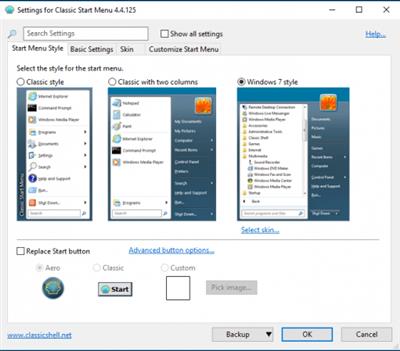
Open-Shell (Classic-Start) 4.4.169 Multilingual
 File Size : 7.1 Mb
Classic-Start continues the Classic Shell project giving you access to the classic style Start Menu for Windows 7, 8.1, and 10.
riginally created by Ivo Beltchev, this fork is true to the first - to help improve productivity by allowing you to enhance the usability of Windows through a customizable start menu. You will be able to manage the way you use your PC via multiple style templates and skins. It also gives you quick access to recent, frequently-used, or pinned programs. You will also be able to quickly find any programs, settings, files, or documents with minimal keystrokes once you have it configured to your specific needs.
Classic-Start will also bring back the start button for Windows 10, 7, 8.1 along with the toolbar and status bar for Windows and Internet Explorer making it an excellent enhancement tool that for your daily Windows experience.
Features:
Classic style Start Menu for Windows 7, 8, 8.1, 10
Toolbar for Windows Explorer
Classic copy UI (Windows 7 only)
Show file size in Explorer status bar
Download link:
Код:
rapidgator_net:
https://rapidgator.net/file/1c55450f6bdad6120cfe731cd4acd152/vwjfi.OpenShell.ClassicStart.4.4.169.Multilingual.rar.html

uploadgig_com:
https://uploadgig.com/file/download/14fF0537aDe2A62e/vwjfi.OpenShell.ClassicStart.4.4.169.Multilingual.rar

nitroflare_com:
https://nitroflare.com/view/7797DCAED75F2FC/vwjfi.OpenShell.ClassicStart.4.4.169.Multilingual.rar
Links are Interchangeable - No Password - Single Extraction
|
|
|
|
|
01.07.2021, 05:54
|
#64188
|
|
Местный
Регистрация: 04.10.2017
Сообщений: 125,003
Сказал(а) спасибо: 0
Поблагодарили 7 раз(а) в 7 сообщениях
|
Outline 3.2105.7 macOS
 Language: Multilingual | File size: 83 MB
Outline - one note app for offline, cloud & WebDAV. OneNote compatible & Office 365 powered. Capture notes at any spot on a page and draggable around. Organize notes in the world's most natural hierarchy. Store notes in your local file system, and synced across devices with your favorite cloud.
ONENOTE'S BEST FRIEND
- Give your OneNote notes a new start beyond OneDrive or SharePoint
- Export to OneNote, just in case
- Go beyond import/export and do a real time collaboration on notes with colleagues who use OneNote (your Mac and their PCs)
STORAGE
- Choose where you want to store your notes: Dropbox, iCloud, WebDAV, Box, or OneDrive
- Consider a no-cloud option too: some notes need offline and cloud-free privacy
- Mind the coming-soon: SharePoint, OneDrive for Business / Office 365
UI
- Find everything a note needs by the hand: text, lists, tables, images, checkboxes, hyperlinks, and more
- Put that stuff anywhere in a note and then move around / re-size / edit it all, the way you like
- Keep notes structured in a natural hierarchy of pages, sections, and notebooks
- Access a note fast via recents, search, and note links
- Manage font size and color, apply styles and highlighting
- Attach files and insert printouts, to collect documents in one place
IMPORT
- From OneNote
- From Circus Ponies
- From Evernote
Release Notes
Release notes were unavailable when this listing was updated.
Supported Operation Systems:
OS X 10.10 or later
Download link:
Код:
rapidgator_net:
https://rapidgator.net/file/90f63610fdde7bc48417936920c80f5d/fnse3.Outline.3.2105.7.macOS.dmg.html

uploadgig_com:
https://uploadgig.com/file/download/cbae04118921dAD9/fnse3.Outline.3.2105.7.macOS.dmg

nitroflare_com:
https://nitroflare.com/view/160F7BC5050630C/fnse3.Outline.3.2105.7.macOS.dmg
Links are Interchangeable - No Password - Single Extraction
|
|
|
|
|
01.07.2021, 05:56
|
#64189
|
|
Местный
Регистрация: 04.10.2017
Сообщений: 125,003
Сказал(а) спасибо: 0
Поблагодарили 7 раз(а) в 7 сообщениях
|
PilotEdit 15.4.0 Multilingual
 Windows x86/x64 | File size: 68.82 MB
PilotEdit is a handy and reliable file editor designed to help users to execute scripts, extract strings and edit large files. PilotEdit is a file editor that will help you search and replace multi line text, edit FTP files or even download and upload FTP files and directories. With PilotEdit file editing just became easier. PilotEdit is an advanced text and hex editor that supports opening of files larger than 4GB. It offers customizable syntax and keyword highlighting, advanced search and replace operations, automatic text encoding, 256-bit AES encryption/decryption, and a built-in FTP client lets you open, edit and upload files directly to/from an FTP server.
Simple user interface
All the program's functions are displayed using a single window. The app's workspace is divided in three smaller windows. The first provides access to the files and folders stored in your computer. The second lets you view and edit the text, while the third is an output window where you can see the program's messages for different actions.
Edit your text
The inserted text can be viewed in a column mode, word wrapped or have the HEX values displayed for the it. The utility can remove tabs and spaces automatically. You can switch the text to upper or lower case letters and increase or decrease text indentation. The app can insert the system date and time into the document. Moreover, words can be browsed, selected or removed using the "Edit" tab.
Different encoding modes
You can change the encoding to ANSI or UTF and set the output to work on different systems like DOS, UNIX or MAC. The tool can apply different predefined scripts which can change the date format and remove empty lines or HTML tags. PilotEdit can sort, find and remove duplicate lines or be used to extract strings from the text and copy it to the Clipboard.
FTP capability
The utility can search and replace in multiple directories and files the custom item, useful in case you have a big text file with a lot of lines. It can open an encrypted FTP file or be used in the decryption process for your files. The program can store your FTP login details and connect to your FTP server.
Conclusion
Overall, PilotEdit is a handy utility for users who want to edit their documents and then upload them to their FTP server. The program does not burden system resources and did not display any errors during tests.
Here are some key features of "PilotEdit":
-The file size supported by PilotEdit is unlimited.
-PilotEdit only uses a little memory even you open a big file.
-ANSI, UTF-8, UTF-16 and UTF-16 big endian files are fully supported by PilotEdit. You may also change a file's encoding with PilotEdit easily.
-DOS, UNIX file support. When you copy/paste text, PilotEdit will adjust text encoding automatically.
-Self-defined file types and key words high-lightening.
-The user interface of HEX mode is as friendly as text mode.
-Column mode.
-Endless undo/redo. You may undo/redo your operations even after you switch between text mode and HEX mode.
-Word wrap enable you to view long lines within one page.
-PilotEdit provides a friendly interface for editing FTP files. You can also download/upload FTP files and directories with PilotEdit.
-Searching and replacing multi-line text has become so easy with PilotEdit.
-You may compare two files or two directories with PilotEdit.
-Self-defined string table enable you to add a pre-defined text by just one click.
-Regular expression has made search and replacement much more powerful.
-You may define some operations in a script file and execute this script file so that you don't need to repeat your work day after day.
-Find/remove duplicated lines
-String collection
-Find/replace in multiple directories
-Sort
Download link:
Код:
rapidgator_net:
https://rapidgator.net/file/422575a26db4b71d781f27fb67b07107/klia2.PilotEdit.15.4.0.Multilingual.rar.html

uploadgig_com:
https://uploadgig.com/file/download/d2f67df8d64463Fd/klia2.PilotEdit.15.4.0.Multilingual.rar

nitroflare_com:
https://nitroflare.com/view/79061C2E840F56F/klia2.PilotEdit.15.4.0.Multilingual.rar
Links are Interchangeable - No Password - Single Extraction
|
|
|
|
|
01.07.2021, 05:57
|
#64190
|
|
Местный
Регистрация: 04.10.2017
Сообщений: 125,003
Сказал(а) спасибо: 0
Поблагодарили 7 раз(а) в 7 сообщениях
|
Ping Monster 1.9
 File Size : 1.2 Mb
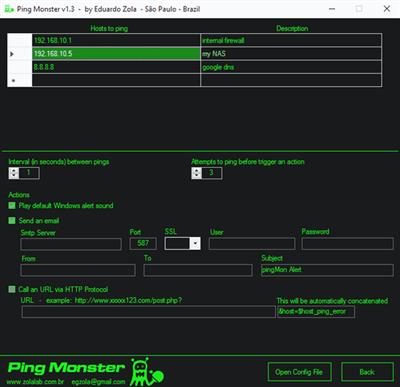
Ping Monster is a freeware ping monitoring tool that comes with some alert actions including email and sound alerts and HTTP post.
The interface is an old-school green and black, reminiscent of the Matrix. You can enter numerous hosts to monitor and then follow up with multiple options.
The first two options are the interval, in seconds, between pings and how many of these attempts before an action is triggered. Now you can set it to alert you with a sound, email or even call a URL.
Any geek who's ever popped open a Command Prompt and then wish they had more options would love to have this small tool in their toolbox. It's also handy for network administrators. They say you should work smarter, not harder, and Ping Monster accomplishes this.
Whats New:
Updates: official site does not provide any info about changes in this version
Download link:
Код:
rapidgator_net:
https://rapidgator.net/file/0425487abc8eb9bfef2cd89e8497ac75/od3mi.Ping.Monster.1.9.rar.html

uploadgig_com:
https://uploadgig.com/file/download/5581A59637806fdF/od3mi.Ping.Monster.1.9.rar

nitroflare_com:
https://nitroflare.com/view/CF295B4E6719C49/od3mi.Ping.Monster.1.9.rar
Links are Interchangeable - No Password - Single Extraction
|
|
|
|
|
01.07.2021, 05:58
|
#64191
|
|
Местный
Регистрация: 04.10.2017
Сообщений: 125,003
Сказал(а) спасибо: 0
Поблагодарили 7 раз(а) в 7 сообщениях
|
Renee Screen Recorder 2021.06.30.47 Multilingual
 File size: 19.1 MB
Screen Recorder can do you a favor when you want to make a video guidance for a software, prepare a video presentation, record a game match or even the online video chat and much more! Renee Screen Recorder is simple to use. Just a few steps you can start and make the screen video! You can make the screen recording with or without sound and enable/disable the webcam whenever you need in recording time. Multiple output formats are available. More functions are waiting for your exploration.
Captures any area on your computer screen
Capture system and microphone sound
Auto record plans are available
Features :
Adjustable frame rate & video quality to save disk space.
Set the recording area at will. Full screen and window capture are available.
Mouse actions capture, mouse effects and hotkeys are available when recording.
Easily zoom in & out to make the video more professional and focus.
Record with or without system sound, microphone alone or record with both.
Enable or disable webcam whenever you want while recording process.
Whats New:
Updates: official site does not provide any info about changes in this version.
Download link:
Код:
rapidgator_net:
https://rapidgator.net/file/2bd6d1281d4c8783d6511e0517ed57f6/rncdg.Renee.Screen.Recorder.2021.06.30.47.Multilingual.rar.html

uploadgig_com:
https://uploadgig.com/file/download/fa18D4310Ad4736b/rncdg.Renee.Screen.Recorder.2021.06.30.47.Multilingual.rar

nitroflare_com:
https://nitroflare.com/view/97A9AD8D80FD171/rncdg.Renee.Screen.Recorder.2021.06.30.47.Multilingual.rar
Links are Interchangeable - No Password - Single Extraction
|
|
|
|
|
01.07.2021, 05:59
|
#64192
|
|
Местный
Регистрация: 04.10.2017
Сообщений: 125,003
Сказал(а) спасибо: 0
Поблагодарили 7 раз(а) в 7 сообщениях
|
ScreenHunter Plus 7.0.647
 Languages: English | File size: 124 MB
ScreenHunter Plus is an award-winning solution to all-in-one image capture, print, edit and video recording. It's the total capture solution to save you time and boost productivity. Also with auto-scroll web pages, auto-capture, webcam and video screen capture. It captures what you see as an image even whilst recording. It has an easy-to-use interface. All the features are visible in 4 easy-to-use tabs, so everyone from beginners to professionals can use ScreenHunter 7. The process is simple, the options are easy to manage, and the results are flawless. Powerful and intelligent, ScreenHunter has proven to be an incomparable helper of your business.
The software supports full screen capture up to 6K for multiple monitors and records 4K videos for a single monitor. Supports frame rate up to 100 fps.
Using DirectX lets ScreenHunter 7 produce professional quality videos. It is a perfect tool for recording movies and courses online.
Moreover, ScreenHunter 7 captures and records windows covered by another window or even minimized windows. Optimal for automatic or scheduled captures and recording.
Furthermore, you can show your webcam anywhere at any given time, so you can integrate it into your recording the way you want.
ScreenHunter Pro 7 is the most advanced version with all the necessary tools included for your screen capture needs. It's the total capture solution to save you time and boost productivity. With this tool, you can capture screen to image or PDF files, immediately see the benefits of numerous time-saving features and deliver the highest quality screenshots. As well, it offers easy-to-use user interface and maximum flexibility for a more interactive capture experience.
Capturing Features
* Rectangular area
* Adjustable rectangle
* Object / Window
* Auto-scroll
* Multi-object
* Text
* Active Window
* Fixed area (user defined)
* Specific window (lock-in window)
* Full screen
* DOS program
* DirectX / Screen saver
* Movie / video
* Freehand
* Round area (Ellipse)
* Round Rectangular area
* Polygon
* Web capture
* Scanning images
Addition Features
* Mouse pointer
* Multiple monitors
* Transparent window
* AutoText (date/time stamps, note)
* Watermark
* Border
Timing Features
* Delayed capture
* Timed auto-capture
* Scheduled auto-capture
* Recurring capture
Viewing and Editing Features
* Image editing, adding text & annotation
* Advanced image processing
* High-quality zooming, resizing & cropping
* Viewing 100 images & conversion
* Drag & drop images from desktop
Saving Features
* Automatic naming and saving to files
* Clipboard
* Auto-email
* Auto-scale
* Saving in the smallest file size
* Optimized JPEG, GIF and PNG
* High quality and transparent GIF
* Saving to TIFF
Other Features
* Screen Color Picker
* System tray
* Zoombox
* Flexible hotkey
* Multiple hotkey
* Direct printing
* Wysiwyg printing
* Developer support
Download link:
Код:
rapidgator_net:
https://rapidgator.net/file/a5f1287c74b676ddb4768163286959af/dkqro.ScreenHunter.Plus.7.0.647.rar.html

uploadgig_com:
https://uploadgig.com/file/download/6b370319fdD4Cd02/dkqro.ScreenHunter.Plus.7.0.647.rar

nitroflare_com:
https://nitroflare.com/view/7D87403F9837721/dkqro.ScreenHunter.Plus.7.0.647.rar
Links are Interchangeable - No Password - Single Extraction
|
|
|
|
|
01.07.2021, 06:01
|
#64193
|
|
Местный
Регистрация: 04.10.2017
Сообщений: 125,003
Сказал(а) спасибо: 0
Поблагодарили 7 раз(а) в 7 сообщениях
|
SILKYPIX Developer Studio 10.1.14.0
 Windows (x64) | File Size: 433 MB
7 new features and workflow innovation. The blissful time named RAW development for you. Enables the user a impressive image quality and new expression The wide variety of composition modes can excite your imagination. Equipped with 6 RAWs composition modes. The new SILKYPIX® is equipped with the new function for compositing multiple RAWs which allows you to create a view of the world that cannot be represented from a single image. And, since this function automatically aligns images according to our image coincidence detection technology (patent No. 4689758), it is possible to combine them without any shift even with hand-held shooting.
Full Basic Functions
SILKYPIX allows you to make adjustments such as exposure (brightness), white balance (shading), tone (light and dark sharpness) while maintaining a high quality of image without deteriorating the image. In addition, anyone can easily perform high-quality adjustments because basic adjustments are arranged in order from the top of the control panel. Furthermore, fine tuning adjustments for each item can be minutely performed with the "Slider" control.
A Variety of Functions to Recreate the Photographer's Images
The Partial correction function is included to adjust saturation and brightness of specified areas. What is more, a variety of fine adjustment functions such as Fine color controller which can be used to adjust each specific color and Highlight controller which restores colors in highlighted parts as well as recover gradation are available.
Easy Editing with Tastes
SILKYPIX Pro has 10 types of maker tastes installed which can take on various shooting scenes in advance. Just by choosing a taste such as "Landscape" or "Portrait," you can make a finished photograph easily that fits your image. In addition, you can save your adjusted parameters as a taste. Parameters are very useful functions, and you can easily create pictures from the same image by applying them to other photographs.
Compliable with JPEG and TIFF
With "SILKYPIX RAW Bridge" available only on SILKYPIX Pro, JPEGs and TIFFs are expanded to 16 bits, so even JPEG and TIFF images can be adjusted to a high degree of image quality with less image degradation.
Exposure (Brightness)
- Auto exposure bias
- Exposure bias
- Dodge / Color Burn
- HDR
- Highlight / Shadow
White balance (Tint)
- White balance adjustment
- Gray balance tool
- Skin color tool
Tone (Sharpness of light and dark)
- Contrast
- Tone curve
- Automatic level correctio
- Black level tool
- Clarity
- Dehaze
Saturation (Vividness)
- Prepare presets for Color representation (Standard color, Memory color, Portrait color, Film color)
Sharpening
- Natural sharp
- Normal sharp
- Pure detail
- Unsharp mask
Noise adjustment
- Color distortion
- Fringe reduction
- Neat noise
- Noise reduction
- Reduce moire
- Level of shadow noise reduction
Practical functions (A part of functions)
- Lens aberration correction
- Shading
- Distortion
- Chromatic aberration
- Distortion correction function by lens profile
- Distortion correction function using simultaneous recording JPEG
Image correction tool
- Crop
- Image rotation
- Shift lens effect
- Spotting tools (Dust removal)
- Red Eye Corrections
Partial correction tool
- Circular correction filter
- Gradual correction filter
- Select area with brush
- Curve / Polygon area selection
- Select color to be corrected
- Invert the filter area
Image controller
- Fine color controller (Adjustment of specific color)
- Highlight controller (Gradation expression of highlights)
- Monochrome controller (Adjustment monochrome image)
- Underwater photo controller (Adjustment underwater photograph)
Display warning
- Highlight warning
- Shadow warning
- Out of color gamut warning
- Soft proofing
- Focus peaking(Display focus area on monitor)
Others
- Search in the thumbnail
- Automatic adjustment button
- Independent arrangement of initialization button
- Open in another application
- Blurred / Sharp periphery
- Portrait Beautification
- Add Noise
System Requirements:
- Microsoft® Windows® 10 / 8.1 64-bit version
- * It does not correspond to the Windows® 10 tablet mode.
- * It does not correspond to 32-bit version OS.
- Intel® Core™ 2 Duo or higher, or AMD Athlon™ 64 X2 or higher processor
- 4GB or more RAM (8GB or higher recommended)
- 10GB of available hard-disk space or more
- Display that supports screen resolution of 1024x768 or higher
Download link:
Код:
rapidgator_net:
https://rapidgator.net/file/83e86f5b28aec124e55f30f8b98fda6a/843lc.SILKYPIX.Developer.Studio.10.1.14.0.rar.html

uploadgig_com:
https://uploadgig.com/file/download/c1620e9eA7f22Fb7/843lc.SILKYPIX.Developer.Studio.10.1.14.0.rar

nitroflare_com:
https://nitroflare.com/view/DAB06B65E4C0EDC/843lc.SILKYPIX.Developer.Studio.10.1.14.0.rar
Links are Interchangeable - No Password - Single Extraction
|
|
|
|
|
01.07.2021, 06:02
|
#64194
|
|
Местный
Регистрация: 04.10.2017
Сообщений: 125,003
Сказал(а) спасибо: 0
Поблагодарили 7 раз(а) в 7 сообщениях
|
SILKYPIX Developer Studio Pro 10.0.14.0
 Windows x64 | File Size: 440.1 MB
7 new features and workflow innovation. The blissful time named RAW development for you. Enables the user a impressive image quality and new expression The wide variety of composition modes can excite your imagination. Equipped with 6 RAWs composition modes. The new SILKYPIX® is equipped with the new function for compositing multiple RAWs which allows you to create a view of the world that cannot be represented from a single image. And, since this function automatically aligns images according to our image coincidence detection technology (patent No. 4689758), it is possible to combine them without any shift even with hand-held shooting.
Full Basic Functions
SILKYPIX allows you to make adjustments such as exposure (brightness), white balance (shading), tone (light and dark sharpness) while maintaining a high quality of image without deteriorating the image. In addition, anyone can easily perform high-quality adjustments because basic adjustments are arranged in order from the top of the control panel. Furthermore, fine tuning adjustments for each item can be minutely performed with the "Slider" control.
A Variety of Functions to Recreate the Photographer's Images
The Partial correction function is included to adjust saturation and brightness of specified areas. What is more, a variety of fine adjustment functions such as Fine color controller which can be used to adjust each specific color and Highlight controller which restores colors in highlighted parts as well as recover gradation are available.
Easy Editing with Tastes
SILKYPIX Pro has 10 types of maker tastes installed which can take on various shooting scenes in advance. Just by choosing a taste such as "Landscape" or "Portrait," you can make a finished photograph easily that fits your image. In addition, you can save your adjusted parameters as a taste. Parameters are very useful functions, and you can easily create pictures from the same image by applying them to other photographs.
Compliable with JPEG and TIFF
With "SILKYPIX RAW Bridge" available only on SILKYPIX Pro, JPEGs and TIFFs are expanded to 16 bits, so even JPEG and TIFF images can be adjusted to a high degree of image quality with less image degradation.
Exposure (Brightness)
- Auto exposure bias
- Exposure bias
- Dodge / Color Burn
- HDR
- Highlight / Shadow
White balance (Tint)
- White balance adjustment
- Gray balance tool
- Skin color tool
Tone (Sharpness of light and dark)
- Contrast
- Tone curve
- Automatic level correctio
- Black level tool
- Clarity
- Dehaze
Saturation (Vividness)
- Prepare presets for Color representation (Standard color, Memory color, Portrait color, Film color)
Sharpening
- Natural sharp
- Normal sharp
- Pure detail
- Unsharp mask
Noise adjustment
- Color distortion
- Fringe reduction
- Neat noise
- Noise reduction
- Reduce moire
- Level of shadow noise reduction
Practical functions (A part of functions)
- Lens aberration correction
- Shading
- Distortion
- Chromatic aberration
- Distortion correction function by lens profile
- Distortion correction function using simultaneous recording JPEG
Image correction tool
- Crop
- Image rotation
- Shift lens effect
- Spotting tools (Dust removal)
- Red Eye Corrections
Partial correction tool
- Circular correction filter
- Gradual correction filter
- Select area with brush
- Curve / Polygon area selection
- Select color to be corrected
- Invert the filter area
Image controller
- Fine color controller (Adjustment of specific color)
- Highlight controller (Gradation expression of highlights)
- Monochrome controller (Adjustment monochrome image)
- Underwater photo controller (Adjustment underwater photograph)
Display warning
- Highlight warning
- Shadow warning
- Out of color gamut warning
- Soft proofing
- Focus peaking(Display focus area on monitor)
Others
- Search in the thumbnail
- Automatic adjustment button
- Independent arrangement of initialization button
- Open in another application
- Blurred / Sharp periphery
- Portrait Beautification
- Add Noise
System Requirements:
- Microsoft® Windows® 10 / 8.1 64-bit version
- * It does not correspond to the Windows® 10 tablet mode.
- * It does not correspond to 32-bit version OS.
- Intel® Core™ 2 Duo or higher, or AMD Athlon™ 64 X2 or higher processor
- 4GB or more RAM (8GB or higher recommended)
- 10GB of available hard-disk space or more
- Display that supports screen resolution of 1024x768 or higher
Download link:
Код:
rapidgator_net:
https://rapidgator.net/file/ffd7e43fe087fe4114e47e31c69d9661/5lehk.SILKYPIX.Developer.Studio.Pro.10.0.14.0.rar.html

uploadgig_com:
https://uploadgig.com/file/download/9aED98e19772Ffb0/5lehk.SILKYPIX.Developer.Studio.Pro.10.0.14.0.rar

nitroflare_com:
https://nitroflare.com/view/965F6C23FEEE5C3/5lehk.SILKYPIX.Developer.Studio.Pro.10.0.14.0.rar
Links are Interchangeable - No Password - Single Extraction
|
|
|
|
|
01.07.2021, 06:03
|
#64195
|
|
Местный
Регистрация: 04.10.2017
Сообщений: 125,003
Сказал(а) спасибо: 0
Поблагодарили 7 раз(а) в 7 сообщениях
|
SoundSwitch 5.10.2
 File Size : 23 Mb
SoundSwitch allows you to easily switch between the different playback devices that are currently connected to your machine via hotkeys.
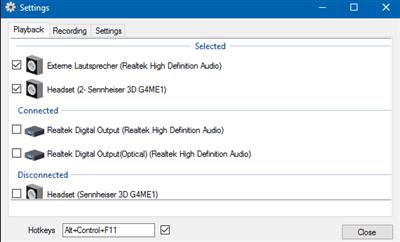
SoundSwitch is simple to configure; all you need to do is right-click on the systray icon to open up the settings. From there, you can select your preferred hotkey as well as select/deselect devices so that only the correct ones are available for switching. Once you are satisfied, it will run silently in the background. All selections made will be saved, so they are ready to go upon the restarting of the app.
It will permit you to quickly select/switch your preferred playback devices (sound cards) by merely using hotkeys. With SoundSwitch, you only need to configure once between which playback devices you want to switch between and then press Ctrl+Alt+F11 to toggle automatically.
Download link:
Код:
rapidgator_net:
https://rapidgator.net/file/03b929aa19eb762bb3df3f342a286078/9b8qc.SoundSwitch.5.10.2.rar.html

uploadgig_com:
https://uploadgig.com/file/download/bB5929360D8d0027/9b8qc.SoundSwitch.5.10.2.rar

nitroflare_com:
https://nitroflare.com/view/E1A5CCDA9DCAF07/9b8qc.SoundSwitch.5.10.2.rar
Links are Interchangeable - No Password - Single Extraction
|
|
|
|
|
01.07.2021, 06:04
|
#64196
|
|
Местный
Регистрация: 04.10.2017
Сообщений: 125,003
Сказал(а) спасибо: 0
Поблагодарили 7 раз(а) в 7 сообщениях
|
Topaz Video Enhance AI 2.3.0
 Windows x64 | Languages: English | File Size: 3.06 GB
Stunning video enlargements with groundbreaking AI technology. Trained on thousands of videos and combining information from multiple input video frames, Topaz Video Enhance AI will enlarge and enhance your footage up to 8K resolution with true details and motion consistency. Using intelligent AI technology, Video Enhance AI is the most powerful video upscaling software ever released.
Incredible Video Upscaling for Professional Filmmakers
Traditional video upscaling simply stretches resolution, degrading quality and destroying details. There has never been a way to perfectly recreate high-resolution video from low-resolution footage... Until now. We developed Video Enhance AI using groundbreaking machine learning technology to upscale video footage intelligently, for crisp details and motion consistency all the way up to 8K resolution. Some call it "magic", but we call it the power of AI.
Enhancing Footage up to 8K
Video Enhance AI is the perfect way to take good footage and make it great. Have you ever wanted your footage to look sharper with more detail? Take HD footage all the way up to 8K for use in high-quality projects.
- DVD Content
- DSLR Footage
- Game Footage
- HD Stock Footage
Upscaling Low-Res Footage
With Video Enhance AI, you can take your footage from SD to HD with an incredible increase in quality. It's perfect for older footage that you want to repurpose for modern use.
- Commercials
- Music Videos
- Movie Content
- Youtube Videos
Quality
Until now, no deep-learning based approach existed for video enlargement as a commercial product. Video Enhance AI is the only product that uses machine learning to extrapolate detail from your footage for a realistic look. The quality of output from Video Enhance AI is simply better than any other product available.
Training
Video Enhance AI was trained using a neural network that analyzes thousands of video pairs to learn how details usually get lost. Unlike Gigapixel AI for photos, Video Enhance AI is able to extrapolate more detail for an even more realistic look given the amount of information available in a single video clip.
Easy to Use
With just a few clicks of a button, your video footage will start rendering to create beautiful high-resolution quality footage. There are no complicated processes or confusing tools - just a few simple steps and your footage is ready to go.
Latest Updates:
DeNoise/Deblock processing
Eliminate noise and blocky artifacts
Improved A.I. Models
Achieve better results with the click of a button
Speed Improvements
We're continuing to make Video Enhance AI faster for you
Release Notes
Major Features
- New model: Chronos Slo-Mo / FPS Conversion. Use this model to increase your video's framerate, or make any video slow-motion
- New model: Proteus 6-Parameter. Use this model to fine-tune deblocking, detail recovery, sharpening, noise reduction, dehaloing, and antialising
- Preset Manager: Allows you to create and switch between multiple presets, as well as download and load them
Improvements
- New tutorial: Slo-Mo & FPS Conversion
- Engine improvements for better speed and stability on a large range of hardware
- Added the ability to switch between showing frames and showing timecodes in the UI
- Processing completion time now displays in hours:minutes:seconds instead of just seconds
- Application should resize correctly at extremely small resolutions
- Estimated completion time and seconds per frame are now averaged out over 3 frames, making them slightly more stable
- Playback speed in the preview is now based on output FPS if there is one, else the input FPS
- Tutorials have been revamped to allow forward / back movement without having to explicitly click the suggested buttons
Fixes
- Fixed excessive memory usage when switching models
- Fixed a memory leak when exiting preview mode. This will have a major affect on memory use when previewing, especially when using Comparison View
- Fixed a frame-skipping issue when previewing the deinterlacing models that double the framerate
- Fixed .mp4 getting appended to .mov files when choosing a custom output location, which was causing write errors when processing
- Feedback dialog now allows click-to-close and has been added to the Mac Help menu
- Menus now have borders around them so they no longer blend into the background
- Fixed keyframing tutorial not selecting the correct model when starting the tutorial
- Grain Settings now get applied to all models when using Comparison View (previously, they would only apply to currently selected one)
- Model parameter sliders (for Theia, Proteus) now allow you to click and hold to change their values
- Comparison Preview panels should now pan correctly when the preview is rendering or looping
- When adding videos to the list when videos are already open, the first one added will now be selected
- When processing, the playback controls now disappear and are replaced with a frame counter showing how many frames have completed processing
- Removed the ability to launch the application after install, which breaks drap & drop on first launch
- Added a cap to the amount of frames that can be previewed
- Preference panel is now scrollable, and should no longer overflow at extreme resolutions
- Preference panel should now be faster to load
- Better error messaging when path is too long on Windows or an invalid video is being previewed or processed
- Application will quit processing a video that it cannot write to
System Requirements:
- DirectX 12 Compatible GPU > 3GB (CPU can run but quite slow).
- Now includes AI models for both interlaced and progressive video.
- Windows 10 (64-bit)
What is the minimum hardware requirement for Video Enhance AI?
We suggest you run Video Enhance AI on high-end dedicated graphics cards. The minimum requirement is a DirectX12 compatible GPU with 2GB of dedicated VRAM or more. Any card later/better than GTX 1080 (included) will do a fairly fast job. If you do not have a dedicated graphics card in your device, the software can run on your Intel iGPU. Typically, it will be 5 times slower. If you do not have an Intel iGPU, the software will finally fall back to your CPU, which can be 10 times slower than the GPU version.
Homepage
[Ссылки доступны только зарегистрированным пользователям
. Регистрируйся тут...]
Download link:
Код:
rapidgator_net:
https://rapidgator.net/file/c907c435056d67d11f2dab6bcb760f3b/key06.Topaz.Video.Enhance.AI.2.3.0.part1.rar.html
https://rapidgator.net/file/36cc368412042a2c87513e588a3a7486/key06.Topaz.Video.Enhance.AI.2.3.0.part2.rar.html
https://rapidgator.net/file/3f1fdb3411743052fb575c005a392724/key06.Topaz.Video.Enhance.AI.2.3.0.part3.rar.html
https://rapidgator.net/file/b156cd14b6f30b793d14495a40f8ce7c/key06.Topaz.Video.Enhance.AI.2.3.0.part4.rar.html

uploadgig_com:
https://uploadgig.com/file/download/65fEdeD93ca6f558/key06.Topaz.Video.Enhance.AI.2.3.0.part1.rar
https://uploadgig.com/file/download/d34bEA98caa2c9E4/key06.Topaz.Video.Enhance.AI.2.3.0.part2.rar
https://uploadgig.com/file/download/1C733D586cabdd4a/key06.Topaz.Video.Enhance.AI.2.3.0.part3.rar
https://uploadgig.com/file/download/161ad893d2a88D2b/key06.Topaz.Video.Enhance.AI.2.3.0.part4.rar

nitroflare_com:
https://nitroflare.com/view/E27CC680E3E2D47/key06.Topaz.Video.Enhance.AI.2.3.0.part1.rar
https://nitroflare.com/view/0B983EC5332579F/key06.Topaz.Video.Enhance.AI.2.3.0.part2.rar
https://nitroflare.com/view/E93DF06E403D23A/key06.Topaz.Video.Enhance.AI.2.3.0.part3.rar
https://nitroflare.com/view/AE4CDB75F3489CF/key06.Topaz.Video.Enhance.AI.2.3.0.part4.rar
Links are Interchangeable - No Password - Single Extraction
|
|
|
|
|
01.07.2021, 06:05
|
#64197
|
|
Местный
Регистрация: 04.10.2017
Сообщений: 125,003
Сказал(а) спасибо: 0
Поблагодарили 7 раз(а) в 7 сообщениях
|
Tracktion Dawesome Abyss v1.0.0 macOS
 File Size: 51 MB
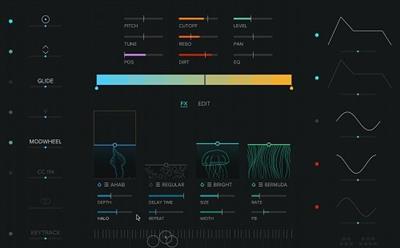
A VISUAL SYNTHESIZER Abyss is a visual synthesiser with character and a bit of fairy dust. It brings to you dark, vibrating drones, vivid cinematic pads and rich evolving textures. With Abyss you find instant inspiration for your music and sound design projects. The sound engine of Abyss combines the rich and deep textures of natural sounds with the effective flexibility of classical synths. Of course there is a virtual analogue filter, but there are also controls to shape tone colours in unheard ways. Explore fresh sonic possibilities.
Tone Colours
Whether we describe sounds or colours - we use similar words like warm, cold, dark, soft or energetic. Not by coincidence it is called tone-colour. In Abyss different sounds are represented by different colours - a whole new way to design sounds.
Rich & Deep Sound
The sound engine of Abyss combines the rich and deep textures of natural sounds with the effective flexibility of classical synths. Of course there is a virtual analogue filter, but there are also controls to shape tone colours in unheard ways. Explore fresh sonic possibilities.\
Surf Your Sound
Navigating through endless lists of weirdly named sounds is not always fun. In Abyss you can simply surf through a panel with more than 2000 tone-colours. Find your sound faster than ever.
Tone Colour Gradient
Its variation that makes sounds interesting. By placing tone-colours on the gradient you create a palette of timbral variation that becomes the base of your patch. Whether you mainly used presets or you are a seasoned sound designer, with Abyss you simply follow your intuition to create your own signature sound.
Download link:
Код:
rapidgator_net:
https://rapidgator.net/file/07ede7827a5ed8907948dcd37f1389b6/mmmen.Tracktion.Dawesome.Abyss.v1.0.0.macOS.dmg.html

uploadgig_com:
https://uploadgig.com/file/download/c6fbEdbbc4Effa20/mmmen.Tracktion.Dawesome.Abyss.v1.0.0.macOS.dmg

nitroflare_com:
https://nitroflare.com/view/33BCE2A03953B00/mmmen.Tracktion.Dawesome.Abyss.v1.0.0.macOS.dmg
Links are Interchangeable - No Password - Single Extraction
|
|
|
|
|
01.07.2021, 06:06
|
#64198
|
|
Местный
Регистрация: 04.10.2017
Сообщений: 125,003
Сказал(а) спасибо: 0
Поблагодарили 7 раз(а) в 7 сообщениях
|
TunePat DisneyPlus Video Downloader 1.0.0 Multilingual
 Languages: Multilingual | File size: 92.7 MB
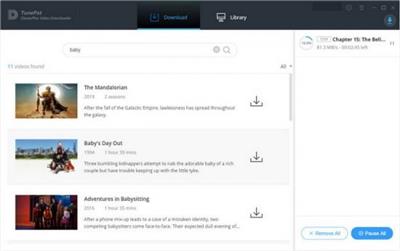
TunePat DisneyPlus Video Downloader is an excellent tool for downloading movies and TV shows from Disney+, letting you to save Disney+ movies and TV shows on your devices forever.
With TunePat DisneyPlus Video Downloader, you are able to download Disney+ videos in MP4 or MKV format with HD quality kept, and save multi-language audio tracks and subtitles at the same time. After downloading, you can watch Disney+ video offline on any device without any limitation
Download HD Amazon Videos
TunePat Amazon Video Downloader is a top-ranking video downloading tool for Amazon Prime Video, devoted to helping users download any movie and TV show from Prime Video in MP4 or MKV format with great speed.
With such a powerful video downloading tool, you can download any videos from Amazon Prime Video in high video quality (up to 1080p) with all audio tracks and subtitles kept
Download HD Netflix Videos
TunePat Netflix Video Downloader is a unique tool for downloading movies and TV shows from Netflix.
With TunePat Netflix Video Downloader, you are able to download Netflix video in HD quality, save multi-language audio tracks and subtitles, and save them in MP4 or MKV format. After downloading, you can watch Netflix video offline on any device without any limitation.
Download Amazon Music
TunePat Amazon Music Converter is a professional Amazon Music conversion tool specially designed for downloading Amazon Music in MP3/AAC/WAV/FLAC/AIFF format.
It requires no need to install any extra apps to get plain audio files from Amazon Music Unlimited & Prime Music. With the program, you can save your Amazon Music on your local computer, transfer them to other devices for convenience and more
Download Songs / Playlist from Spotify
If you'd like to download songs or playlist from Spotify to your local computer for offline listening, TunePat Spotify Converter, a professional Spotify Downloader, is an essential tool for you.
With no need to install Spotify or any other apps, TunePat itself enables you to get plain audio files from Spotify and save your favorite songs from Spotify as local files for enjoying more freely
Convert Apple Music to MP3/AAC/WAV/FLAC/AIFF
TunePat provides the best Apple Music Converter, which enables you to convert your Apple Music songs to common MP3/AAC/WAV/FLAC/AIFF format.
With such a smart tool, you can save any Apple Music song on computer, and transfer them to any device for playback even when your subscription is over.
Export Hi-Fi Sound Quality Songs
TunePat Media Downloader is an excellent music converter and downloader, which supports converting music tracks, playlists, and albums to common audio format, including MP3, AAC, WAV, AIFF, and FLAC format.
No need to install the app on your computer, TunePat Media Downloader can help you download Hi-Fi audio quality music from the web player at a fast speed
Convert Audiobook to M4A/M4B/MP3
TunePat Any Audiobook Converter is a professional audiobook converter for Audible which supports converting AA/AAX audiobooks to M4A, M4B, and MP3 format.
With TunePat Any Audiobook Converter, you can get the Audible audiobooks converted at 60X fast speed, keeping chapters and ID3 tags at the same time, and you can play the converted audiobooks on any device without any limitation
Whats New:
Updates: official site does not provide any info about changes in this version.
Download link:
Код:
rapidgator_net:
https://rapidgator.net/file/86a00f8cf8ad6bf91cc946c3ae6f90d5/1zf2z.TunePat.DisneyPlus.Video.Downloader.1.0.0.Multilingual.rar.html

uploadgig_com:
https://uploadgig.com/file/download/8555306eD2C1a7a8/1zf2z.TunePat.DisneyPlus.Video.Downloader.1.0.0.Multilingual.rar

nitroflare_com:
https://nitroflare.com/view/E7B3C2E0A6EF794/1zf2z.TunePat.DisneyPlus.Video.Downloader.1.0.0.Multilingual.rar
Links are Interchangeable - No Password - Single Extraction
|
|
|
|
|
01.07.2021, 06:08
|
#64199
|
|
Местный
Регистрация: 04.10.2017
Сообщений: 125,003
Сказал(а) спасибо: 0
Поблагодарили 7 раз(а) в 7 сообщениях
|
WhyNotWin11 2.3.0.22-1
 File Size : 2 Mb
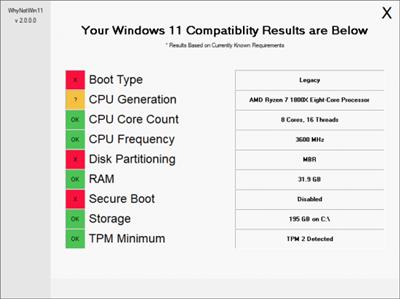
WhyNotWin11 lets you know if your machine is Windows 11 compatible by running a small script.
WhyNotWin11 runs through the currently known system requirements for Windows 11 and then provides you with the results. There are nine categories included; Boot Type, CPU Generation/Core Count/Frequency, Disk Partitioning, RAM, Secure Boot, Storage, and whether or not TPM minimum is activated. The interface provides clear results and is also color-coded.
Download link:
Код:
rapidgator_net:
https://rapidgator.net/file/fa66325fa87588f0240898e38eeb6cf5/un0jp.WhyNotWin11.2.3.0.221.rar.html

uploadgig_com:
https://uploadgig.com/file/download/25ed92f9c83d2B3E/un0jp.WhyNotWin11.2.3.0.221.rar

nitroflare_com:
https://nitroflare.com/view/F35BDFAB0FED8BF/un0jp.WhyNotWin11.2.3.0.221.rar
Links are Interchangeable - No Password - Single Extraction
|
|
|
|
|
01.07.2021, 06:09
|
#64200
|
|
Местный
Регистрация: 04.10.2017
Сообщений: 125,003
Сказал(а) спасибо: 0
Поблагодарили 7 раз(а) в 7 сообщениях
|
WiFi Manager 2.6.9.704
 File Size : 37 Mb
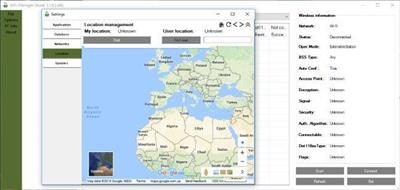
WiFi Manager allows you to manage wireless networks. Using scan feature you can quickly find your lost password for the wireless network. Also the application gets you the ability to connect, check and set up hosted networks.
WiFi Manager has many features:
Scanning passwords
The connection to the AP
Large database (~130,000 passwords)
Create a managed network (AP)
Users location search function over IP on the map
It supports three themes
The ability to management wireless profiles
Ability to synchronize databases between users of the program
And many more useful features
Download link:
Код:
rapidgator_net:
https://rapidgator.net/file/8e04199749e51ffa3e176ecce591e9e9/1szgj.WiFi.Manager.2.6.9.704.rar.html

uploadgig_com:
https://uploadgig.com/file/download/87F35Ffb25e7ff71/1szgj.WiFi.Manager.2.6.9.704.rar

nitroflare_com:
https://nitroflare.com/view/8CBD0540635A52F/1szgj.WiFi.Manager.2.6.9.704.rar
Links are Interchangeable - No Password - Single Extraction
|
|
|
|
      
Любые журналы Актион-МЦФЭР регулярно !!! Пишите https://old.nado.in/private.php?do=newpm&u=12191 или на электронный адрес pantera@nado.ws
|
Здесь присутствуют: 1 (пользователей: 0 , гостей: 1)
|
|
|
 Ваши права в разделе
|
Вы не можете создавать новые темы
Вы не можете отвечать в темах
Вы не можете прикреплять вложения
Вы не можете редактировать свои сообщения
HTML код Выкл.
|
|
|
Текущее время: 09:37. Часовой пояс GMT +1.
| |







